TTL, Expiration & Cleanup
On this page
Your login service keeps a session row for every sign-in. Sessions are valid for 30 days, but nothing ever deletes them. Two years later the sessions table has 400 million rows, 99% of them dead. Queries are slower, backups take hours, and a nightly DELETE FROM sessions WHERE expires_at < now() locks the table and makes replicas fall minutes behind. Meanwhile your Redis cache is full of keys for products that were removed a year ago.
Most systems hold data that should stop existing after some time: sessions, password-reset tokens, cache entries, idempotency keys, rate-limit counters, temporary uploads, old logs. Deciding when data dies, and how it actually gets removed, is expiration and cleanup, usually driven by a TTL (time to live).
How it works
Expired is not deleted
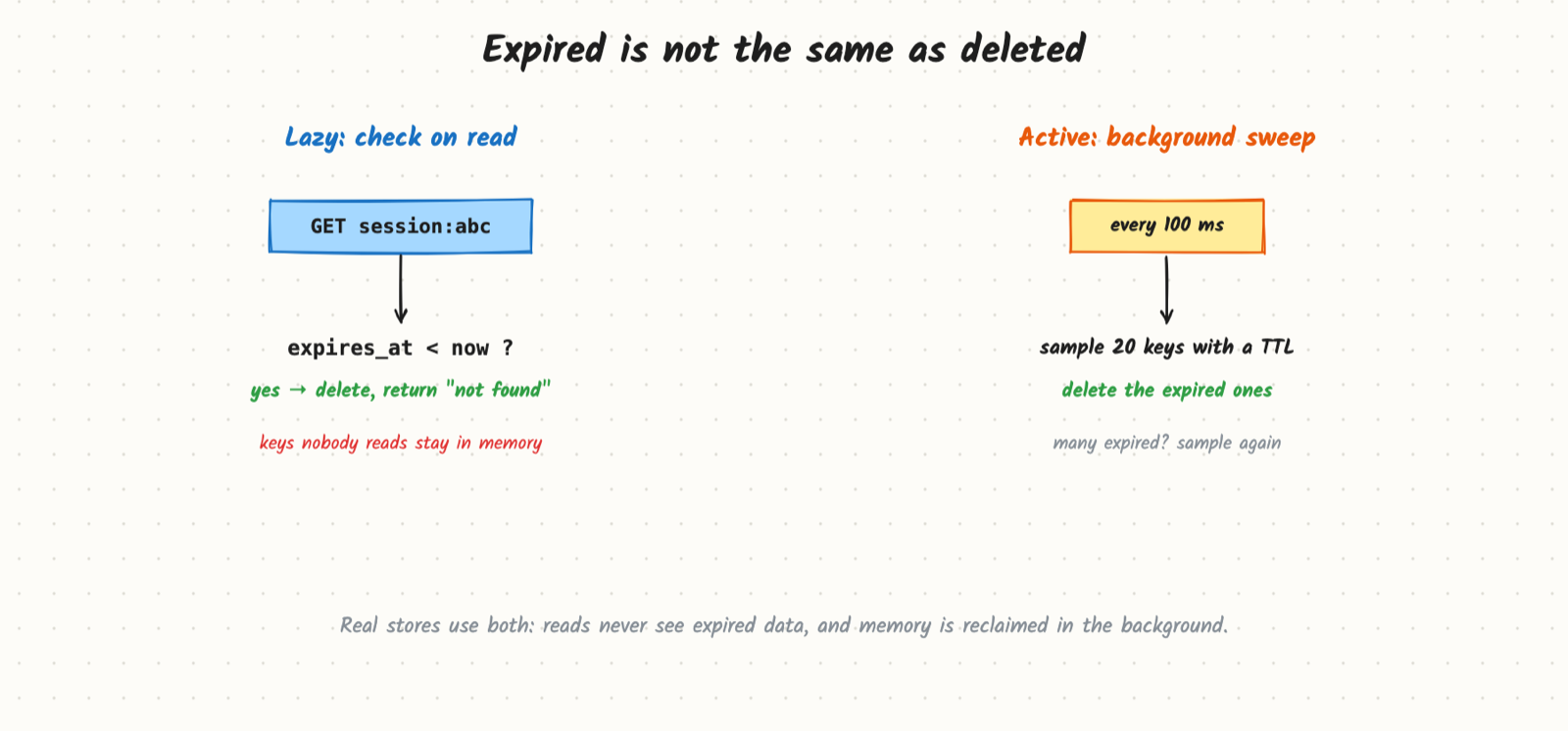
Two mechanisms work together:
- Lazy (on read): each item stores its expiry time. On every read, if
expires_at < now, treat it as missing (and delete it). This guarantees readers never see expired data, at zero background cost. But items nobody reads again stay in memory or on disk forever. - Active (background): a sweeper periodically finds and deletes expired items. Redis, for example, samples a small set of keys with a TTL several times a second, deletes the expired ones, and samples again if many were expired. Databases with TTL features run a background job.
Real systems use both: correctness from the lazy check, space from the sweep. In your own tables, that means every query filters WHERE expires_at > now(), and a separate job does the deleting.
Native TTL support
| Store | How |
|---|---|
| Redis / Memcached | SET key value EX 600; lazy + sampled active expiry; also eviction under memory pressure |
| DynamoDB | A TTL attribute; items are deleted in the background, typically within a day or two, so still filter on read |
| Cassandra | TTL per write; expired cells become tombstones, removed during compaction |
| MongoDB | TTL index on a date field; a background task deletes about once a minute |
| Blob storage | Lifecycle rules: move to colder tiers after N days, delete after M days |
| Kafka | Retention by time or size per topic; old log segments are deleted whole |
Cleaning up big SQL tables
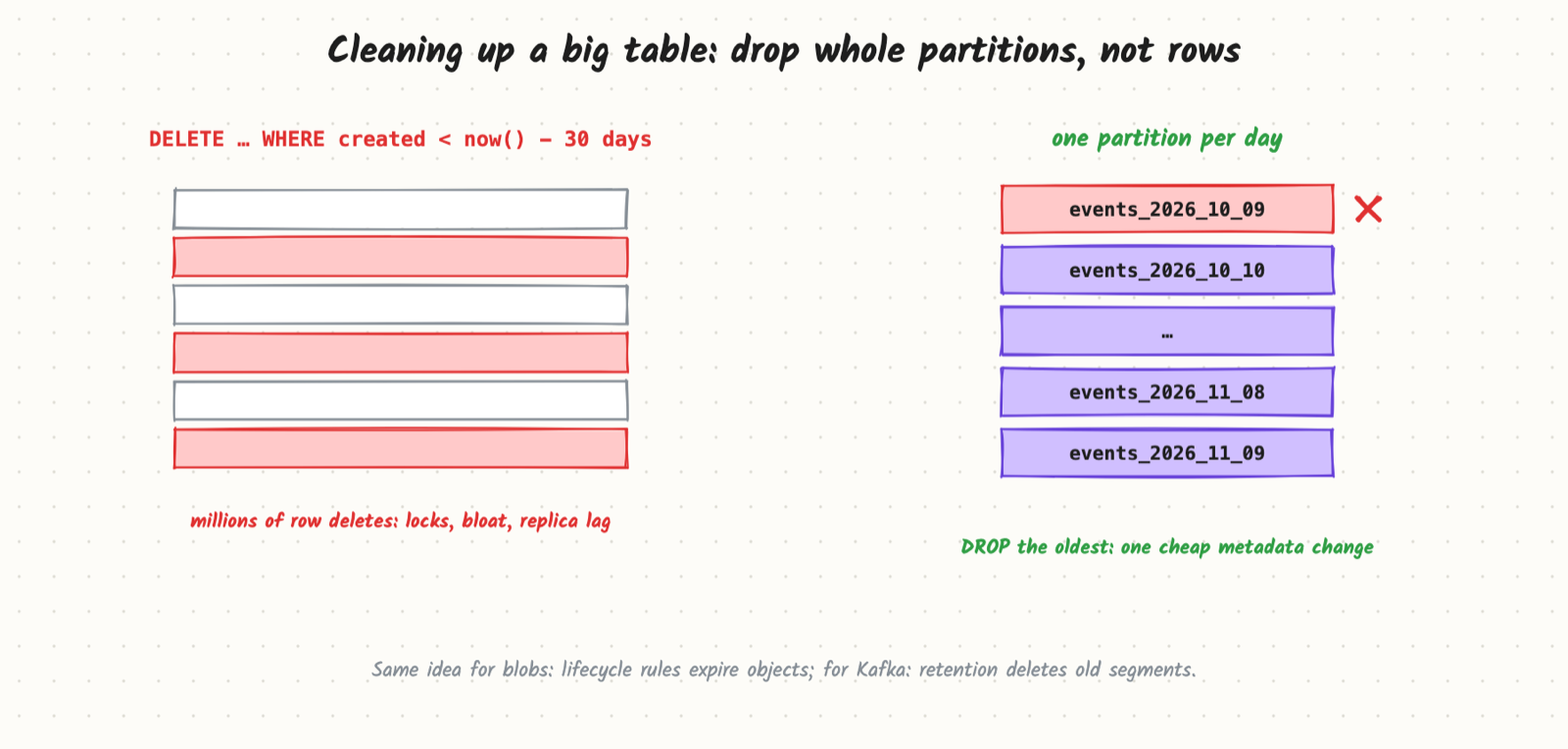
A huge DELETE touches millions of rows, holds locks, bloats the table (space isn't returned right away), and floods replication. Better options:
- Partition by time (one partition per day or month) and
DROPthe oldest partition. It is a metadata change, nearly instant, with no row-by-row work. - If you can't partition, delete in small batches (
DELETE … WHERE id IN (SELECT id … LIMIT 5000)), pausing between batches and watching replica lag. - For data that must be kept but not hot, archive to cheaper storage first, then drop.
Avoiding expiry spikes
If you load 1 million cache keys at 09:00 with a 1-hour TTL, they all expire at 10:00 and the database takes a burst of misses. Add jitter: TTL = 3600 s ± 10% random. Same for scheduled cleanups: spread them out instead of running everything at midnight.
Trade-offs and costs
- Shorter TTL means fresher data and less storage, but more cache misses and more frequent re-creation (users logged out sooner).
- Longer TTL means fewer misses, but more stale data and more storage.
- Background deletion takes time. DynamoDB and Cassandra can take hours or days, so expired data is still on disk (and still costs money) for a while; filter on read.
- Tombstones: in log-structured stores, deletes are writes; many expiring items can slow reads until compaction runs.
- Legal and privacy requirements (keep payment records 7 years, delete personal data on request) override convenience; write the retention policy down per data type.
When to reach for it
- Sessions, auth tokens, password-reset and email-verification links.
- Caches of every kind.
- Idempotency keys, dedup records, rate-limit counters.
- Temporary holds: a seat held for 5 minutes, a cart reservation.
- Logs, metrics and events with a retention period; abandoned uploads.
Example
Sessions and related data for a course site. Assumptions: 2 million active users, 5 million sign-ins a month, sessions last 30 days.
- Sessions: stored in Redis as
session:{id}withEX 2592000(30 days) and sliding renewal: each request older than one day resets the TTL. Redis memory holds only live sessions, about 5 million × 1 KB = 5 GB. - Audit table of logins in Postgres: partitioned by month, kept 13 months; a monthly job drops the oldest partition.
- Password-reset tokens: a table with
expires_at = now() + 30 min. Lookups filter onexpires_at > now()andused = false. An hourly batch job deletes rows older than a day, 5,000 at a time. - Upload staging: blob lifecycle rule deletes objects under
tmp/after 1 day, so abandoned uploads clean themselves up. - Product cache:
TTL = 600 s + random(0, 60)to avoid synchronized expiry.
Common mistakes
- No expiry at all, so temporary data grows forever.
- Relying on the background delete for correctness, and serving expired tokens because the TTL job hasn't run yet.
- Giant
DELETEstatements on live tables. - Same TTL for everything loaded at once, causing an expiry stampede.
- Forgetting soft limits elsewhere: the row is gone, but the blob, the search document and the cache entry are not.
- Retention that ignores legal requirements (deleting too early or keeping personal data too long).
Say this in the interview
"Sessions live in Redis with a 30-day TTL that slides on activity, so memory only holds live sessions. Reset tokens are rows with an expires_at, and every lookup checks it, so an expired token never works even before the cleanup job runs. Login history is partitioned by month and we drop partitions older than 13 months instead of running huge deletes. Cache TTLs get random jitter so keys don't all expire together."
Used in
- Cache, Rate Limiting Algorithms, Idempotency & Deduplication, Blob Storage.
- Design a Distributed Cache like Redis, Design a URL Shortener, Design a Logging System.