Blob Storage


Blob storage is used for large files such as images, videos, PDFs, logs, and backups.
In interviews, the most common pattern is simple: store metadata in the database, and store the actual file in object storage.
What blob storage is
Blob storage, also called object storage, stores unstructured binary data.
Examples:
- images,
- videos,
- audio files,
- PDFs,
- user uploads,
- backup files,
- exported reports,
- logs.
Common products:
- Amazon S3,
- Google Cloud Storage,
- Azure Blob Storage.
Why not store files in the database?
Databases are great for structured data. They are not ideal for large binary files.
A better pattern is:
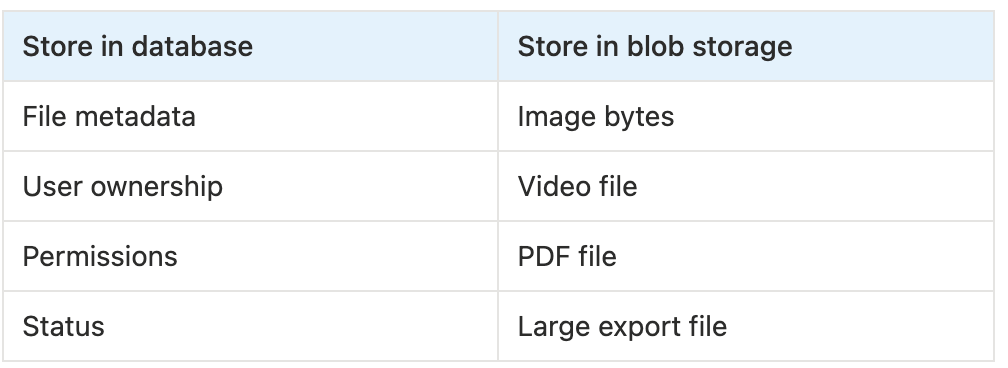
Database: file metadata
Blob storage: actual file
Example:
Database
- file_id
- owner_id
- file_name
- file_size
- content_type
- s3_url

S3
- actual file bytes
When to use blob storage
Good interview signals:
- users upload files,
- system stores images or videos,
- files are large,
- users download attachments,
- system needs backups or exports,
- media should be served globally.
Examples:
- YouTube,
- Instagram,
- Dropbox,
- Google Drive,
- image management system,
- file sharing system,
- support ticket attachments.
Presigned URL upload
Presigned URLs are very common in interviews.
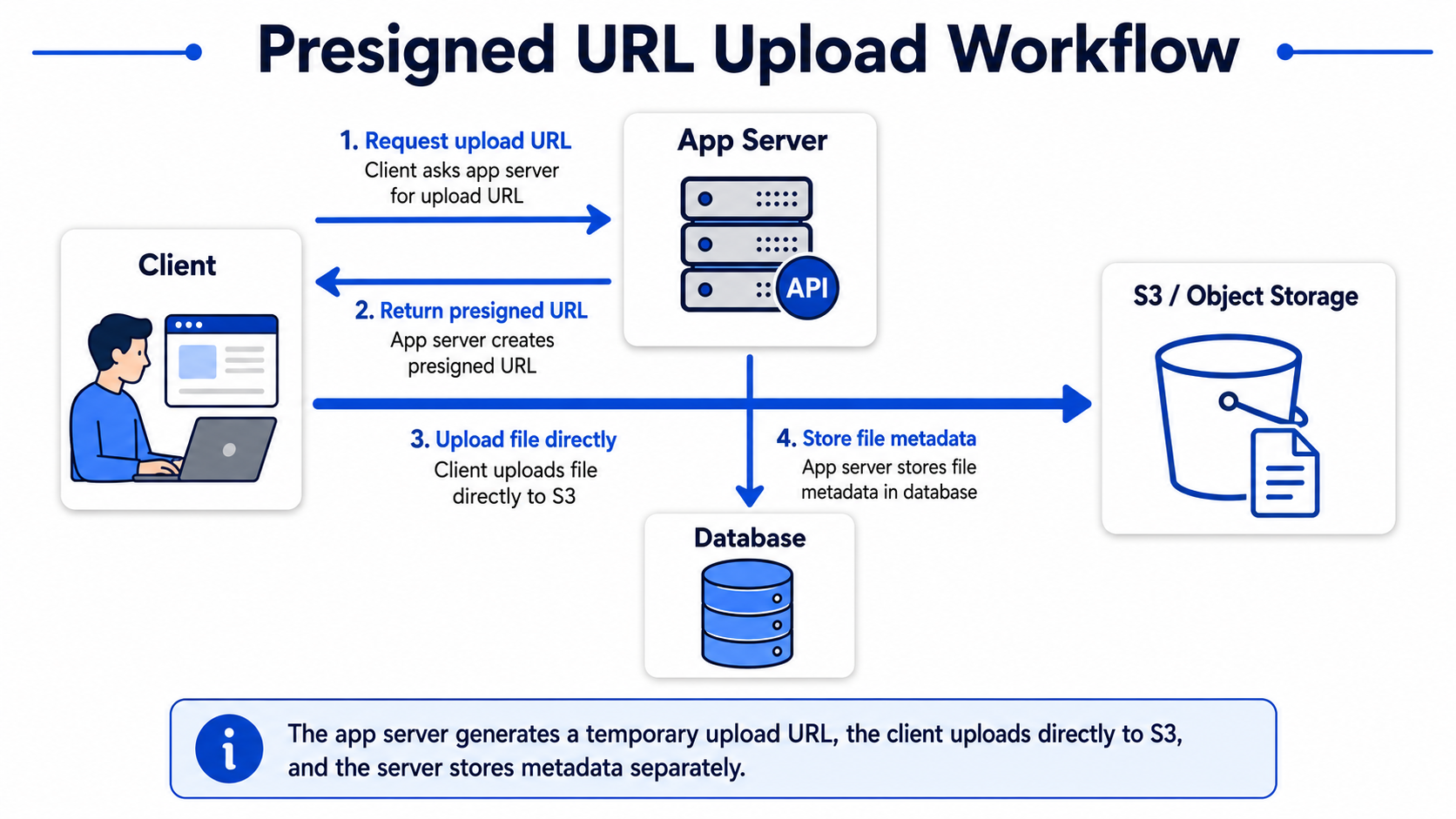
Instead of uploading a file through your application server, the client uploads directly to blob storage.
1. Client asks app server for upload URL.
2. App server creates presigned URL.
3. Client uploads file directly to S3.
4. App server stores file metadata in database.
Why this is good:
- app servers do not handle large file traffic,
- uploads scale better,
- blob storage handles file transfer,
- cost and server load are lower.
A good interview sentence:
I would use presigned URLs so clients can upload files directly to S3. The application server only stores metadata and permissions.
Blob storage and CDN
Blob storage is often used together with CDN.
S3 stores the file
CDN serves the file to users
This is common for images and videos.
A strong phrase:
Store in S3, serve through CDN.
Common design details
File metadata
Store this in the database:
- file id,
- owner id,
- file name,
- file size,
- content type,
- storage key,
- created time,
- access permissions.
File processing
Some files need processing after upload.
Examples:
- generate thumbnails,
- scan for viruses,
- transcode video,
- extract metadata,
- compress images.
This is usually done with a message queue and workers.
Upload complete → Queue → Worker → Process file
Access control
For private files, do not expose public URLs.
Use:
- short-lived signed URLs,
- permission checks before download,
- private buckets.
Common mistakes
- Storing large files directly in the database.
- Sending large uploads through the app server.
- Forgetting file metadata.
- Serving media without CDN.
- Ignoring permissions for private files.
- Not planning async processing for large media.
Final takeaway
Blob storage is the default choice for files.
A strong answer is:
I would store the binary file in object storage and keep metadata in the database. For uploads, I would use presigned URLs. For downloads, I would serve public media through CDN or private files through signed URLs.