Design Dropbox / Google Drive

Problem statement
Short description
Design a cloud file storage and sync service: users can upload files, download them, sync them automatically across devices, and share them with others.
For example, a user edits a document on their laptop; within seconds the updated file appears on their phone and on a teammate's machine it was shared with.
Understanding the problem
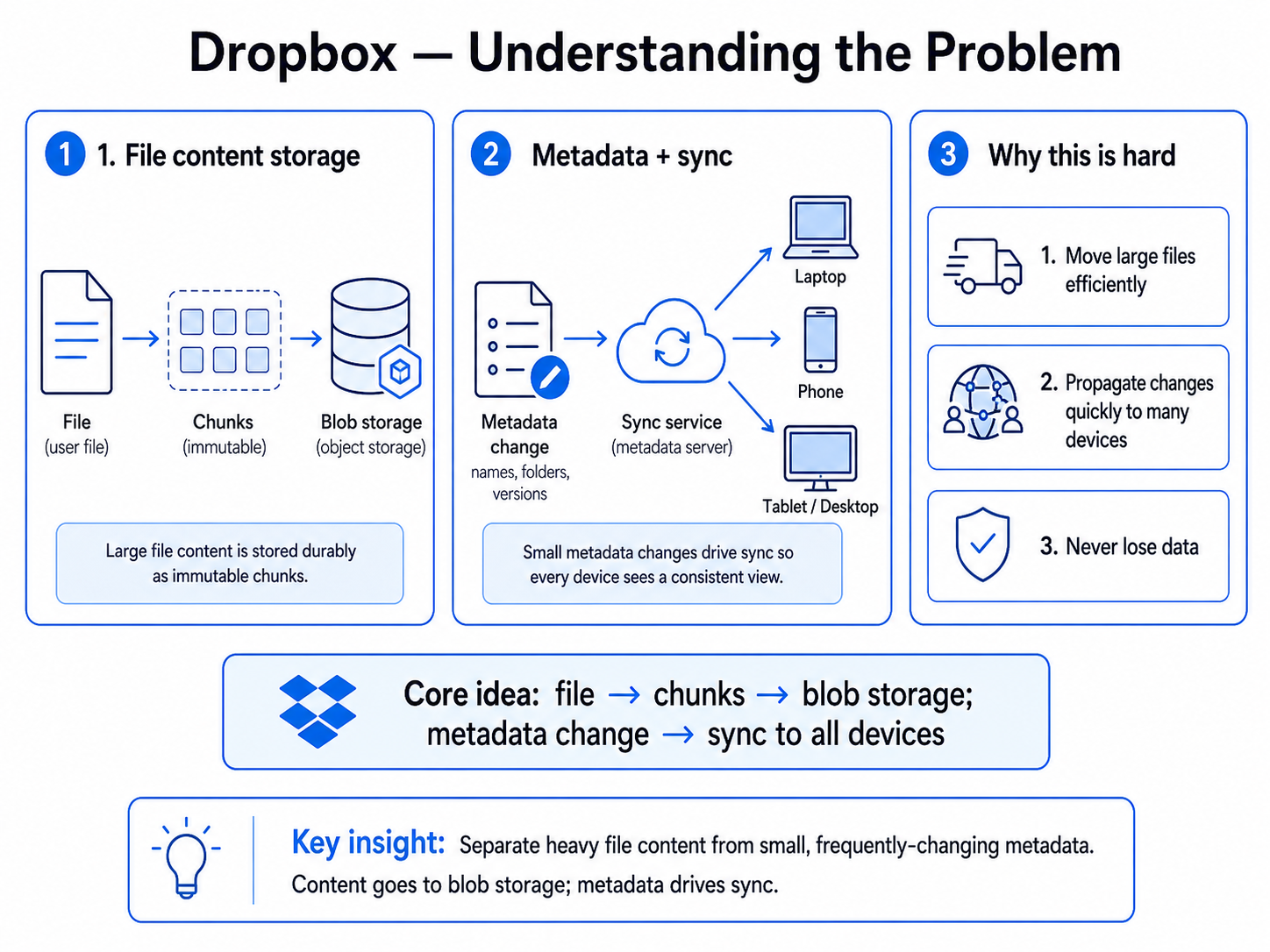
From the statement, the system does two core things: it stores file content durably, and it keeps every device's view of the files consistent.
The key insight is to separate the heavy, immutable file content from the small, frequently-changing metadata (names, folders, versions, who has what). Content goes to blob storage; metadata drives sync.
In other words, the core of the system is:
file content → blob storage; metadata change → sync to all devices
The hard parts are moving large files efficiently, propagating changes quickly to many devices, and never losing data.
What we need to discuss with the interviewer
Before designing, clarify the boundary of the problem. Pick these four questions:
- Scale — How many users and files, and what is the typical and maximum file size?
- Latency (sync) — How fast must changes propagate across devices? Real-time or eventual?
- Consistency — How do we handle two devices editing the same file (conflict resolution)?
- Sharing — Do we need shared folders, permissions, and collaborative access?
For this design, we focus on upload/download, multi-device sync, sharing, and efficient large-file transfer. Real-time collaborative editing is a follow-up.
Requirements
Functional requirements
- Upload — Users can store files in the cloud.
- Download — Users can retrieve their files.
- Sync across devices — Changes on one device automatically appear on the user's other devices.
- Share — Users can share files and folders with others, with permissions.
Non-functional requirements
- Low latency — Sync propagates across devices in < ~5 s; metadata reads p99 < 200 ms.
- High availability — 99.99% for upload/download (always-on storage).
- Scale — ~500M registered users / ~100M DAU, ~100B files, ~1B uploads/day; files up to 50 GB (avg ~1 MB); read-heavy and global.
- Consistency — Strong consistency for metadata (ownership, sharing, file listing); eventual consistency for sync propagation across devices (a few seconds is fine). Concurrent edits resolve by last-writer-wins with conflict copies.
- Durability — ~11 nines; effectively never lose a file.
- Efficient large-file transfer — Multi-GB files; avoid re-transferring unchanged data when only part of a file changes.
Core entities
At this stage we only name the obvious nouns the requirements talk about. We deliberately avoid mechanism (versions, sync cursors, chunks) — those emerge naturally as we design each step.
- File — the actual bytes a user stores.
- FileMetadata — describes a file:
name,size,owner. Splitting metadata from the file bytes is the one key decision we make up front, because the two have completely different access patterns. - User — owns files and devices.
- SharedFile — records that a file is shared with another user.
API design
The API follows directly from the functional requirements — one set of endpoints per FR, in the same order. We keep them at their simplest here: the client just sends and receives file bytes through our service. Refinements (like keeping those bytes off our servers) are something we'll naturally arrive at in the high-level design, not now.
Upload a file
POST /files
{ "name": "report.pdf", "size": 52428800, "mime_type": "application/pdf", "content": <bytes> }
→ { "file_id": "..." }
Download a file
GET /files/{file_id}
→ { "metadata": { "name": "report.pdf", "size": 52428800 }, "content": <bytes> }
Get changes since last sync
GET /files/changes?since=<last_sync_time>
→ { "changes": [ { "file_id": "...", "action": "created|modified|deleted" } ] }
Share a file
POST /files/{file_id}/share
{ "user_emails": ["alice@example.com"], "permission": "edit" }
→ { "shared_with": [ { "user_id": "...", "permission": "edit" } ] }
High-level design
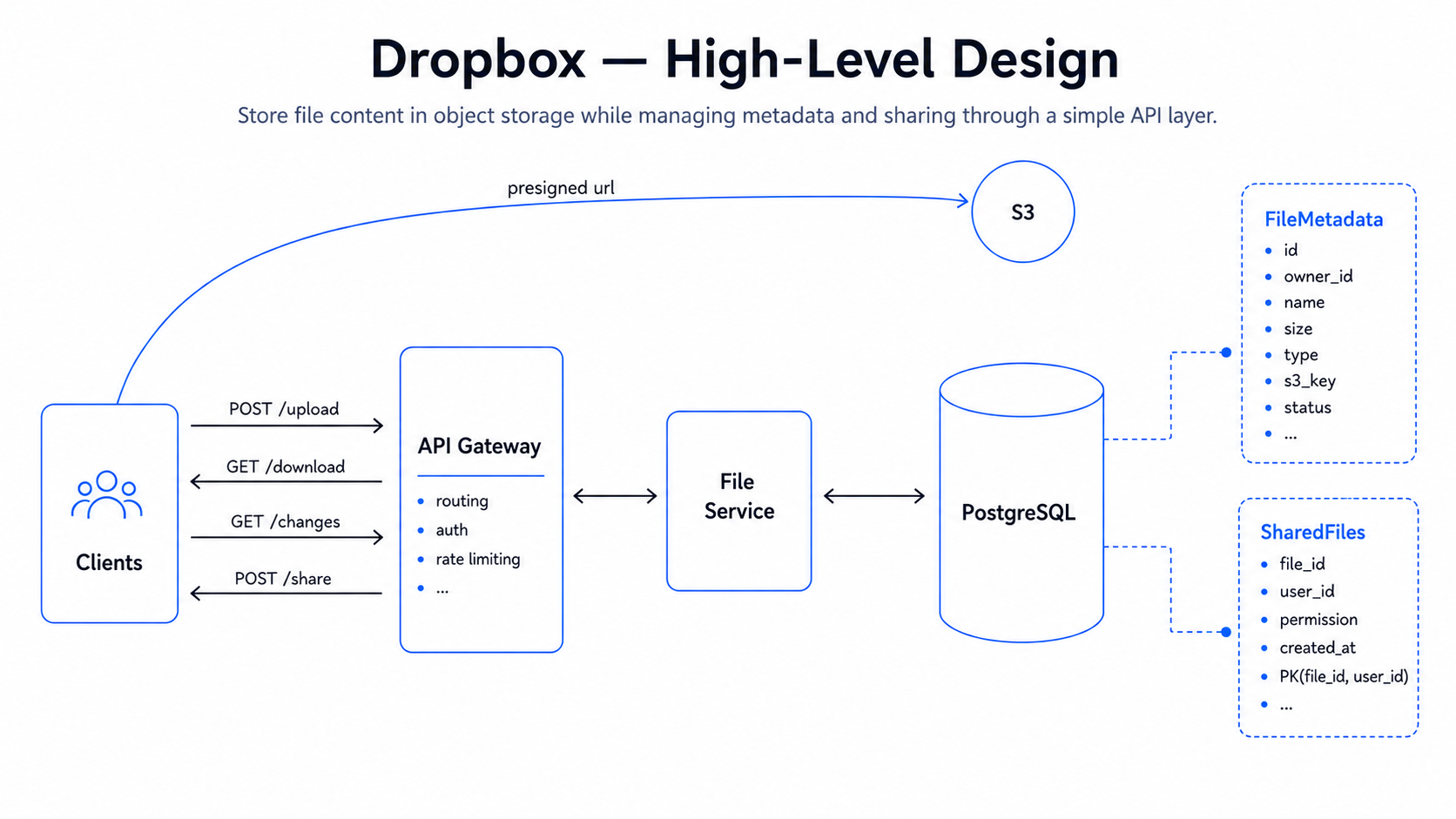
The high-level design should match the functional requirements exactly, and only the functional requirements — we want a system that works end-to-end first, and leave durability, scale, latency, and availability to the deep dives. We have four functional requirements, so we design in four steps, growing the data model only as far as each step needs. A few choices here are deliberately naive; we flag them and fix them in the deep dives.
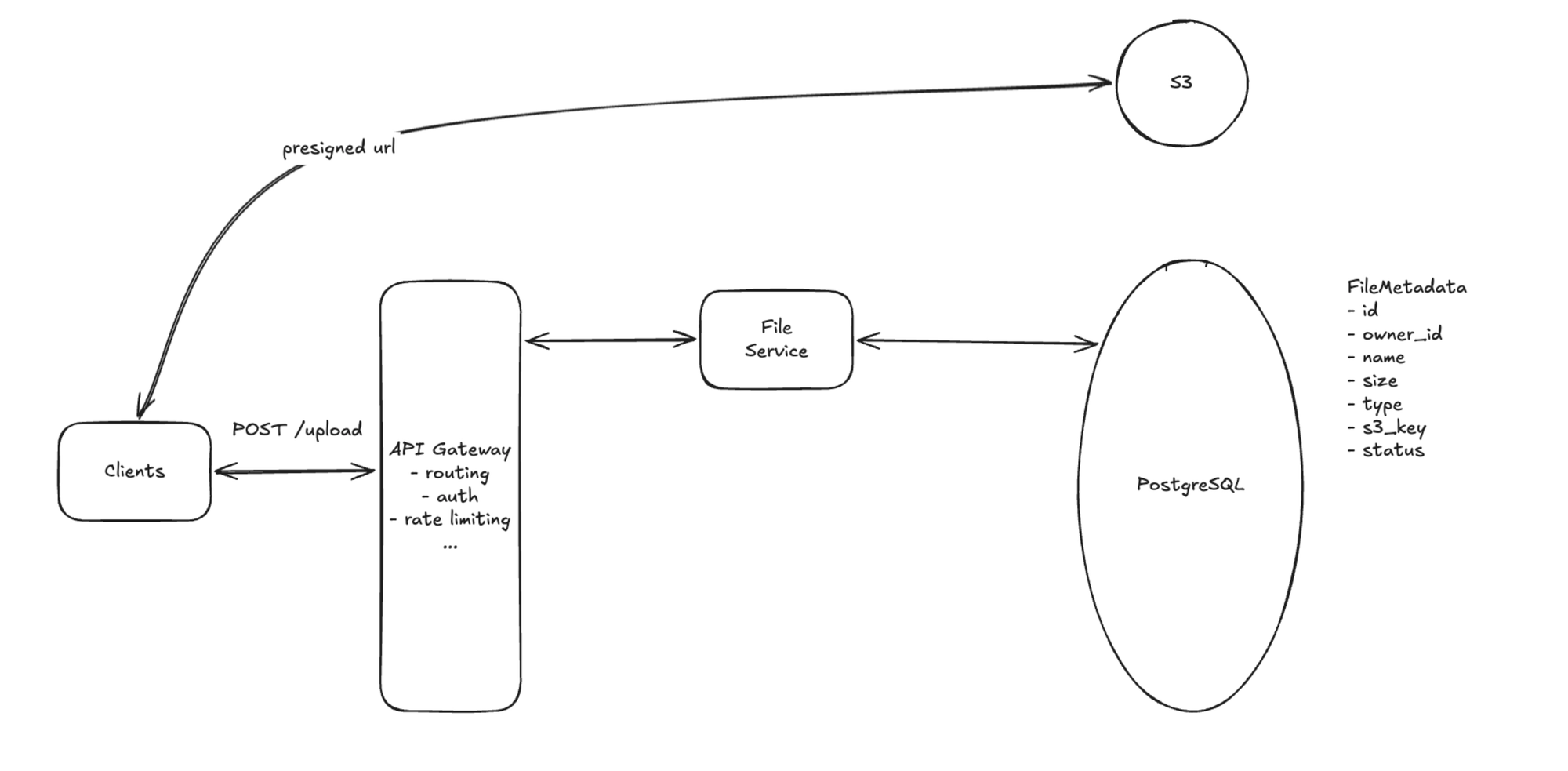
1. Upload
Flow: Client → File Service (request a presigned URL) → upload bytes directly to Blob Storage (S3) → S3 notifies File Service on completion → commit metadata.
The client asks the File Service for an upload URL, uploads the bytes straight to blob storage (keeping our servers off the data path), and the upload is confirmed by a storage completion notification.
Minimal state:
file_metadata(file_id, owner_id, name, size, mime_type, blob_key, status)—blob_keylocates the bytes in blob storage;statusgoespending_upload → uploaded.
Naive on purpose: a 50 GB file uploaded as a single blob is fragile — any drop restarts it. We add chunking + resumable uploads in Deep Dive 1.
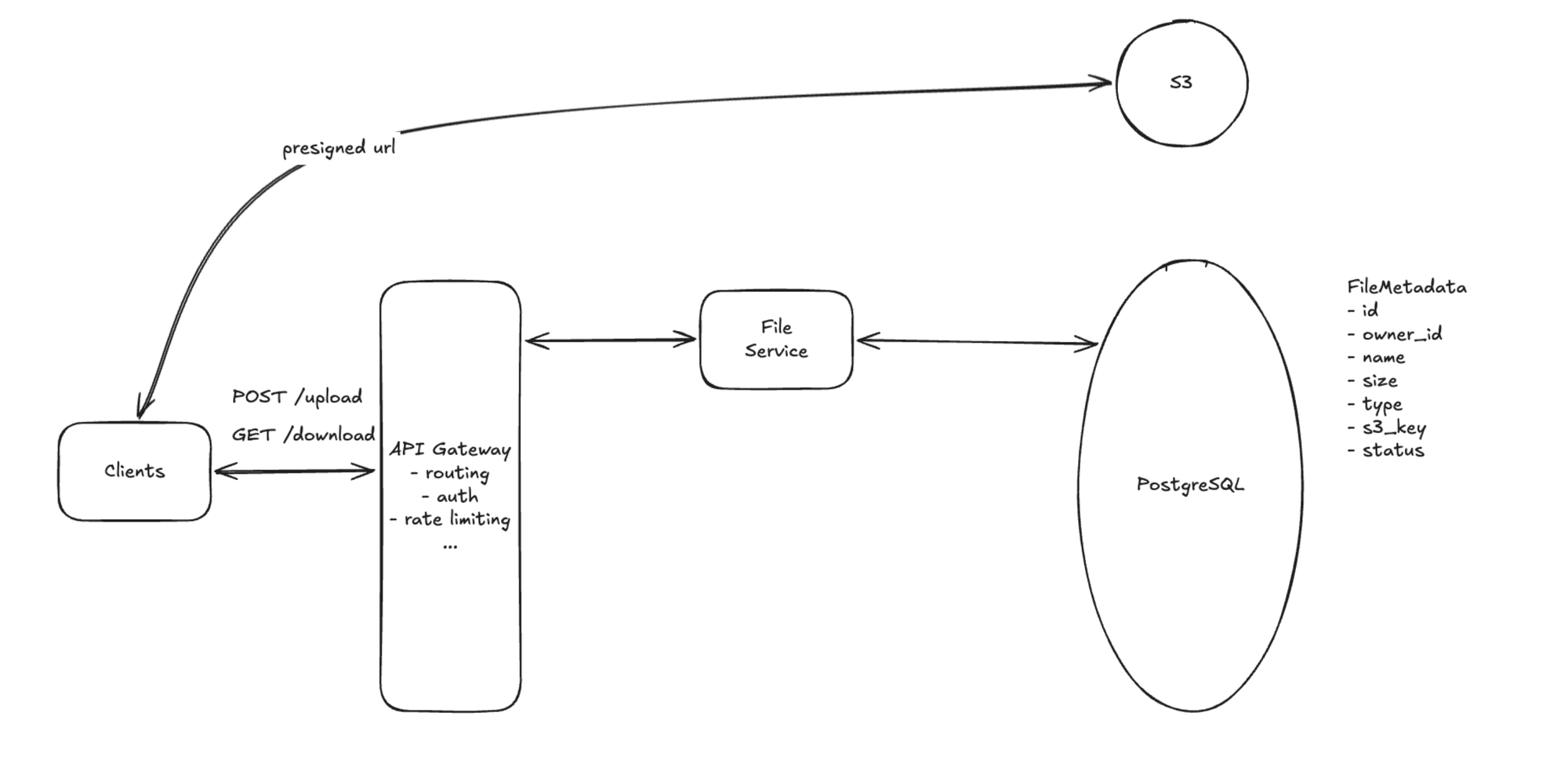
2. Download
Flow: Client → File Service (read metadata, check access) → return a presigned URL → Client fetches bytes directly from Blob Storage.
Download reverses upload: read the file record, verify the requester can access it, then hand back a presigned (or CDN) URL to fetch the bytes.
Minimal state: reuses file_metadata — no new fields needed.
Naive on purpose: serving every download from one region is slow for distant users. We add CDN edge caching in Deep Dive 2.
3. Sync across devices
Flow: File Service records each create/modify/delete as a change → devices periodically poll GET /files/changes?since=… → pull updated metadata, then fetch changed files.
We keep it simple: every metadata change appends to a per-user change log with a monotonically increasing version, and each device tracks how far it has synced.
Minimal state adds:
change(change_id, user_id, file_id, action, version, created_at)—actioniscreated|modified|deleted, indexed by(user_id, version)for fast catch-up.device(device_id, user_id, last_synced_version)— tracks how far each device has synced.
Naive on purpose: polling from 100M devices every few seconds is mostly empty responses and huge wasted load. We move to push (WebSocket + long-poll hybrid) in Deep Dive 3.
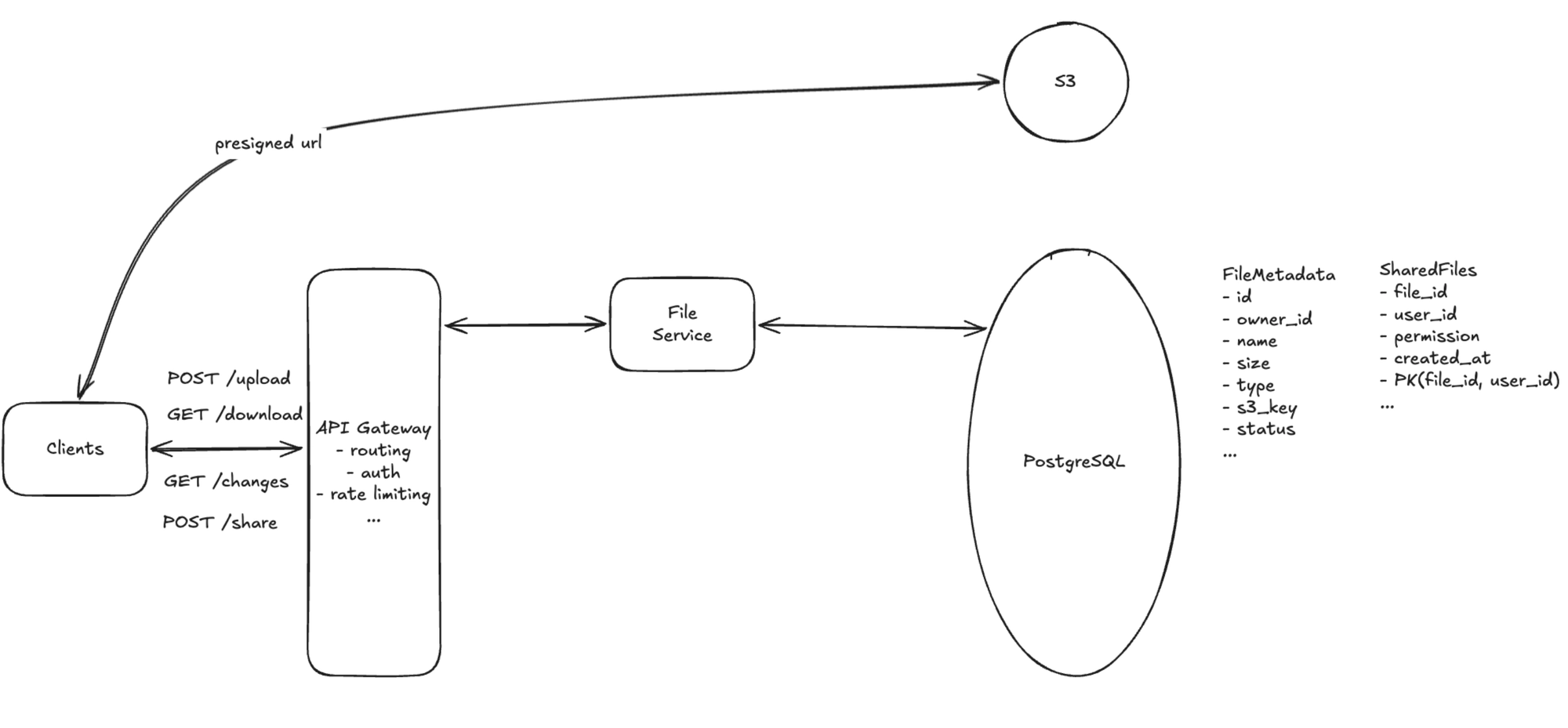
4. Share
Flow: Client → File Service → resolve emails to user IDs → write a permission row → the grantee sees the resource on their next sync.
A share grants a user a role on a file; once written, the grantee's change log (Step 3) starts including that resource.
Minimal state adds:
shared_file(file_id, grantee_id, role)— composite key(file_id, grantee_id);roleisviewer|editor. A user's file list joins their own files with the rows shared to them.
Deep dives
The high-level design satisfies the functional requirements. The deep dives exist to satisfy the non-functional requirements — and to fix the three choices we flagged as naive in the HLD.
Each deep dive maps back to specific non-functional requirements:
- Large file uploads (chunking, resumable, dedup) → solves Efficient large-file transfer.
- Fast downloads (CDN, chunked download, compression) → solves Low latency (download).
- Multi-device sync (push + change feed + conflict resolution) → solves Low latency (sync) and Consistency.
- Scaling the data and service layers → solves Scale and High availability.
- Graceful degradation → solves High availability under partial failure.
Deep Dive 1: How do we reliably move files up to 50 GB?
This deep dive addresses Efficient large-file transfer.
Uploading a 50 GB file as a single blob over HTTP is fragile — one interruption restarts hours of transfer — and re-uploading a whole file after a small edit wastes bandwidth.
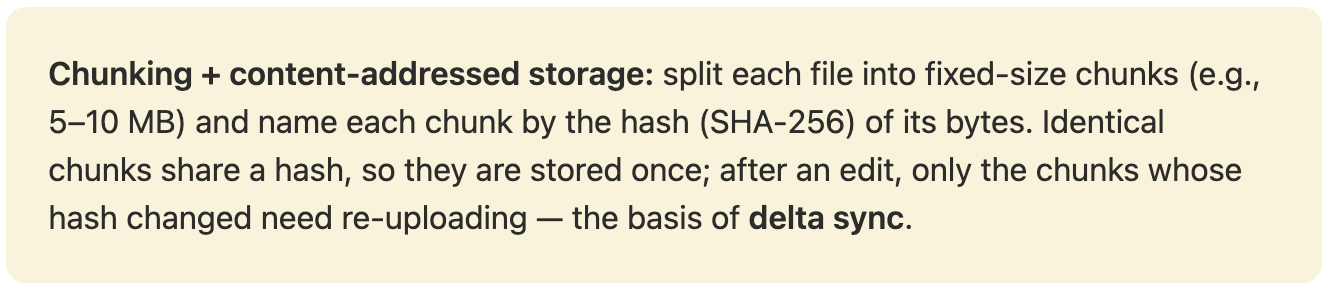
Recommended: chunking + resumable + dedup
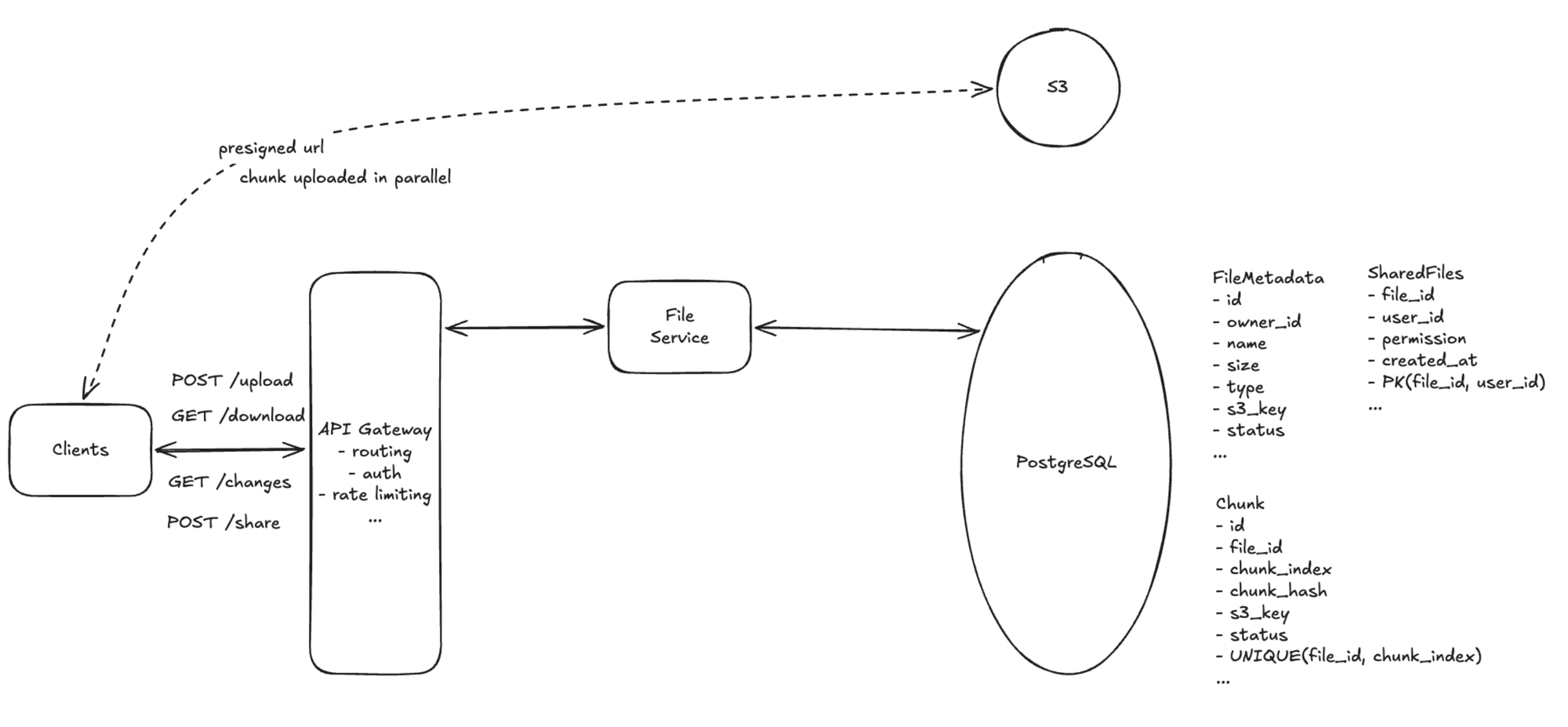
- Fixed-size chunks (5–10 MB): a 50 GB file → ~5–10k chunks, each uploaded independently and in parallel with its own presigned URL.
- Resumable uploads: track per-chunk status; if the connection drops at chunk 3,000 of 5,000, resume from 3,001. Chunk uploads are idempotent, so retries are safe.
- Content-based dedup: hash each chunk and skip uploading any whose hash already exists (re-uploading the same file → 100% dedup; a small edit → only changed chunks transfer).
- Manifest commit: the client sends a chunk manifest; File Service returns presigned URLs only for new chunks, and marks the file
uploadedonce all chunks land.
Alternatives
- Whole-file upload: simplest, but fragile for large files and wasteful for small edits.
- Content-defined (variable) chunking: better dedup when bytes shift (insertions), but more complex than fixed-size blocks.
Deep Dive 2: How do we serve downloads fast, globally?
This deep dive addresses Low latency.
Downloading from a single storage region adds 200–300 ms of round-trip latency for distant users before any bytes flow.
Recommended: CDN + chunked download + compression
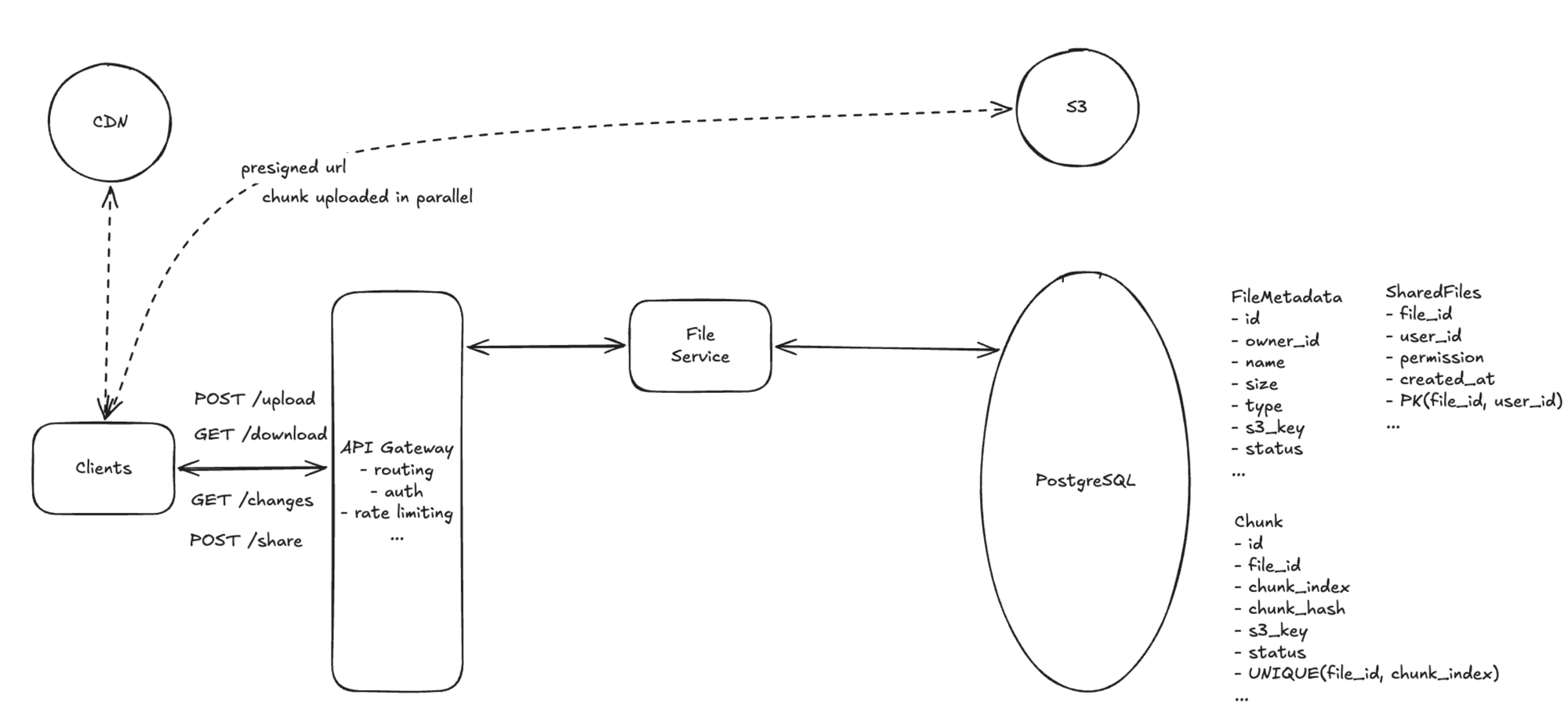
- CDN edge caching: popular files are cached at edge nodes worldwide; the first request fills the edge from origin, later requests are served locally at sub-50 ms. File Service hands out CDN URLs.
- Chunked, parallel download: reuse the upload chunk structure — download chunks in parallel and retry only failed chunks, never the whole file.
- Compression: compress with gzip/zstd on upload and decompress on the client; skip already-compressed formats (JPEG, MP4, ZIP).
Why this is a strong answer
- Reuses the chunk abstraction from Deep Dive 1 for both directions.
- Keeps bandwidth off our services entirely (client ↔ CDN / blob store).
Deep Dive 3: How do we sync changes quickly without crushing the server?
This deep dive addresses Low latency (sync) and Consistency.
Polling from 100M DAU every few seconds is ~20M requests/sec of mostly-empty responses, and still lags by the polling interval.
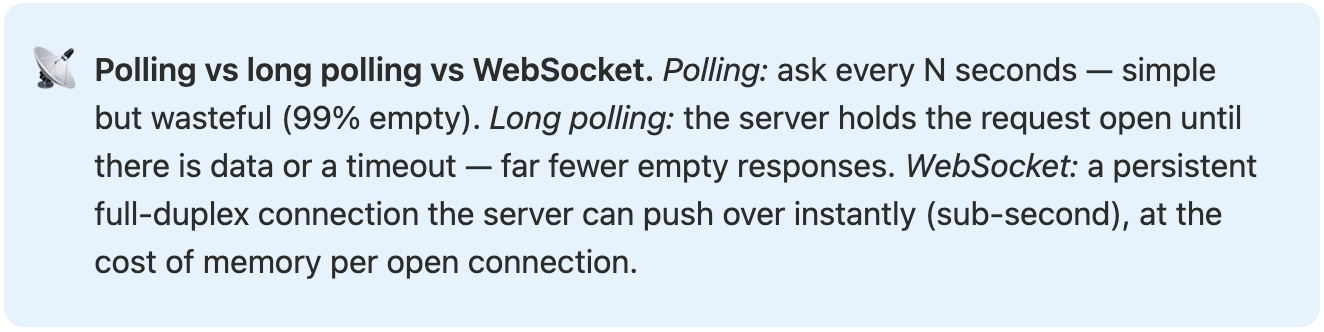
Recommended: push via WebSocket + long-poll hybrid, over a change feed
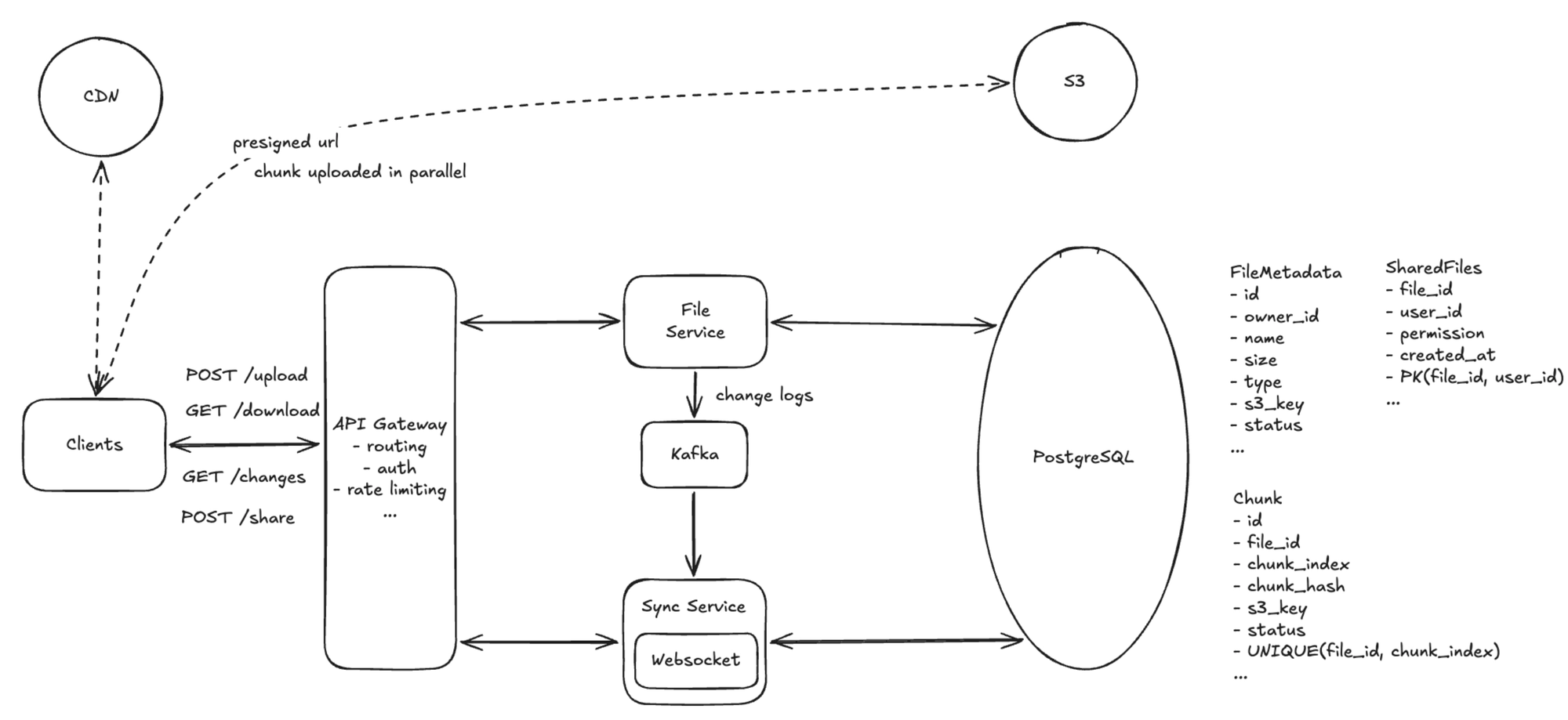
- WebSocket for active devices: a Sync Service holds connections for recently-active devices and pushes change notifications instantly.
- Long-poll / slow-poll for idle devices: idle devices fall back to long polling (or ~60 s polling) and upgrade to WebSocket when active — keeping concurrent connections manageable since most devices are idle.
- Change feed (Kafka): publish file changes to a per-user(-group) log; the Sync Service subscribes and fans out. This decouples writes from delivery, supports replay for offline catch-up, and doubles as an audit trail / version-history source.
- Conflict resolution: last-writer-wins for the primary copy, plus a conflict copy preserving the other edit (Dropbox's approach), so no work is lost.
Alternatives
- Pure polling: trivial, but wasteful and laggy at scale.
- Pure WebSocket for everyone: lowest latency, but tens of millions of mostly-idle connections to hold is expensive.
Insert image: Hybrid sync architecture with change feed.
Deep Dive 4: How do we scale to 100M DAU and ~1B uploads/day?
This deep dive addresses Scale and High availability.
The read path (file lists, change polling) and the connection layer dominate, so we scale each independently.
Recommended approach
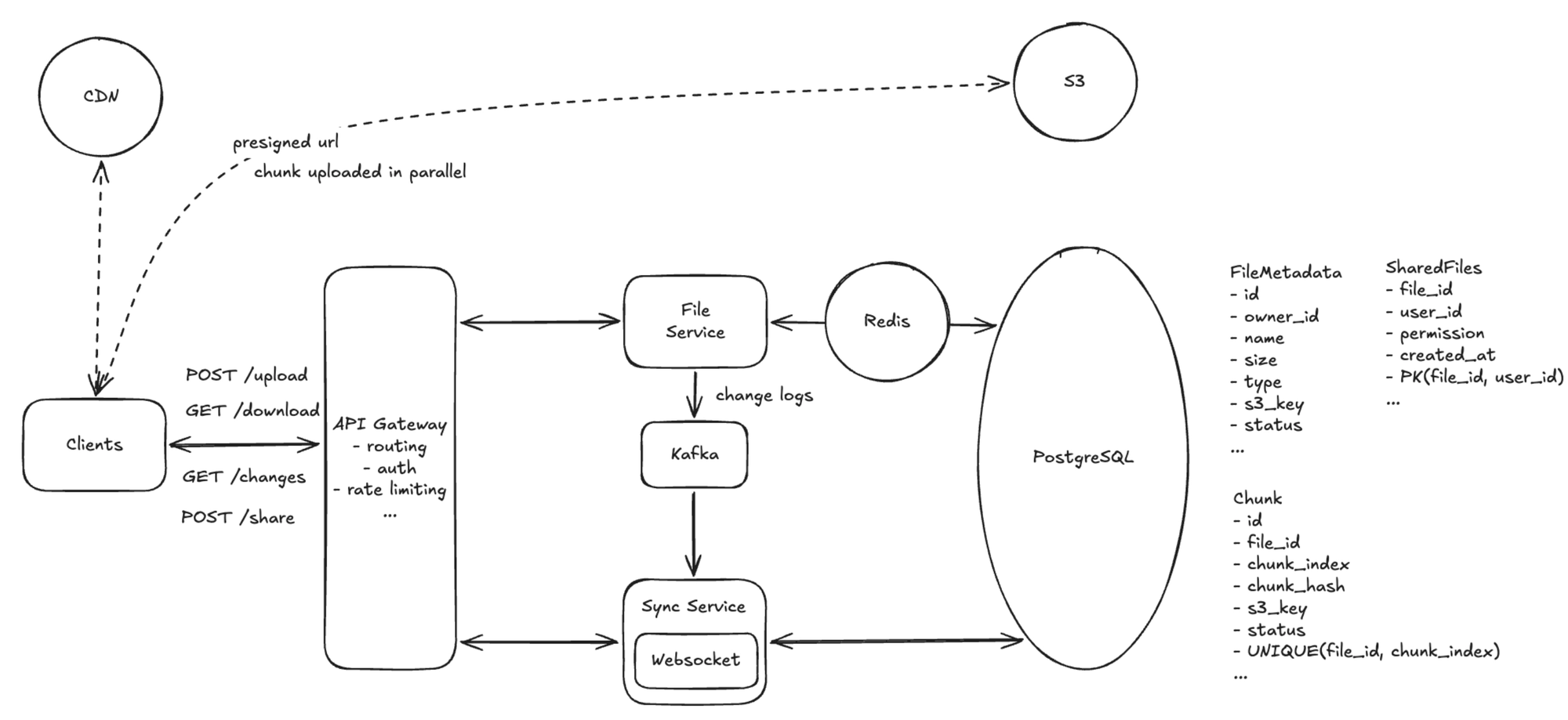
- Metadata DB: shard by
user_id(a user's files co-locate), add read replicas for read-heavy paths, and front it with a Redis cache for hot metadata. - Stateless File Service: horizontal scaling behind a load balancer, auto-scaled by request rate, with per-user rate limiting.
- Blob storage (S3) scales natively: multi-region replication for durability and latency; intelligent tiering for cost.
- Sync Service: partition WebSocket connections by
user_idhash; a service registry routes a user to the right instance; Kafka partitioned byuser_idaligns change delivery.
Back-of-the-envelope
- ~1B uploads/day ≈ ~12K/s average, ~36K/s peak (3×) → ~36 File Service instances at ~1K req/s.
- ~20M concurrent WebSocket connections ÷ ~100K per instance → ~200 Sync Service instances.
Deep Dive 5: How does the system behave when components fail?
This deep dive addresses High availability.
The guiding principle is simple: degrade features, never lose data.
Recommended: component-level fallbacks
- Blob storage (S3) outage: clients queue uploads locally and retry with exponential backoff; downloads serve from CDN cache when possible; metadata operations continue (separate store).
- Metadata DB outage: serve stale reads from Redis (browse/download cached lists); reject writes gracefully and replay queued writes on recovery.
- Sync Service outage: WebSockets drop → clients fall back to polling the changes endpoint directly; on recovery they reconnect and catch up from the change log (no missed changes).
- CDN outage: fall back to direct blob-store download — higher latency, still fully functional.
Cross-cutting patterns
- Circuit breakers on inter-service calls (fail fast, no cascading timeouts), rate limiting at the API gateway, health checks with auto-restart, and multi-AZ deployment.
Wrap up and final design
At the end, briefly summarize the architecture and confirm it satisfies both functional and non-functional requirements.
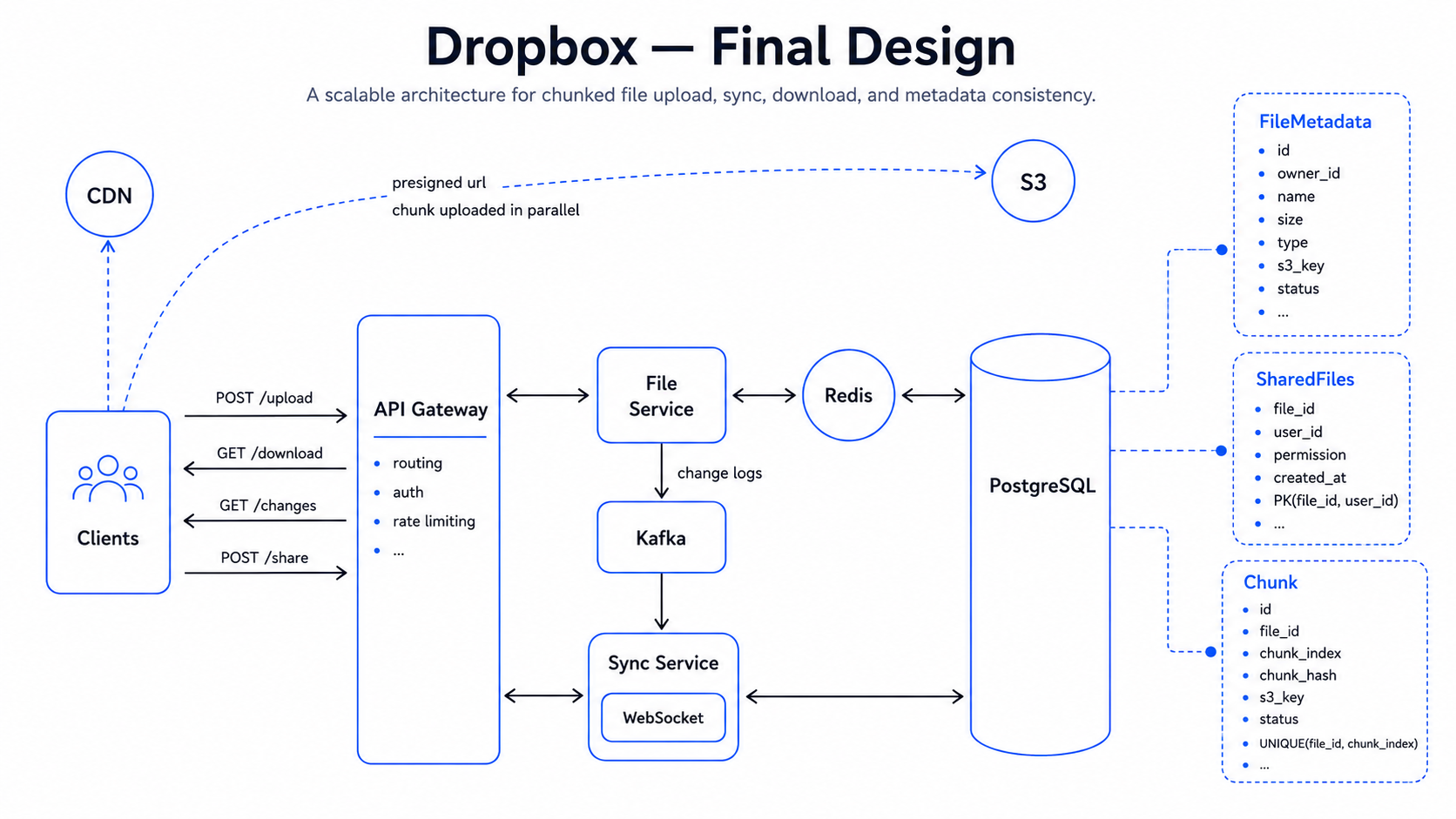
Final design
- Upload path: Client → File Service (presigned URLs for new chunks only) → chunks uploaded directly to Blob Storage; chunk manifest + metadata committed to a sharded Metadata DB.
- Download path: Client → File Service → presigned CDN/blob URL → bytes served from a CDN edge (or origin) in parallel chunks.
- Sync path: each change is appended to a Kafka change feed → Sync Service pushes to active devices over WebSocket (idle devices long-poll) → devices pull changed metadata and fetch missing chunks.
- Resilience: circuit breakers, multi-AZ deployment, and per-component fallbacks keep the system available and never lose data.
Requirements coverage
All four functional requirements — upload, download, multi-device sync, and sharing — are handled by the paths above. The non-functional requirements map to the deep dives: efficient large-file transfer to chunking, resumable, and dedup (DD1); low latency to CDN-backed downloads (DD2) and push-based sync (DD3); consistency to last-writer-wins with conflict copies over a change feed (DD3); scale and availability to sharding, stateless services, and the Sync fleet (DD4); and availability under failure to graceful degradation (DD5). Strong consistency for metadata and eventual consistency for sync propagation are honored throughout.
Interview expectations by level
Different levels are expected to go into different depths. The goal is the right depth, not saying everything.
Junior to Mid-level
Expected focus:
- Clarify file sizes, sync speed, and the consistency split (strong for metadata, eventual for propagation).
- Make the key split: file content in blob storage, metadata in a database.
- Design presigned-URL upload/download and a simple polling-based sync.
- Describe the
file_metadata/change/shared_filedata model.
Strong signal:
The candidate separates file content from metadata and explains why that split matters.
Senior
Expected focus:
- Design chunked + resumable uploads with content-based dedup for large files.
- Add CDN-backed, chunked downloads.
- Move sync from polling to a WebSocket + long-poll hybrid over a change feed.
- Shard metadata by user, add read replicas + cache, and keep services stateless.
Strong signal:
The candidate reasons about transfer efficiency, sync freshness, and read-heavy scale as distinct, well-handled concerns.
Staff+
Expected focus:
- Handle conflict resolution (last-writer-wins + conflict copy) and offline catch-up via change-log replay.
- Plan graceful degradation per component and a metadata/blob reconciliation job.
- Identify the key tradeoff: dedup/compression savings vs metadata, GC, and connection-management complexity.
Strong signal:
The candidate anticipates conflicts, failure modes, and the operational cost of running storage at scale.