Tool Calling and the Agent Loop
On this page
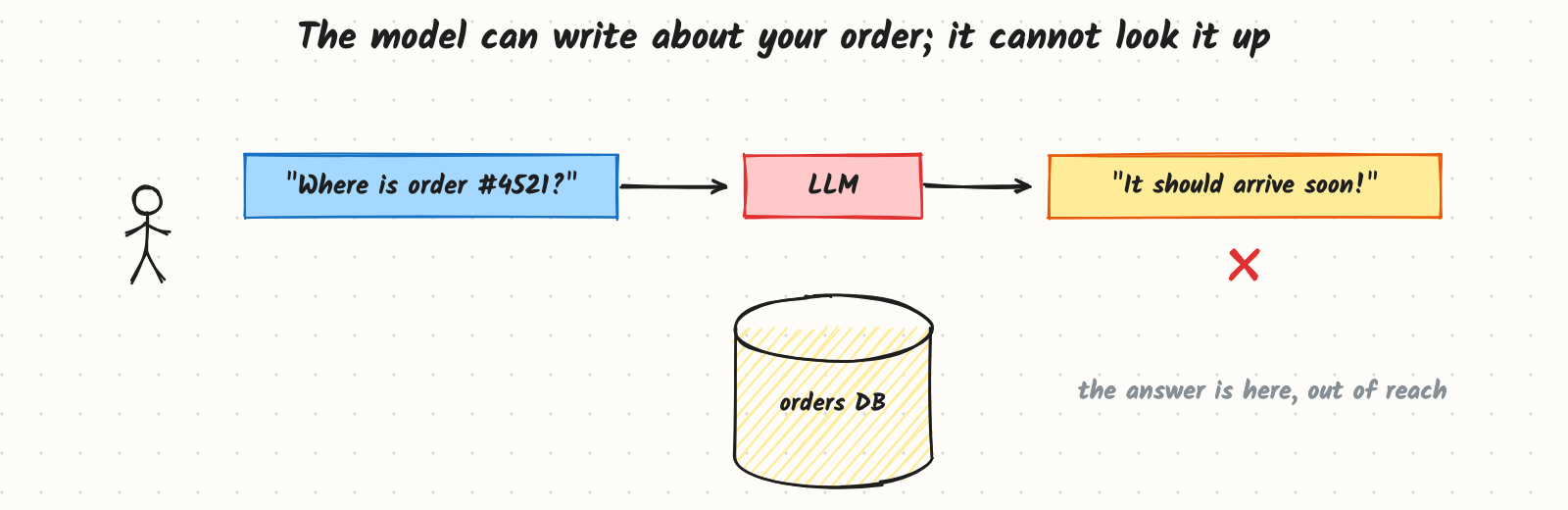
A customer asks the support assistant "Where is order #4521?". The model knows how to write a friendly reply about shipping, but it has no way to see the orders database, so it answers "It should arrive soon!", which may be false. The answer exists in your systems; the model just can't reach it. Tool calling lets the model ask your code to run a function and read the result. Put that in a loop and you have an agent.
How it works
Describing tools
You give the model a list of tools, each with a name, a description of when to use it, and a JSON Schema for its arguments. For example: get_order(order_id: string): "Look up an order's status and delivery estimate by its ID." The model was trained to respond either with normal text or with a tool call: the tool's name and arguments as JSON.
The loop
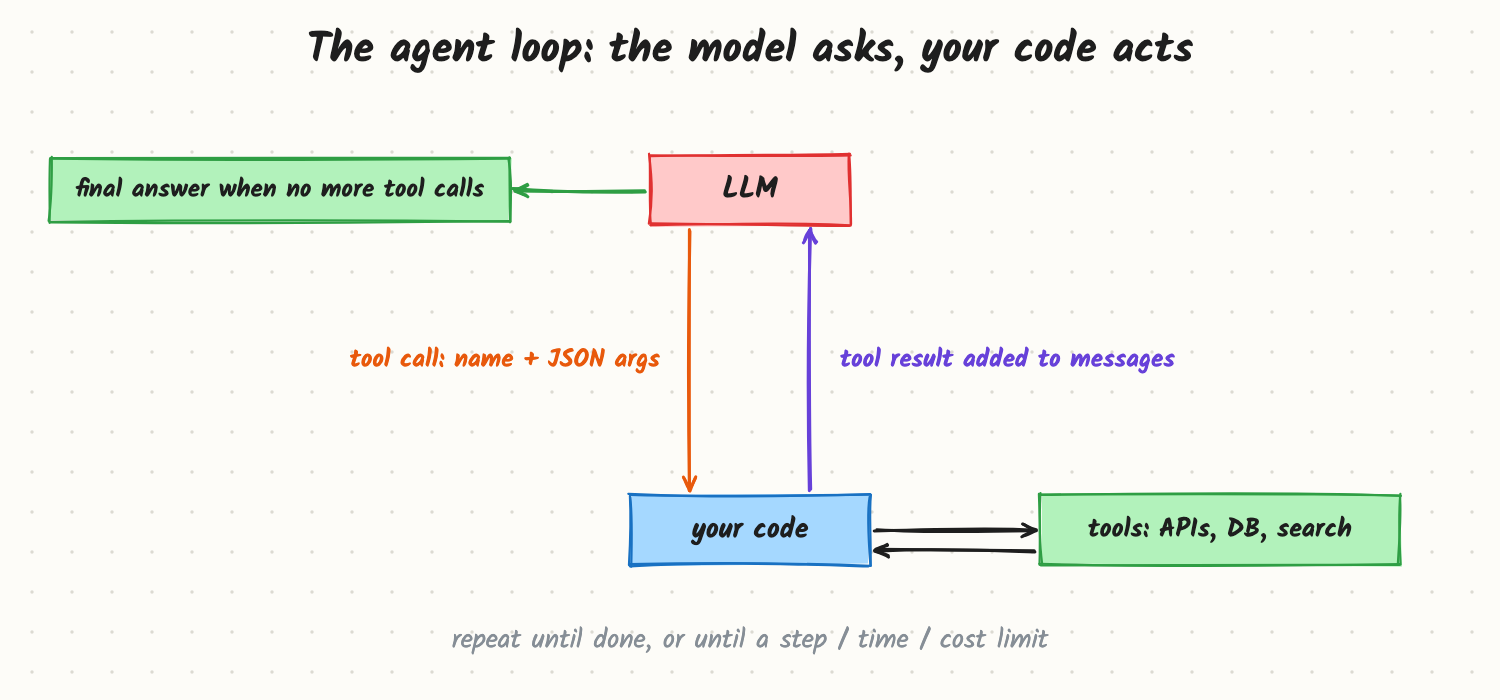
- Send the conversation and the tool list to the model.
- If the reply is a tool call, your code validates the arguments, runs the tool, and appends the result to the conversation.
- Call the model again with the updated conversation.
- Repeat until the model replies with plain text (the final answer) or a limit is reached: maximum steps, time or cost.
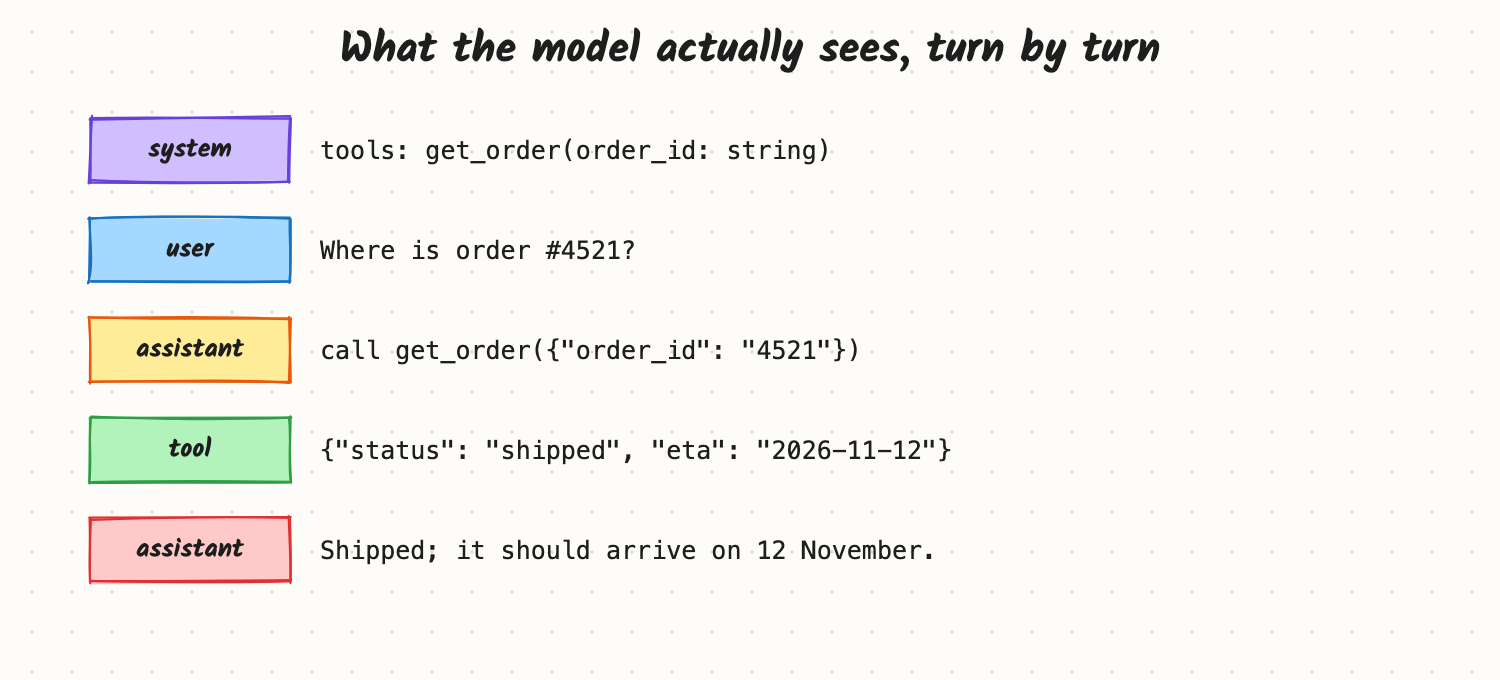
A minimal version of the loop, with a fake model standing in for a real API:
import json

def get_order(order_id: str) -> dict:
    return {"order_id": order_id, "status": "shipped", "eta": "2026-11-12"}  # example data

TOOLS = {"get_order": get_order}

def run_agent(call_model, user_message, max_steps=8):
    messages = [{"role": "user", "content": user_message}]
    for _ in range(max_steps):
        reply = call_model(messages)                 # {"content": ...} or {"tool": name, "args": {...}}
        if "tool" not in reply:
            return reply["content"]                  # final answer
        fn = TOOLS.get(reply["tool"])
        try:
            result = fn(**reply["args"]) if fn else {"error": f"unknown tool {reply['tool']}"}
        except Exception as err:                     # tool errors go back to the model
            result = {"error": str(err)}
        messages.append({"role": "assistant", "tool_call": reply})
        messages.append({"role": "tool", "content": json.dumps(result)})
    return "Stopped: step limit reached."

def fake_model(messages):                            # stands in for a real LLM API
    if messages[-1]["role"] == "user":
        return {"tool": "get_order", "args": {"order_id": "4521"}}
    data = json.loads(messages[-1]["content"])
    return {"content": f"Order {data['order_id']} is {data['status']}, arriving {data['eta']}."}

print(run_agent(fake_model, "Where is order #4521?"))
# Order 4521 is shipped, arriving 2026-11-12.
Notice the important details: a step limit, errors returned to the model as results (so it can try again or explain), and an explicit check for unknown tools.
Workflows vs agents
- Workflow: your code fixes the sequence (retrieve → summarise → classify), and the model fills in each step. Predictable, testable, cheap.
- Agent: the model decides which tool to call next and when to stop. Flexible for open-ended tasks, but harder to predict and test.
Use the simplest one that works. Many "agents" in production are workflows with one or two model-chosen steps.
Parallel tool calls
Models can request several independent tool calls at once (look up three orders); run them concurrently and return all results together to save round trips.
Trade-offs and costs
- Every step is a model call. A 10-step task costs roughly 10 calls, and the growing message list makes later calls more expensive (see Context Windows and Token Cost).
- Latency adds up: model time plus tool time per step; users need progress updates.
- More tools, more confusion: models choose worse among 50 similar tools than among 8 clear ones.
- Autonomy vs control: letting the model decide is powerful but means validating every action (see Agent Safety).
In production
- Validate arguments in code (types, ranges, permissions); never trust them because the schema looked right.
- Limits: max steps, max wall-clock time, max tokens or spend per task.
- Idempotency for tools with side effects, so a retried step doesn't charge a card twice.
- Trace every step: model input/output, tool calls, results, timing (see LLM Observability).
- Failure modes: loops calling the same tool forever; invented tool names or arguments; huge tool outputs flooding the context; the model claiming it did something it never called a tool for.
When to reach for it
Whenever answers depend on live or private data (orders, accounts, inventory), on computation (calculations, code execution), or on actions (create a ticket, schedule a meeting). Start with a fixed workflow; let the model choose steps only when the task really varies.
Example
A support agent has four tools: get_order, get_customer, search_help_center, and create_refund (which requires a human approval step in the UI). Limits: 8 steps, 30 seconds, and tool outputs truncated to 2,000 tokens. On 300 eval conversations, 92% are resolved without human help; the most common failure was looking up an order before asking for its ID, fixed by a clearer tool description ("ask the user for the order ID if it is missing").
Common mistakes
- No step limit, so a confused agent loops until it hits a timeout or a bill.
- Throwing tool errors as exceptions instead of returning them to the model.
- Vague tool descriptions that leave the model guessing when to use which tool.
- Building an agent where a fixed workflow would do.
- Trusting the model's claim of success without checking tool results.
Say this in the interview
"Tool calling lets the model emit a structured request, a tool name and JSON arguments, that my code validates and executes, returning the result as a new message. The agent loop repeats that until the model answers in text or hits a step, time or cost limit. The message list is the state. I'd start with a fixed workflow and only give the model control over steps when the task needs it, validate every argument, return errors to the model, and trace every step."
Interview questions on this
- Does the model execute the tool? No; it outputs a request. Your code decides whether and how to run it.
- What stops an agent from looping forever? Step, time and cost limits, plus loop detection on repeated identical calls.
- Workflow or agent? Workflow when steps are known; agent when the path depends on what is found.
- How do you handle a tool failure? Return a clear error as the tool result so the model can retry, change approach or explain.
- How many tools should one agent have? As few as cover the task, with distinct names and clear descriptions; split into sub-agents or route if the list grows large.
Used in
- AI Engineering: Agent Patterns; Designing Tools an Agent Can Use Well; Model Context Protocol; Making Agents Reliable; Implement a Minimal Agent Loop with Tool Calls (ML coding); Your Agent Is Stuck in a Loop (practical question).
- AI System Design: Tool calling and the agent loop; Design a Customer Support Agent; Design Operator; Design Deep Research.