Designing Tools an Agent Can Use Well
On this page
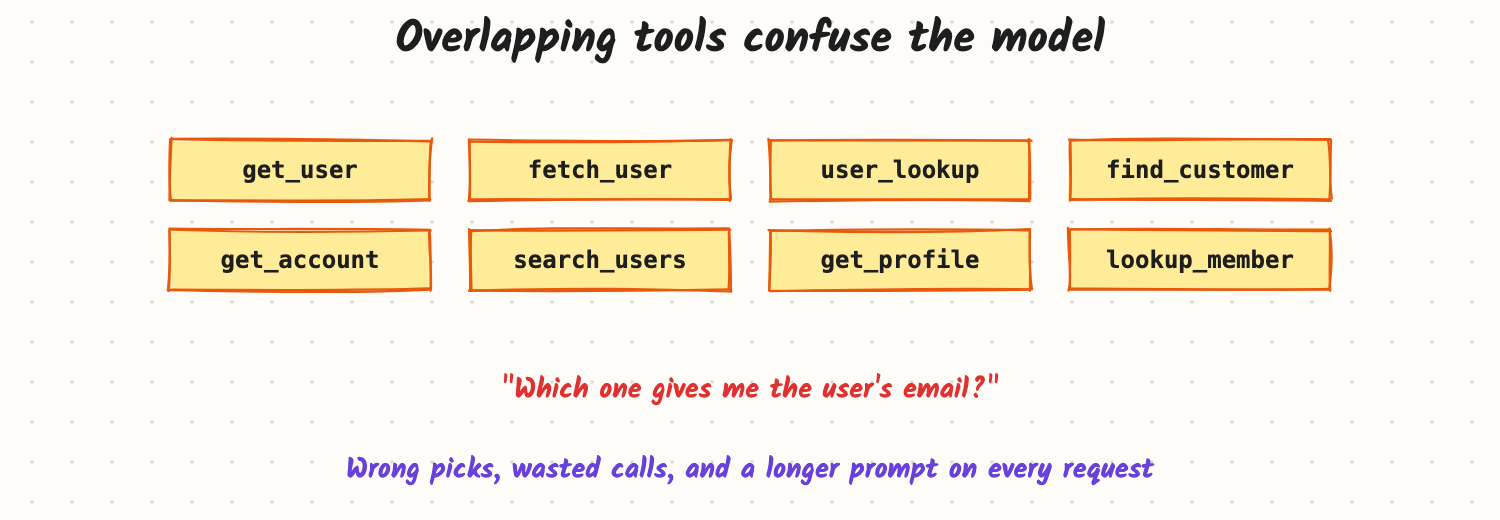
A team wraps their whole internal API as agent tools: 40 endpoints, auto-generated names like get_user, fetch_user and user_lookup, one-line descriptions, and responses passed through as raw JSON. The agent picks the wrong tool a third of the time, a single call returns 48,000 tokens and pushes the instructions out of context, and when something fails it sees "Error 500" and tries the same call again. The model isn't the weak link here. Tools are the agent's interface to the world, and they need to be designed for a model reader, the way an API is designed for developers.
How it works
Pick the right set of tools
- Few and distinct. Each tool should have a clear job no other tool does. Merge near-duplicates; remove tools the agent never needs.
- Shape tools around tasks, not endpoints. One
search_orders(customer_email, status)beats three calls the model has to chain (find customer → list orders → filter). Fewer steps mean fewer chances to go wrong. - Group by namespace when you have many (
billing_\,orders_\), or split them across specialised sub-agents or a router, so each model call sees only the tools it needs.
Write definitions for a new colleague
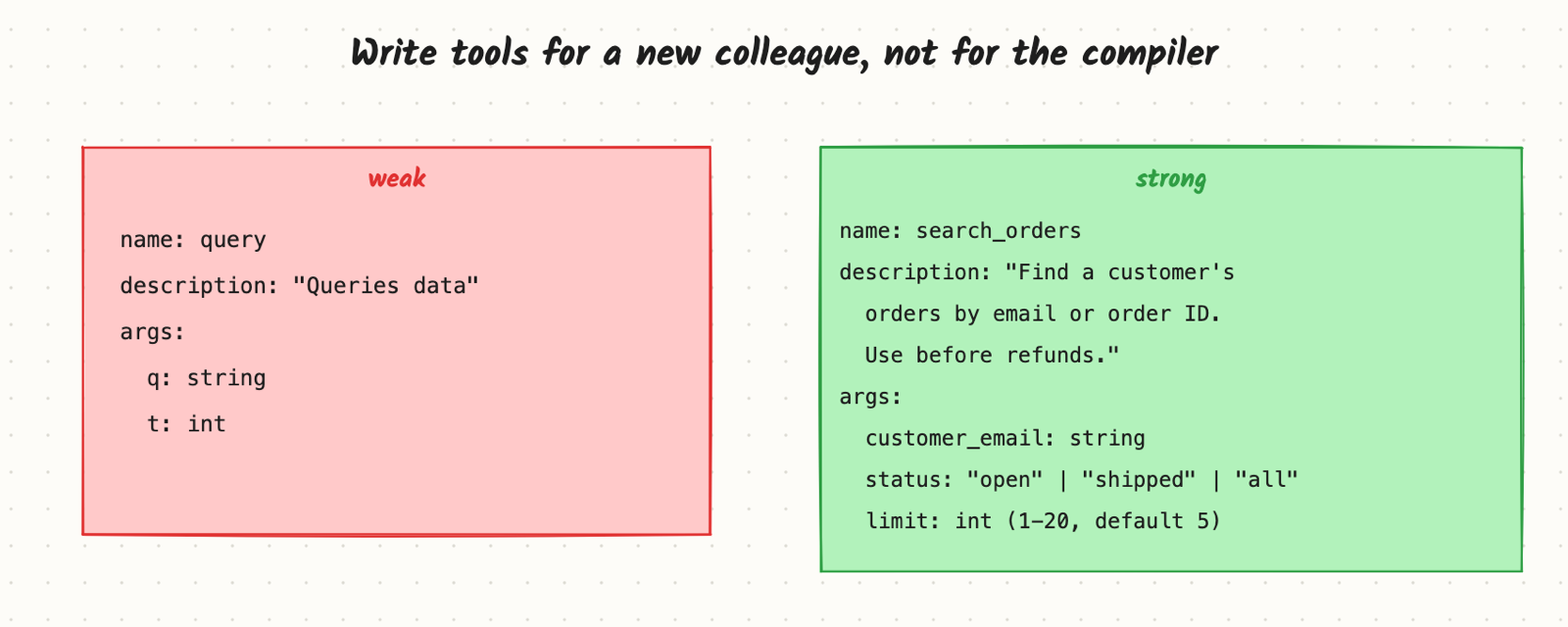
- Name: verb plus object, specific (
search_orders,create_refund). - Description: what it does, when to use it (and when not), what it returns, important limits. "Use before issuing a refund; returns at most 20 orders."
- Arguments: descriptive names (
customer_email, notq), types, enums for fixed choices, defaults and ranges. Prefer simple, flat arguments over deeply nested objects. - Examples in the description for tricky formats (dates, IDs).
Design the outputs and errors
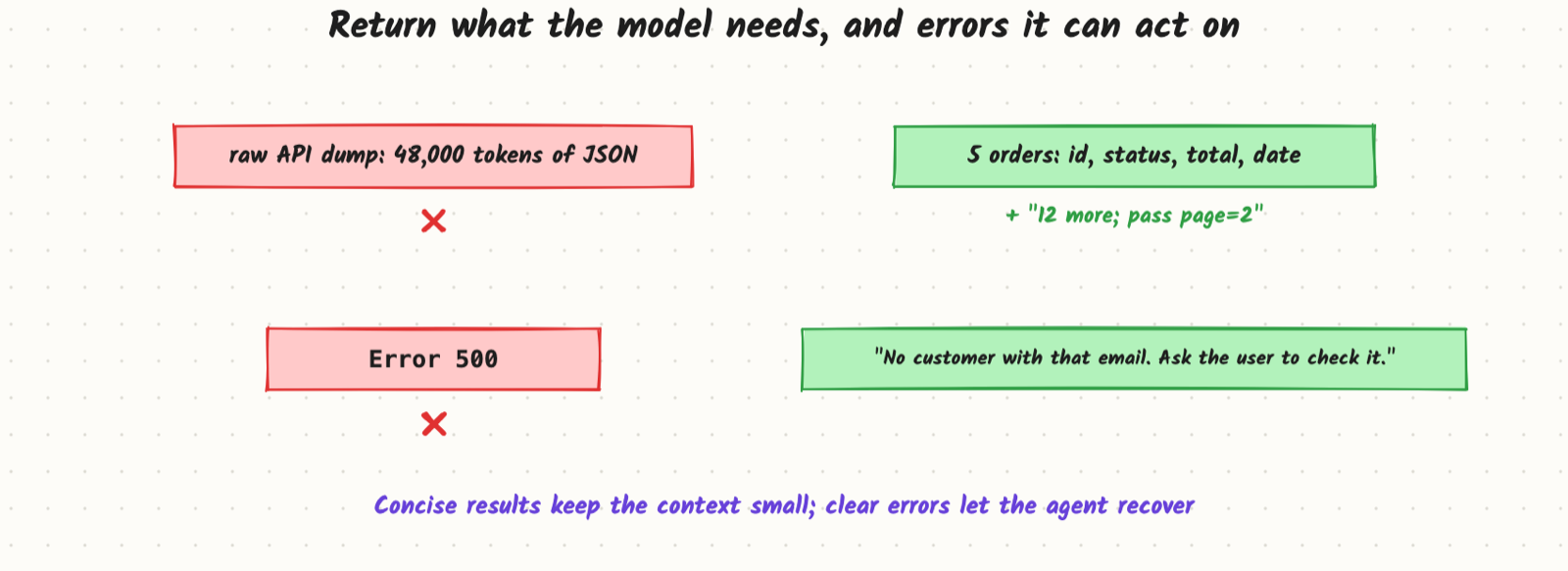
- Concise by default. Return the fields the agent needs, not the whole database row. Offer a
detailflag or a separateget_*tool for more. - Paginate and truncate large results, and say so ("12 more results; pass page=2").
- Human-readable identifiers alongside opaque IDs (names, titles), so the model can reason about them.
- Actionable errors: what went wrong and what to try ("No customer with that email. Ask the user to confirm it."), not stack traces or bare status codes.
Safety is part of tool design
- Separate read from write tools, and make destructive or external actions explicit (
send_email, not a genericrun). - Validate arguments in code, enforce the current user's permissions inside the tool, and make side-effecting tools idempotent (accept an idempotency key).
- Require confirmation for high-impact actions (see Agent Safety).
Trade-offs and costs
- Fewer, broader tools are easier to choose between, but each needs more arguments and logic.
- Concise outputs save tokens but may omit something the agent needed; watch traces and add fields deliberately.
- Tool definitions cost tokens on every call; 40 detailed tools can add thousands of tokens per request, so load tool sets dynamically when the list is large.
In production
- Evaluate tools like prompts: run agent evals after changing tool names, descriptions or outputs; small wording changes shift behaviour.
- Log tool-selection errors (wrong tool, invalid arguments, repeated calls) and fix the definitions that cause them.
- Version tools and keep old versions working while prompts and evals catch up.
- Failure modes: the agent passing made-up IDs; calling a write tool when a read tool was meant; huge outputs pushing instructions out of the context; ambiguous errors causing retry loops.
When to reach for it
Whenever an agent's evals show wrong tool choices, invalid arguments, long tool outputs or retry loops, check the tool design before changing the model or the prompt.
Example
The team cut 40 tools to 9 task-shaped ones, rewrote descriptions with "use when" guidance, capped list results at 10 items with pagination, and replaced status-code errors with short instructions. On 120 eval tasks, wrong-tool calls dropped from 31% to 6%, average tokens per task fell by more than half because tool outputs shrank, and retry loops after errors mostly disappeared (example numbers).
Common mistakes
- Exposing every API endpoint as a tool.
- Cryptic names and one-line descriptions.
- Returning raw, unbounded JSON.
- Error messages written for engineers, not for the agent.
- Mixing read and destructive actions in one generic tool.
Say this in the interview
"I treat tools as an API for the model: a small set of distinct, task-shaped tools with specific names, descriptions that say when to use them, and simple typed arguments with enums and defaults. Outputs are concise, paginated, and include readable identifiers; errors say what to do next. Write tools are separate, validated in code, permission-checked and idempotent, and I measure tool changes with agent evals."
Interview questions on this
- Your agent keeps calling the wrong tool. What do you check? Overlapping tools, vague names and descriptions, too many tools in context; then fix definitions and re-run evals.
- How do you handle a tool that can return thousands of rows? Filters, pagination, a concise default view, and a count of what was left out.
- Why task-shaped tools instead of one per endpoint? Fewer steps and decisions for the model, so fewer errors and lower cost.
- What makes a good tool error? It states the problem in plain words and suggests the next action.
- How do you deal with 100+ possible tools? Route to sub-agents or load tool subsets by intent, so each call sees only a few.
Used in
- AI Engineering: Tool Calling and the Agent Loop; Model Context Protocol; Structured Output; Agent Safety; Evaluating Agents.
- AI System Design: Design a Customer Support Agent; Design Operator.