Versioning Prompts and Models, and Rolling Them Out
On this page
A team edits one sentence in their assistant's system prompt to fix a tone complaint, and ships it straight to production on a Friday. On Monday, support tickets show the assistant has stopped calling the refund tool in a third of cases. Nobody can say exactly what changed: the prompt lives in a config file edited by three people, the model alias they call was silently upgraded by the provider the same week, and traces don't record either version. Prompts, model versions, parameters, tool schemas and retrieval settings are all code that changes behaviour, so they need versions, a registry, gated rollouts and instant rollback.
How it works
What a "release" is
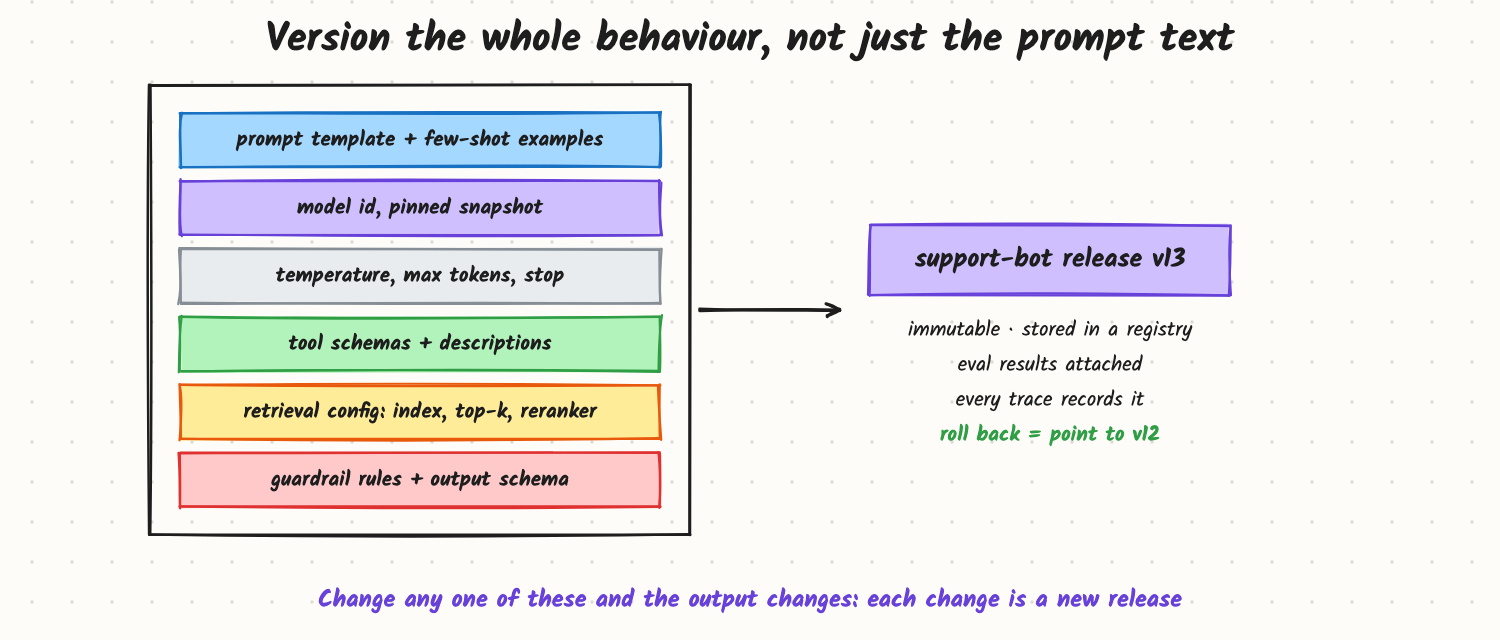
The behaviour of an LLM feature depends on more than the prompt text:
- Prompt template and few-shot examples.
- Model ID, pinned to a dated snapshot, not a moving alias.
- Sampling parameters (temperature, max tokens, stop sequences).
- Tool definitions and their descriptions (the model reads them as prompt text).
- Retrieval config: which index, embedding model, top-k, reranker.
- Guardrail rules and output schema.
Bundle these into one immutable release (for example support-bot v13) stored in a registry: a Git repository with CI, or a prompt-management tool backed by a database. The application asks for "the active release for support-bot", so changing behaviour doesn't require redeploying the app, and every trace records the release ID (see LLM Observability and Tracing).
Practices that follow:
- Code review for prompt changes, like any code.
- Eval results attached to each release: the regression set, safety suite and cost and latency numbers it was approved with.
- Environment promotion: dev → staging → production pointers to release IDs.
- Rollback is changing a pointer back to the previous release, in seconds.
Rolling out
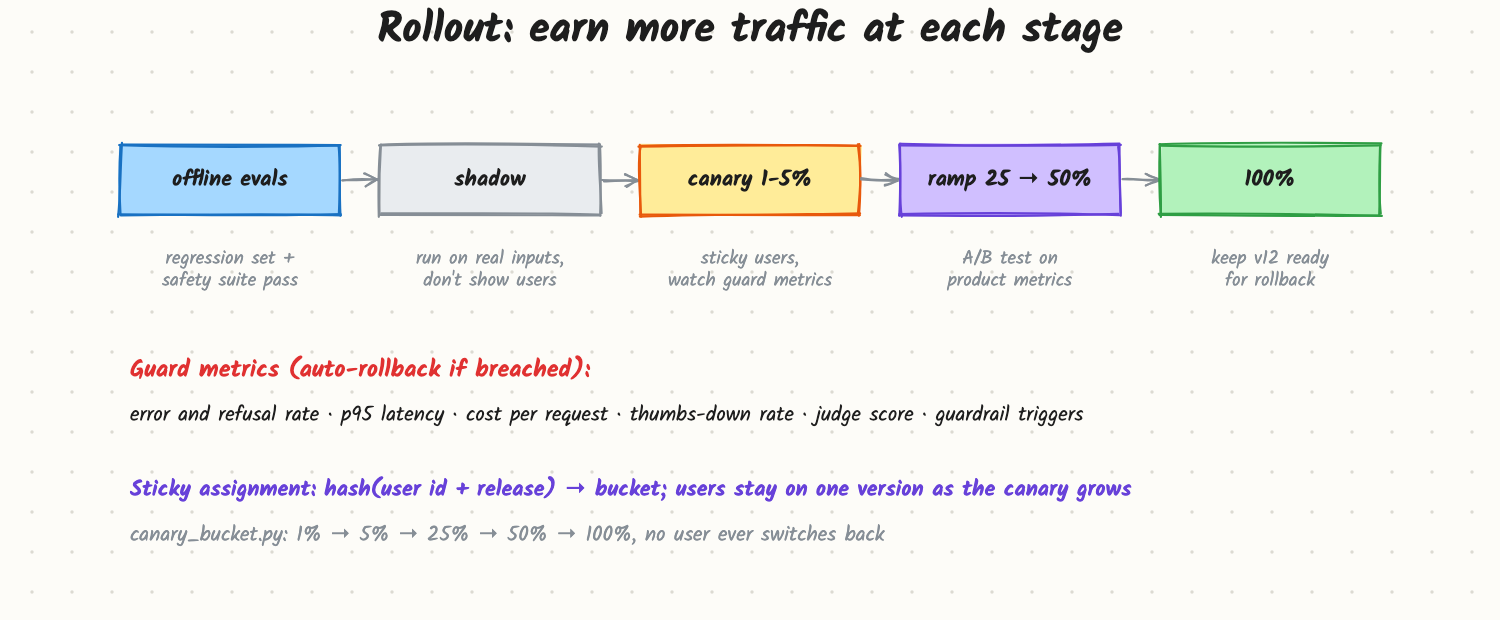
- Offline evals: the release must pass the regression set (including past incidents), safety tests and budgets for cost and latency (see How Do You Ship a Prompt Change Safely? for the practical walkthrough).
- Shadow: run the new release on a copy of real traffic without showing users; compare outputs, tool-call rates, cost.
- Canary: 1–5% of users, assigned stickily (hash of user ID and release name) so each user sees one version consistently. The included
canary_bucket.pychecks that as the canary grows from 1% to 100%, no user ever switches back. - Ramp through 25% and 50% as an A/B test on product metrics (see Online Evaluation and A/B Tests).
- Full rollout, keeping the previous release ready.
Guard metrics during canary and ramp, with automatic rollback when breached: error and refusal rate, p95 latency, cost per request, thumbs-down rate, judge score on sampled traffic, guardrail triggers, and feature-specific signals such as tool-call rate.
Model versions and retirements
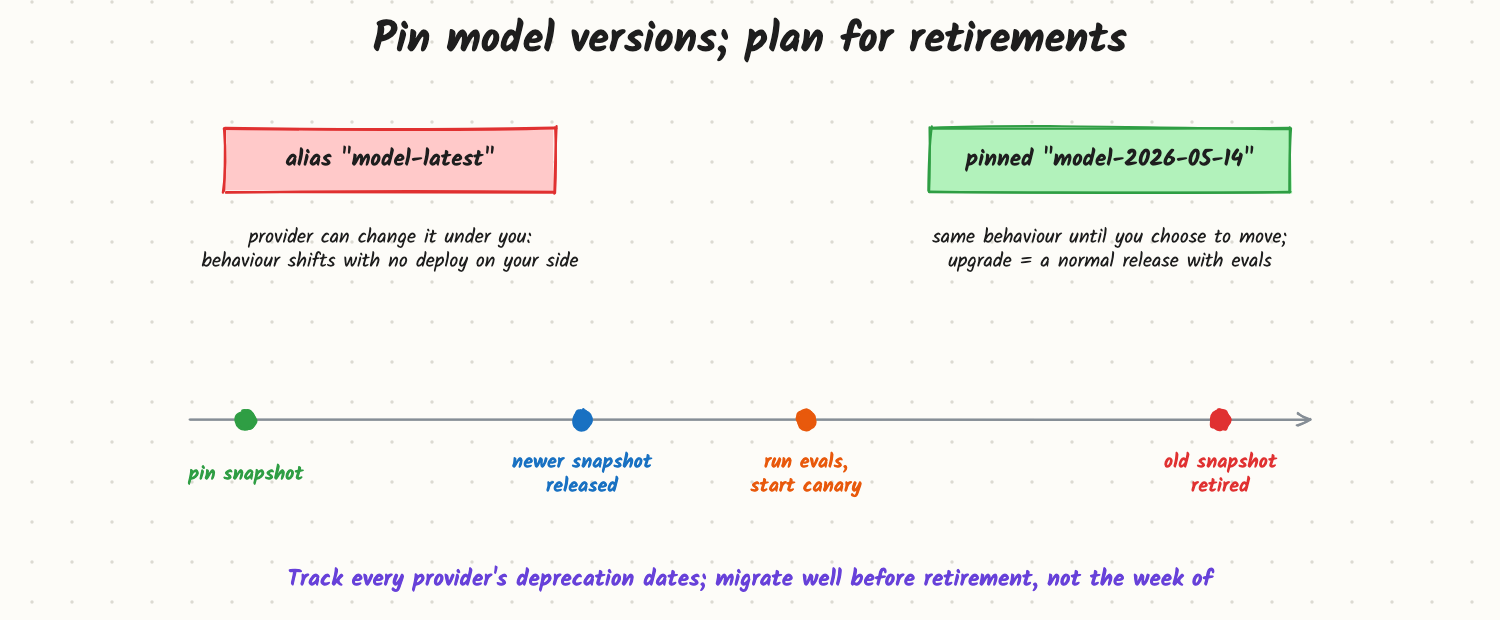
Hosted model aliases ("latest") can point to new snapshots without notice to your code. Pin a dated snapshot and treat each upgrade as a normal release with evals and a canary. Providers retire snapshots on published schedules, so track deprecation dates and start migrations well ahead. Even a pinned model can vary slightly between calls (sampling, batching on the provider's side), so evals use enough samples to separate real changes from noise. Self-hosted models need the same discipline: weights, tokenizer, serving engine version and quantization are all part of the release.
Trade-offs and costs
- Speed vs safety: a full pipeline slows down tiny wording fixes. Use lighter gates for low-risk changes (copy tweaks) and full gates for prompts, models and tools.
- Registry vs Git: a prompt-management UI lets non-engineers edit; Git gives review and CI. Many teams edit in a UI but require the same evals and approvals before activation.
- Canary size vs signal: small canaries limit harm but take longer to show differences in noisy quality metrics.
- Many dimensions at once: changing prompt and model in one release makes regressions hard to attribute; change one thing at a time when possible.
In production
- Release IDs on every trace, metric and eval result.
- A changelog of who changed what and why, linked to eval reports.
- Feature flags or a config service to switch releases per tenant, region or user segment.
- Kill switch: revert to the last good release, or to a safe fallback, with one action.
- Scheduled re-runs of evals on the current release to catch provider-side drift.
When to reach for it
As soon as more than one person edits prompts or the feature matters to customers. It's also the answer to "how do you upgrade the model under a production feature?" and part of every LLM platform design.
Example
The team from the opening sets up a registry: support-bot releases bundle prompt, a pinned model snapshot, parameters, tool schemas and retrieval settings. The tone fix becomes v13: it passes the 400-case regression set but the tool-call check on refund intents drops from 97% to 81%, so it's blocked before shipping. After revising the wording, v14 passes, runs in shadow for a day, then a 5% sticky canary with auto-rollback on tool-call rate and thumbs-down rate, then 50%, then 100%. The provider's alias upgrade is now irrelevant: the model only changes when the team releases it. (Example scenario.)
Common mistakes
- Prompts edited in place with no version or history.
- Calling a moving model alias in production.
- Traces without release IDs, so changes can't be tied to quality shifts.
- Non-sticky canaries, so users bounce between behaviours.
- No rollback path faster than a full redeploy.
- Missing a provider retirement date and migrating in a rush.
Say this in the interview
"I'd treat everything that shapes behaviour (prompt, pinned model snapshot, parameters, tool schemas, retrieval config, guardrails) as one immutable, versioned release in a registry, with eval results attached and the release ID on every trace. Rollout goes offline evals, shadow, a sticky canary with guard metrics and auto-rollback, then an A/B ramp to 100%, with the previous release one pointer-change away. Model upgrades are releases too: pin snapshots, track deprecation dates and migrate early."
Interview questions on this
- What belongs in a prompt "version"? Template, examples, model snapshot, parameters, tools, retrieval config, guardrails.
- Why pin model snapshots? Aliases can change behaviour without your deploy; pinning makes changes deliberate.
- How do you assign canary traffic? Sticky hashing of user or session ID with the release name.
- What would trigger an automatic rollback? Breached guard metrics: errors, refusals, latency, cost, feedback, judge scores.
- How do you let product managers edit prompts safely? A registry UI with review, required evals and staged activation.
- A provider retires your model in 60 days. What's your plan? Evaluate candidates on your eval set, adjust prompts, shadow and canary, switch with rollback ready.
Used in
- AI Engineering: How Do You Ship a Prompt Change Safely?; LLM Observability and Tracing; Online Evaluation and A/B Tests for LLM Features; Model Routing and Fallbacks; Evals and LLM-as-Judge; Prompt Engineering for Production.
- AI System Design: Design a Prompt Playground; Design an LLM Gateway; Design an Eval Platform.