Continuous Batching
On this page
A team moves its chatbot from one request at a time to batches of 32 and throughput jumps. Then users start complaining that short questions sometimes take 20 seconds. The logs show why: a two-line answer finished in a second but sat in a batch until a 1,000-token essay next to it was done, and new requests waited for the whole batch to clear. The GPU was "busy", yet most of its batch slots were empty. The fix every modern LLM server uses is continuous batching: schedule at the level of one decode step, not one batch.
How it works
Why batch at all
Decode is memory-bound: each step reads all the model's weights to produce one token per request (see Prefill, Decode and the KV Cache). Reading the weights once for 32 requests costs almost the same as reading them for 1, so batching multiplies throughput almost for free. The question is how to keep the batch full.
Static batching wastes slots
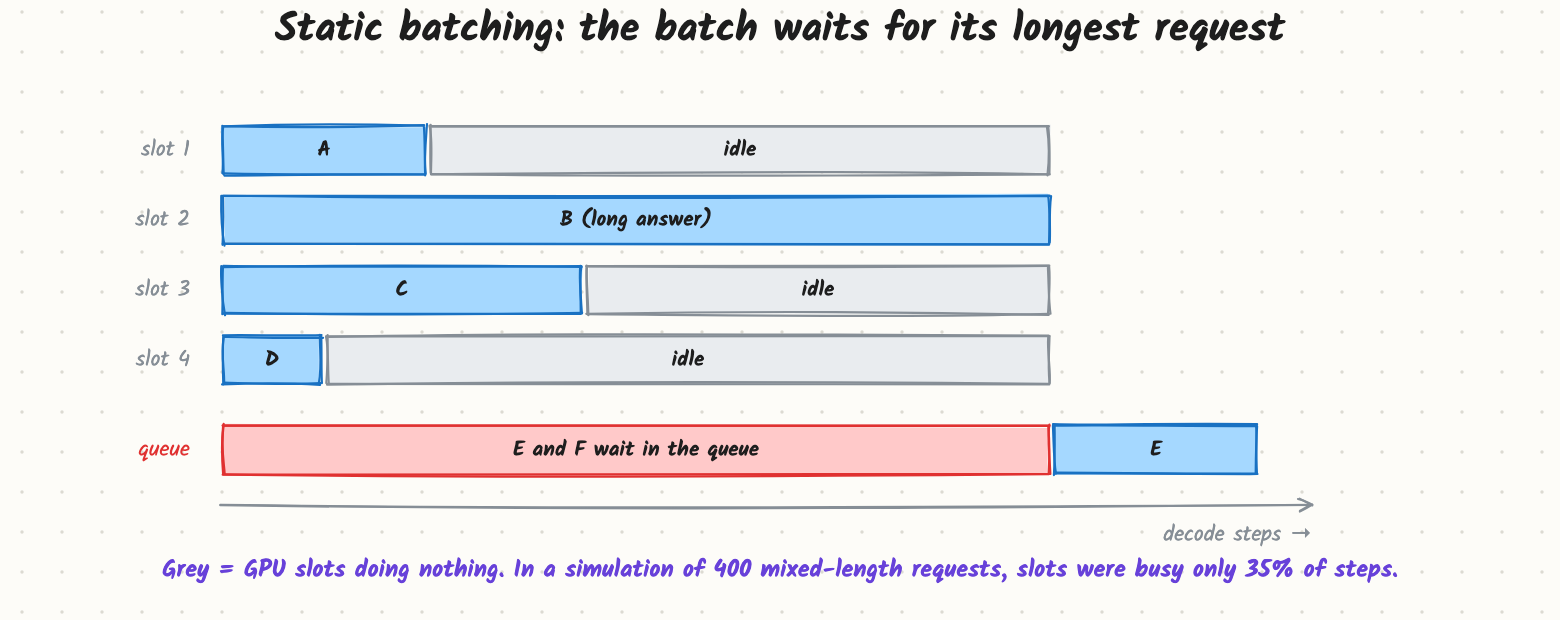
A static (request-level) batch starts together and ends together. LLM outputs vary from a few tokens to thousands, so most slots finish early and sit idle, and arrivals queue until the whole batch drains. In a small simulation (included as batching_sim.py: 400 requests, output lengths 20–1,000 tokens, 32 slots), slots were busy only 35% of decode steps.
Continuous batching refills every step
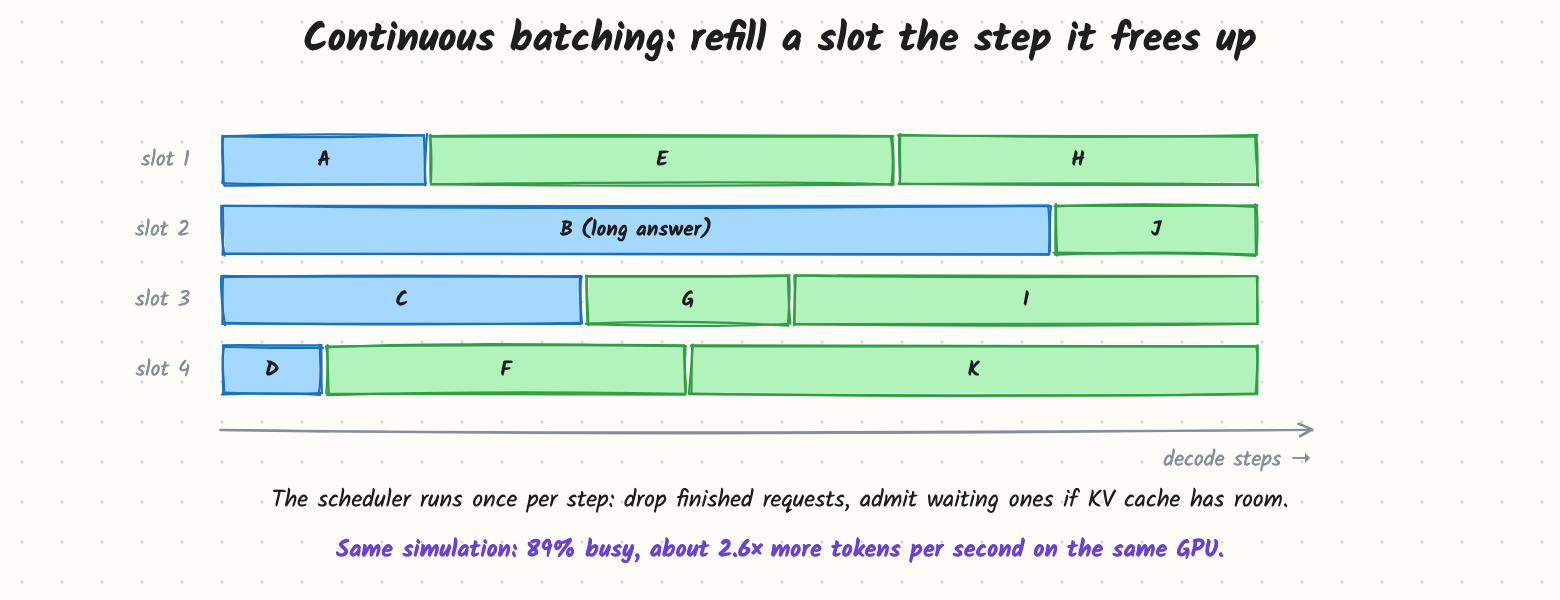
Also called iteration-level or in-flight batching (it was introduced by the Orca paper in 2022). Before each decode step the scheduler:
- Removes requests that just produced an end-of-sequence token or hit their max length, and frees their KV cache.
- Admits waiting requests while there is KV cache room and the step's token budget isn't used up.
- Runs one forward pass over everything in the batch, each request at its own position.
Requests no longer have to start or end together. The same simulation keeps slots busy 89% of steps, about 2.6× the tokens per second on the same hardware.
Chunked prefill: mixing new prompts in
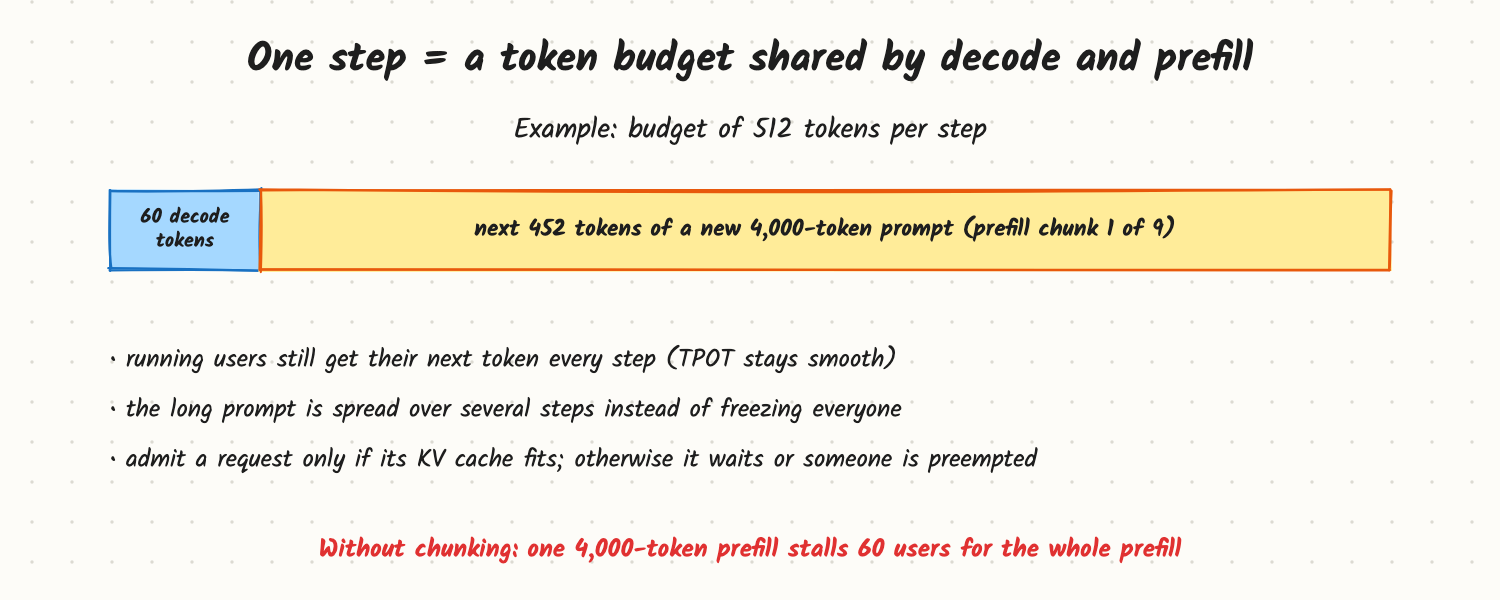
A newly admitted request needs its prompt prefilled first. If a 4,000-token prefill runs as one block, every running user waits for it, and their next token is late. With chunked prefill, each step has a token budget (say 512): running requests take one decode token each, and the rest goes to the next slice of a waiting prompt. TPOT stays smooth and the GPU does compute-heavy prefill work alongside memory-heavy decode work in the same pass.
Trade-offs and costs
- Throughput vs per-user speed. Bigger batches raise tokens per second for the server but make each step a little slower for every user. Servers expose knobs such as max batch size and max tokens per step to choose a point on that curve.
- Memory decides admission. A request can only join if its KV cache fits. Without paged allocation (see PagedAttention), servers must reserve space for the maximum length up front and can admit far fewer requests.
- Preemption. If running requests grow and the cache fills, the server must pause someone: swap their cache to CPU memory or drop it and recompute later. Both cost latency for that request.
- Chunk size. Small chunks keep TPOT smooth but make TTFT for the new prompt longer; big chunks do the opposite.
In production
- It is on by default in vLLM, SGLang, TensorRT-LLM (in-flight batching) and Hugging Face TGI. Your job is tuning, not building: max running requests, max batched tokens per step, chunked prefill on or off, and scheduling policy (first-come-first-served, priority).
- Watch: running vs waiting requests, KV cache usage, preemptions per minute, p95 TTFT and TPOT. Waiting requests while cache usage is low means the batch limit is too small; preemptions mean the cache is too small for your context lengths.
- Load test with realistic length distributions. Uniform test prompts hide the variance that makes batching matter.
When to reach for it
Any online LLM serving with more than a handful of concurrent users. Offline batch jobs (scoring a million documents) get the same benefit by submitting everything at once to an engine that batches continuously.
Example
An internal assistant on one GPU: p95 TTFT is 9 s at peak, while GPU compute utilisation is only 40%. Metrics show 120 waiting requests, a running batch capped at 16, and KV cache usage at 30%. The batch cap, not the hardware, is the limit. Raising max running requests to 96 and turning on chunked prefill with a 2,048-token budget brings p95 TTFT to 1.2 s; TPOT rises from 22 ms to 30 ms, still well under the 50 ms budget. (Example numbers.)
Common mistakes
- Saying "batching adds latency, so don't batch". Continuous batching adds little delay and is what makes serving affordable.
- Tuning only batch size and ignoring KV cache memory, which actually decides how many requests fit.
- Benchmarking with identical prompts and outputs, which hides the length variance that static batching suffers from.
- Ignoring prefill interference: long prompts landing in a busy batch cause TPOT spikes for everyone unless prefill is chunked or separated.
Say this in the interview
"Decode is memory-bound, so batching shares each weight read across many requests. Static batching wastes that because outputs have very different lengths: slots go idle and new requests wait. Continuous batching schedules every decode step: it evicts finished requests and admits waiting ones if their KV cache fits, so the batch stays full; throughput typically goes up several times. I'd add chunked prefill so long prompts don't stall running users, and watch waiting requests, cache usage and preemptions to tune max batch size and tokens per step."
Interview questions on this
- Why does static batching waste GPU time for LLMs but not for image classification? Classification outputs have fixed cost; LLM outputs vary by 100× in length.
- What limits how many requests can be in a continuous batch? KV cache memory, the per-step token budget, and the latency target.
- What is chunked prefill and why is it needed? Splitting a long prompt across steps so decode for running users isn't blocked.
- What happens when the KV cache fills mid-generation? The server preempts a request (swap or recompute) or stops admitting new ones.
- How would you tune for a latency-sensitive chat vs an offline batch job? Smaller batch and token budget for chat; maximum batch for offline.
- How do you know if you are limited by batch size, memory or compute? Waiting requests with low cache use: batch cap; preemptions and full cache: memory; full compute with long steps: compute.
Used in
- AI Engineering: Prefill, Decode and the KV Cache; PagedAttention and KV Cache Memory Management; Serving LLMs: Metrics, Autoscaling and Disaggregated Prefill; GPU Utilization and Cost; How Would You Cut LLM Cost by 10x?
- AI System Design: Design ChatGPT; Design an Inference Platform.