Online Evaluation and A/B Tests for LLM Features
On this page
A team ships a new prompt for its writing assistant that scored 6 points higher on the offline eval set. Two weeks later, product asks whether it helped. The thumbs-up rate went from 61% to 62%, but only 4% of sessions leave a rating, so nobody knows if that's real. Meanwhile, session length grew and fewer users copied the generated text, which might mean better engagement or might mean users are struggling. Offline evals tell you whether a change is safe to ship; online evaluation tells you whether it actually helped, and that takes the right signals, a proper A/B test, and enough traffic to see the difference.
How it works
Online signals
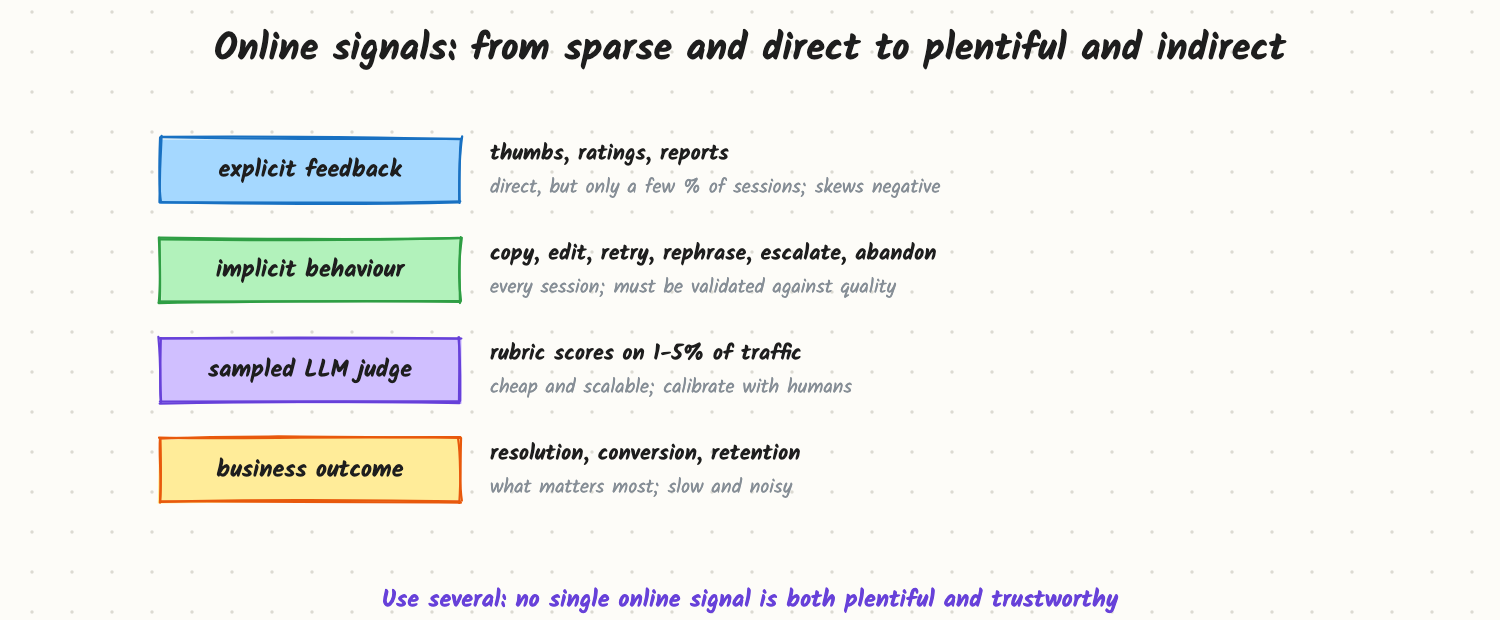
- Explicit feedback: thumbs, star ratings, "report" buttons. Direct, but only a few percent of sessions give it, and unhappy users give it more.
- Implicit behaviour: copying the answer, editing it, regenerating, rephrasing the question, abandoning, escalating to a human, accepting a code suggestion. Available for every session, but each signal needs validating: a longer session can be good or bad.
- Sampled LLM-judge scores: run a rubric judge (correctness, groundedness, tone, policy) on 1–5% of production traffic. Plentiful and cheap, but only as good as the judge's calibration against human ratings (see Evals and LLM-as-Judge).
- Business outcomes: tickets resolved without a human, conversion, retention. What matters most, but slow and affected by everything else.
A/B tests
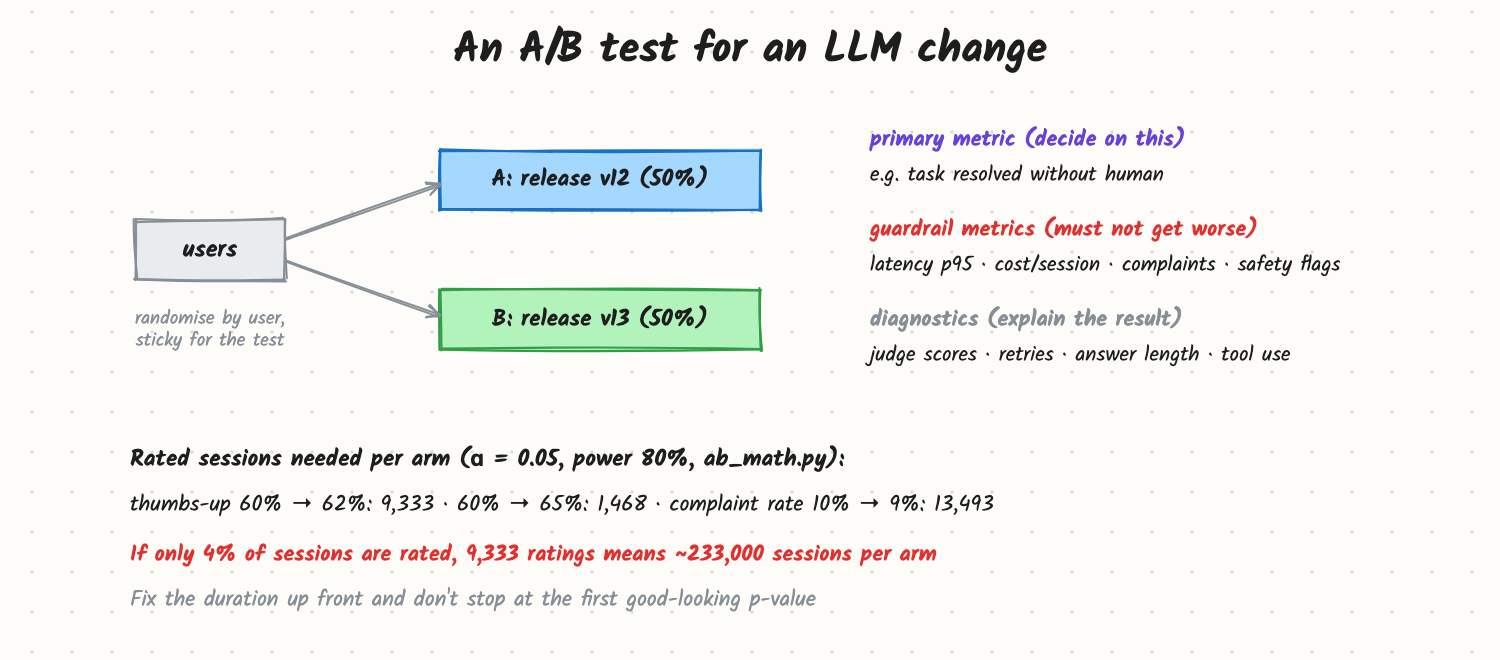
- Randomise by user (or account), sticky for the test, so each person sees one version and sessions aren't mixed.
- Pick one primary metric before starting, plus guardrail metrics that must not get worse (latency, cost per session, complaints, safety flags) and diagnostics to explain the result.
- Size the test: for a rate, users per arm ≈ (z₁₋α/₂ + z_power)² × (p₁(1−p₁) + p₂(1−p₂)) / (p₁ − p₂)². From the included
ab_math.py: detecting 60% → 62% thumbs-up takes about 9,300 rated sessions per arm; 60% → 65% takes about 1,500. If 4% of sessions are rated, the first case needs roughly 233,000 sessions per arm. A simulation in the same file with 200,000 sessions per arm and a true 2-point lift gives p = 0.13: not significant. - Fix the duration in advance (at least a full weekly cycle) and don't stop the first time the p-value dips below 0.05; repeated peeking inflates false positives.
- Check sample ratio (did each arm really get 50%?) and novelty effects (users trying a new feature more at first).
When ratings are too sparse, use more plentiful metrics as the primary (judge scores on sampled traffic, task completion), and keep ratings as a guardrail.
Offline and online together
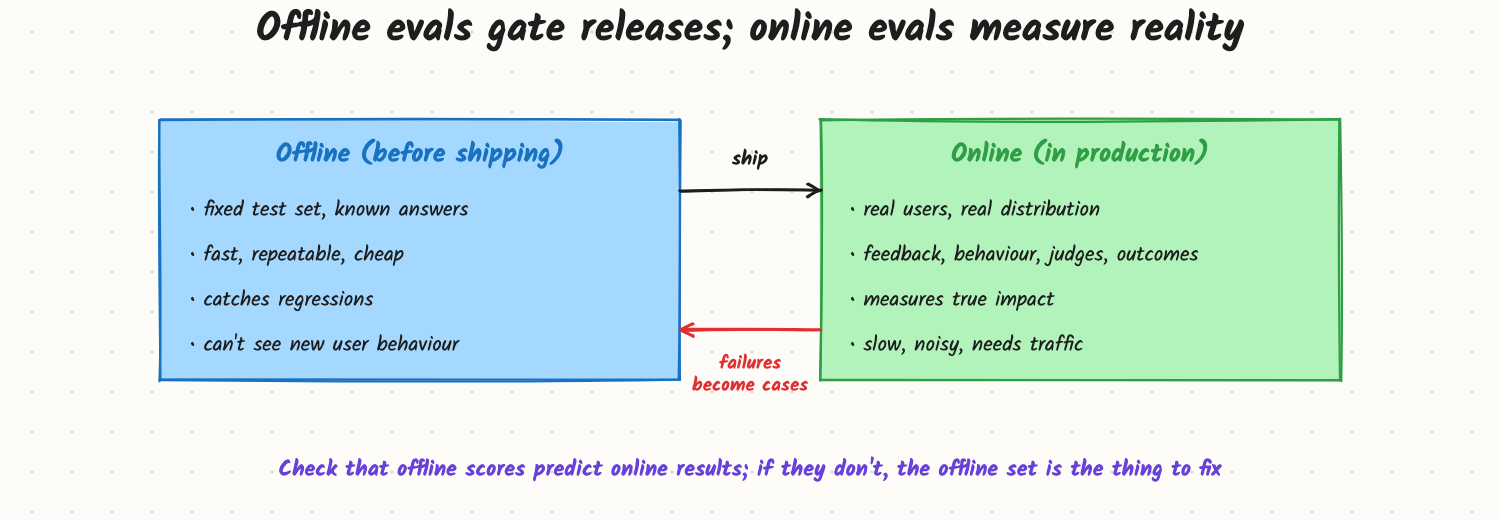
- Offline evals run before release: fixed cases, repeatable, fast (see How Do You Ship a Prompt Change Safely?).
- Online evaluation measures real impact on real users.
- Production failures (thumbs-down, escalations, judge flags) are sampled into the offline set.
- Check periodically that offline improvements predict online ones. If they don't, the offline set no longer reflects real usage.
Other online designs: interleaving for ranking and search (mix results from A and B in one list and see which gets clicked), and multi-armed bandits when you want to shift traffic toward the winner during the test, at the cost of cleaner statistics.
Trade-offs and costs
- Speed vs certainty: small effects on sparse metrics need weeks of traffic; decide what effect size matters before testing.
- Judge cost and bias: judging 5% of traffic with a strong model costs money; judges have position and length biases.
- Metric gaming: a prompt that makes answers longer can raise "helpfulness" judge scores and lower user satisfaction; watch several metrics.
- Ethics and privacy: tests on sensitive features need review; sampled transcripts need redaction.
- Low-traffic features may never reach significance; rely on offline evals, expert review and staged rollouts instead.
In production
- An experiment service shared with the rest of the product (assignment, exposure logging, analysis), with release IDs as the variants (see Versioning Prompts and Models).
- A standard metrics set per LLM feature: primary, guardrails, diagnostics, by segment (language, plan, intent).
- Online judges running continuously on sampled traffic, with daily calibration checks against a small human-rated sample.
- Dashboards per release, with confidence intervals, not just point estimates.
When to reach for it
Any user-facing LLM change where you need to know the effect on users: prompt and model changes, RAG and agent changes, new UX around the model. For low-traffic or high-risk features, pair small canaries with expert review instead.
Example
The writing assistant team reruns the test properly: primary metric "suggestion accepted (copied or inserted)", measured on every session; guardrails p95 latency, cost per session, thumbs-down rate; judge scores on 2% of traffic as diagnostics. Sized for a 1.5-point change on a 38% acceptance rate, the test runs 14 days with 120,000 users per arm. Result: acceptance +2.1 points (95% CI +1.0 to +3.2), cost per session +6%, thumbs-down flat. They ship, and add the 50 lowest-scoring judged sessions to the offline set. (Example numbers.)
Common mistakes
- Shipping on offline scores alone and never measuring online impact.
- Deciding on sparse thumbs ratings without a power calculation.
- Peeking and stopping early.
- Randomising by request instead of by user.
- One metric only, inviting gaming by verbosity or flattery.
- Uncalibrated online judges.
Say this in the interview
"Offline evals gate releases; online evaluation measures real impact. I'd combine explicit feedback, implicit behaviour like copying, editing or retrying, a calibrated LLM judge on a sample of traffic, and business outcomes. Changes go through an A/B test randomised by user, with one primary metric, guardrails for latency, cost and safety, a sample size computed up front (a 2-point change in a 60% rate needs about 9,000 rated sessions per arm, so sparse ratings often can't be the primary metric) and a fixed duration. Failures found online feed back into the offline set."
Interview questions on this
- Why randomise by user rather than by request? Consistent experience and independent units; per-request randomisation leaks effects across arms.
- How many samples to detect 60% → 62%? About 9,300 per arm at 5% significance and 80% power.
- What implicit signals would you use for a coding assistant? Suggestion acceptance, edits after acceptance, undo, time to accept.
- What's wrong with peeking at results daily? It inflates false positives unless you use sequential testing methods.
- How do you use LLM judges online? Score sampled traffic with a rubric, calibrated against human ratings regularly.
- Offline scores improved but online metrics didn't. What now? The offline set doesn't reflect real usage; refresh it from production samples.
Used in
- AI Engineering: Evals and LLM-as-Judge; How Do You Ship a Prompt Change Safely?; Versioning Prompts and Models, and Rolling Them Out; LLM Observability and Tracing; Labeling and Preference Data; Evaluating Agents.
- AI System Design: Design an Eval Platform; Design Cursor; Design a Customer Support Agent.