Model Context Protocol (MCP)
On this page
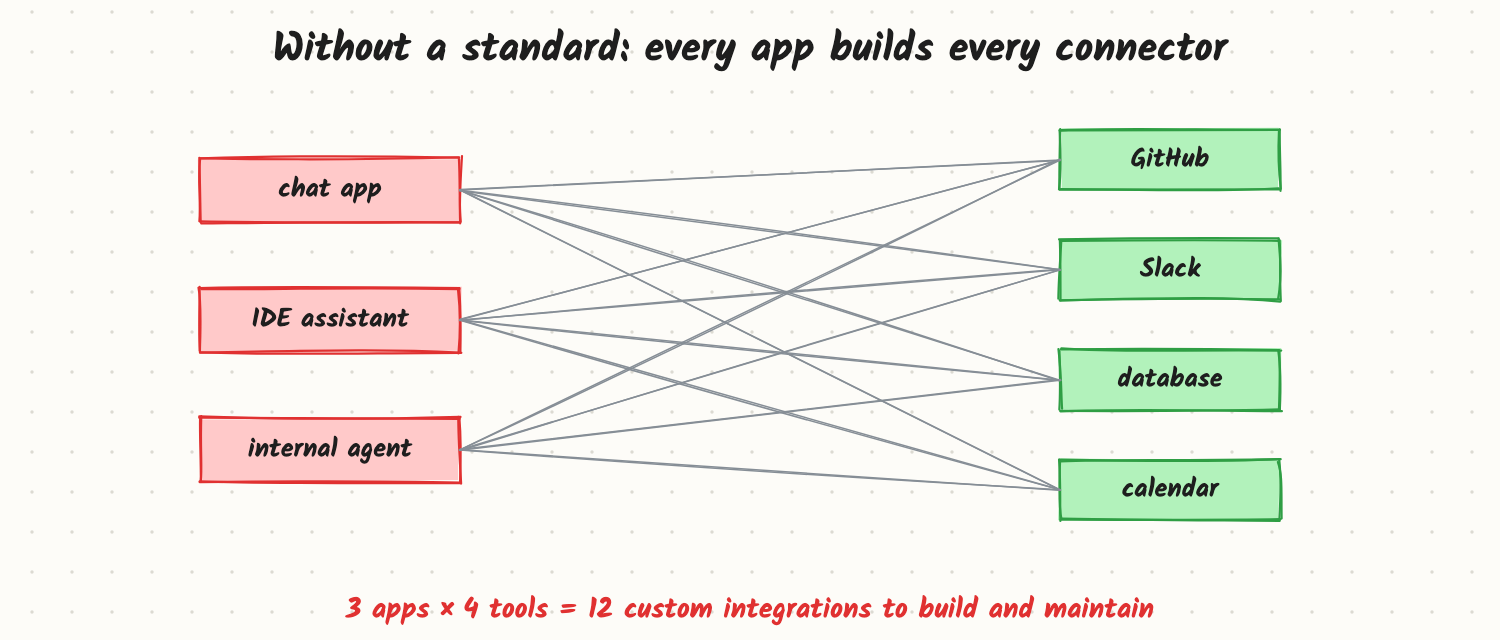
A company has a chat assistant, an IDE coding assistant and an internal agent. Each one needs GitHub, Slack, the database and the calendar, so each team writes its own four connectors, with its own auth, error handling and quirks. Twelve integrations to build, and every API change breaks three of them. The Model Context Protocol (MCP) is an open standard, introduced by Anthropic in late 2024 and now supported across many AI tools, that lets any AI application connect to any tool or data source through one common protocol.
How it works
Hosts, clients and servers
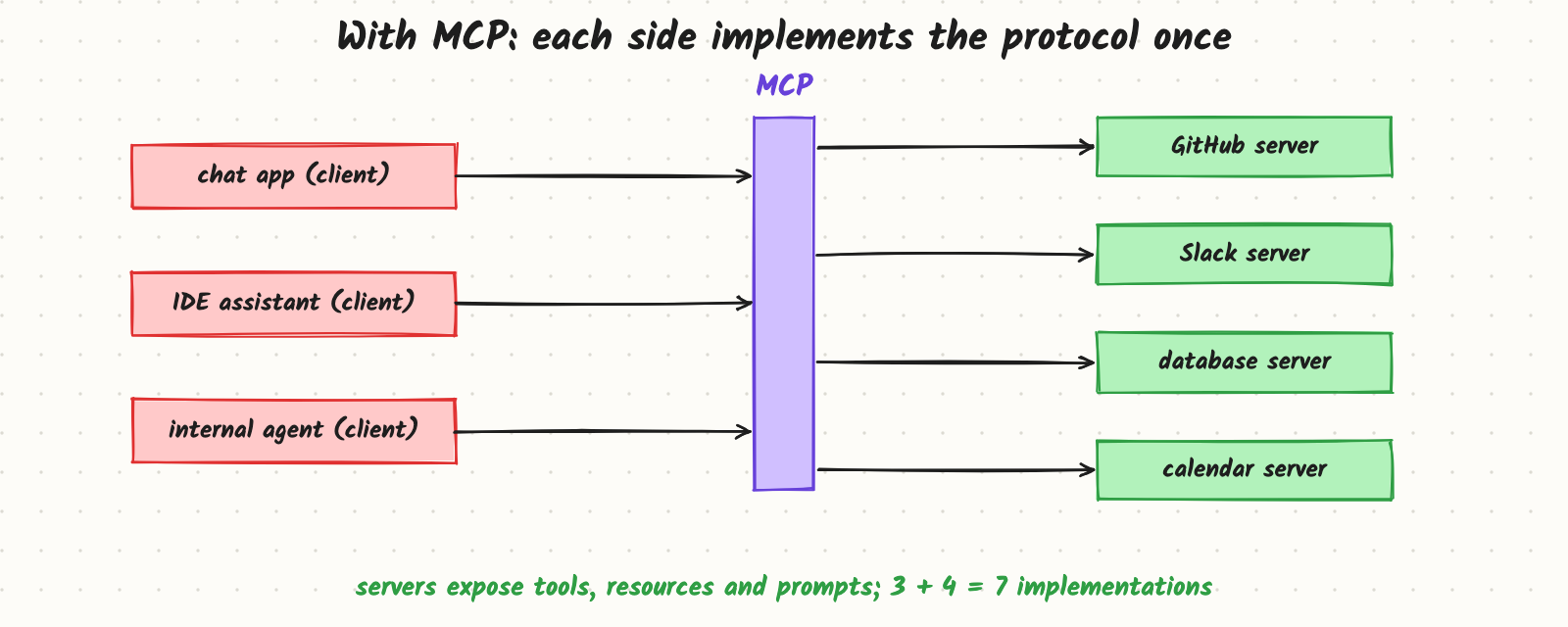
- Host: the AI application the user works in (a chat app, an IDE, an agent runtime).
- Client: a component inside the host that holds one connection to one server.
- Server: a program that exposes capabilities from some system: a GitHub server, a database server, a filesystem server.
What a server can offer
- Tools: functions the model can call, with names, descriptions and JSON Schema arguments (create an issue, run a query). The same idea as tool calling, in a standard format.
- Resources: data the application can read and put into context (files, records, documents), identified by URIs.
- Prompts: reusable prompt templates the user can pick (for example "summarise this pull request").
Clients can also offer features to servers, such as asking the user for missing input or letting a server request a model completion through the host, always under the host's control.
A session
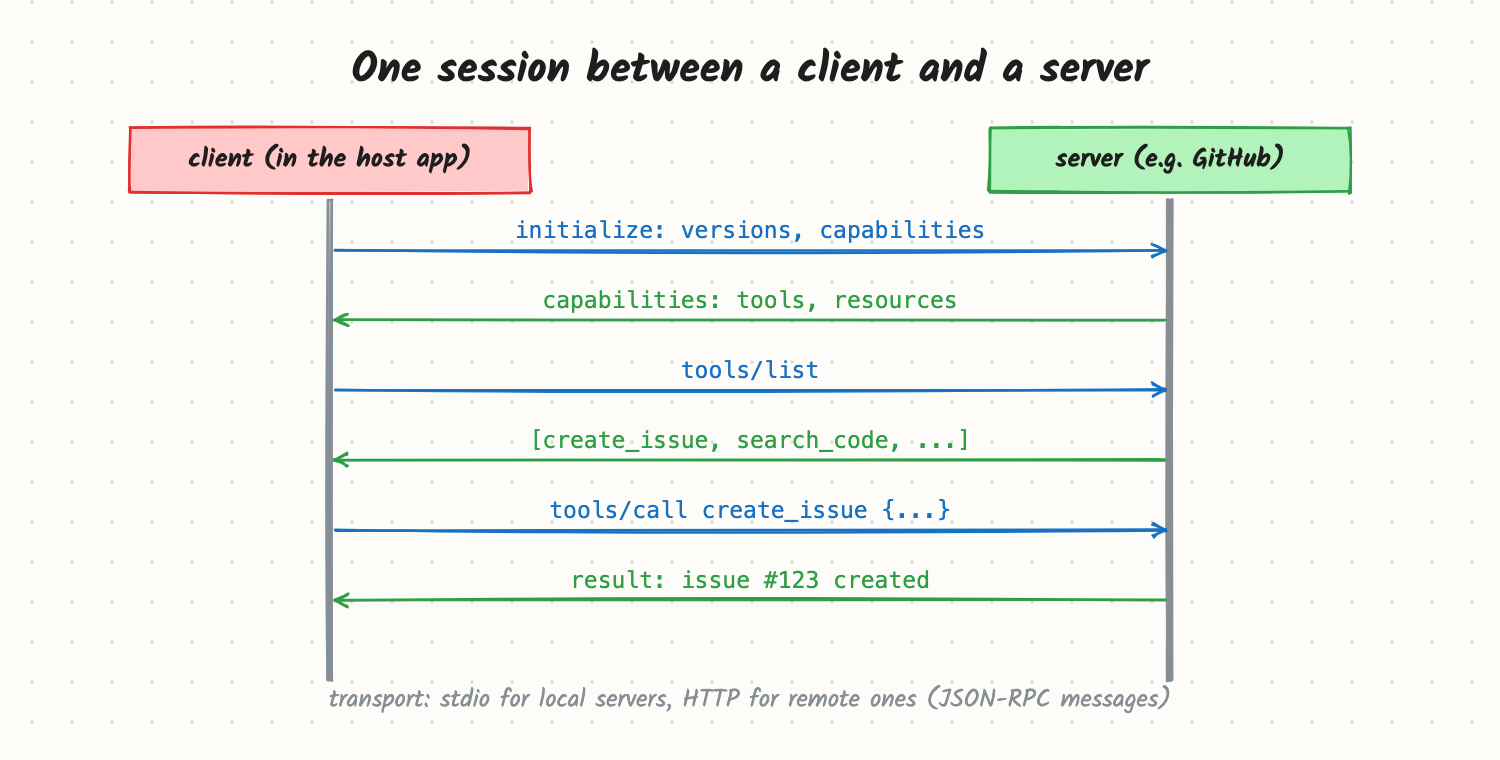
- Initialise: client and server agree on a protocol version and capabilities.
- Discover: the client lists tools (and resources, prompts).
- Use: the host gives the tool list to the model; when the model emits a tool call, the client sends
tools/callto the server and passes the result back. - Servers can notify the client when their tool list or resources change.
Messages are JSON-RPC. Two transports are common: stdio for a local server started as a subprocess (for example a filesystem server on your laptop) and HTTP for remote servers, with standard authorisation (OAuth-based) for user accounts.
What MCP is not
It doesn't make the model smarter or decide which tool to call; the host's model and agent loop still do that. It is plumbing: a standard way to describe, discover and call tools and data, so integrations are written once and reused.
Trade-offs and costs
- Reuse vs control: a public server saves building a connector, but you inherit its tool design, output size and security posture. Wrapping or curating servers is common.
- Context cost: connecting many servers can put dozens of tool definitions into every request; load only the servers and tools a task needs.
- Another moving part: servers are processes or services to run, version, monitor and update.
- Security: a server runs code with access to real systems. A malicious or compromised server, or a tool description containing hidden instructions, is an injection and data-exfiltration risk.
In production
- Trust boundary: treat third-party servers like dependencies: review, pin versions, run with least privilege, and prefer servers from known publishers or your own.
- Auth per user: remote servers should act with the end user's permissions (delegated tokens), not a shared admin key.
- Approval: hosts typically ask the user before running tools with side effects; keep that for write actions.
- Observability: log every tool call across servers with the session, user, arguments and result size.
- Failure modes: a server's tool list changing and breaking agent behaviour; tool descriptions with injected instructions; timeouts on slow remote servers; too many tools confusing the model.
When to reach for it
When the same tools or data must be used from several AI applications, when you want your product's capabilities to be usable from users' own AI tools, or when you'd rather adopt existing connectors than write them. For a single app with two private tools, plain tool calling is simpler.
Example
The company exposes its internal ticketing system as one MCP server with five well-designed tools, authenticated with each employee's single sign-on token. The chat assistant, the IDE assistant and the internal agent all connect to it; a fix to the search_tickets output format ships once and every app benefits. They also adopt a public GitHub server, pinned to a reviewed version, and disable its write tools for the chat assistant.
Common mistakes
- Connecting every available server and drowning the model in tool definitions.
- Running unreviewed third-party servers with broad credentials.
- Using a shared service account instead of per-user authorisation.
- Assuming MCP solves tool design; badly designed tools are still badly designed over MCP.
- Ignoring tool-list changes from servers in evals.
Say this in the interview
"MCP standardises how AI applications connect to tools and data. A host app runs clients that connect to servers; servers expose tools, resources and prompts with JSON Schema, over JSON-RPC via stdio locally or HTTP remotely. It turns N apps times M tools integrations into N plus M. The model and agent loop still decide what to call; MCP is the plumbing. The main risks are security and context bloat, so I'd vet and pin servers, use per-user auth, require approval for writes, and load only the tools a task needs."
Interview questions on this
- What problem does MCP solve? Reusable, standard integrations between AI applications and tools or data, instead of custom connectors per pair.
- What are tools, resources and prompts in MCP? Callable functions; readable data for context; reusable prompt templates.
- stdio or HTTP transport? stdio for local servers launched by the host; HTTP for shared remote servers with auth.
- What are the security risks? Malicious or compromised servers, injected instructions in tool descriptions or results, and over-broad credentials.
- Does MCP replace function calling? No; the model still makes tool calls. MCP standardises how those tools are described and reached.
Used in
- AI Engineering: Tool Calling and the Agent Loop; Designing Tools an Agent Can Use Well; Agent Safety; Prompt Injection and Guardrails.
- AI System Design: Design Cursor; Design an LLM Gateway.