Conversation Memory for LLM Apps
On this page
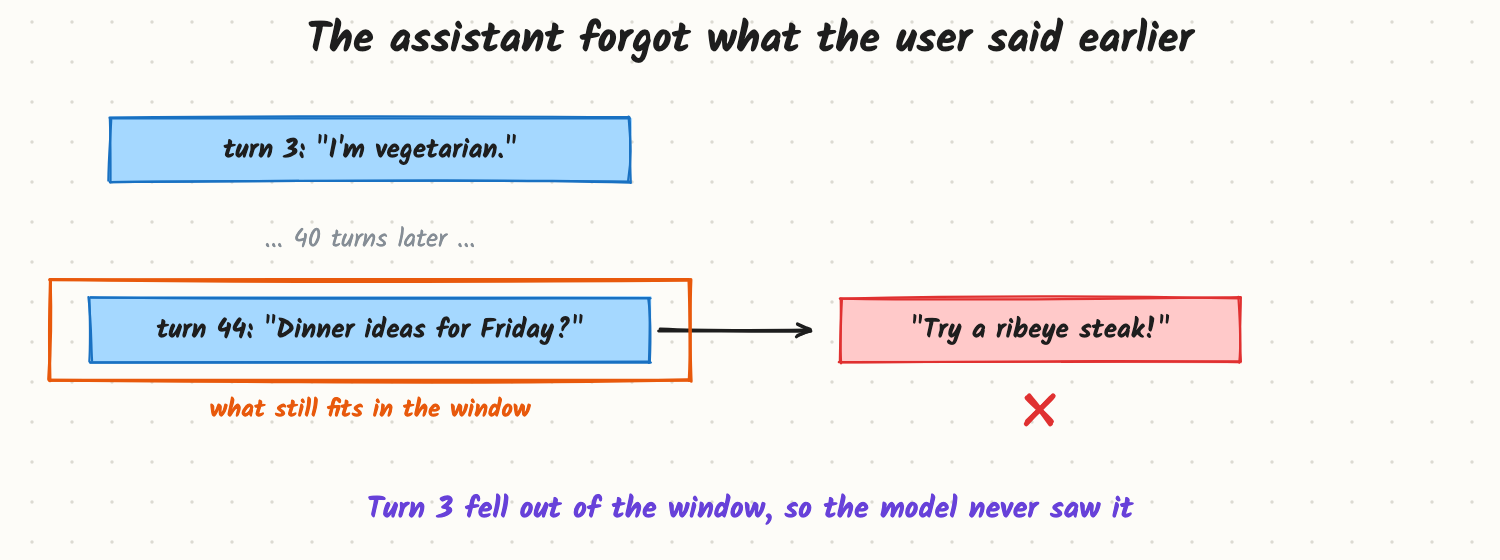
Early in a long chat, a user mentions they're vegetarian. Forty messages later they ask for dinner ideas and get a steak recipe. Next week they come back and have to explain their whole situation again. Users experience this as "the assistant doesn't listen". The cause is simple: the model has no memory of its own; it only sees what the app puts into the current prompt. Memory is something you build around the model.
How it works
Three kinds of memory
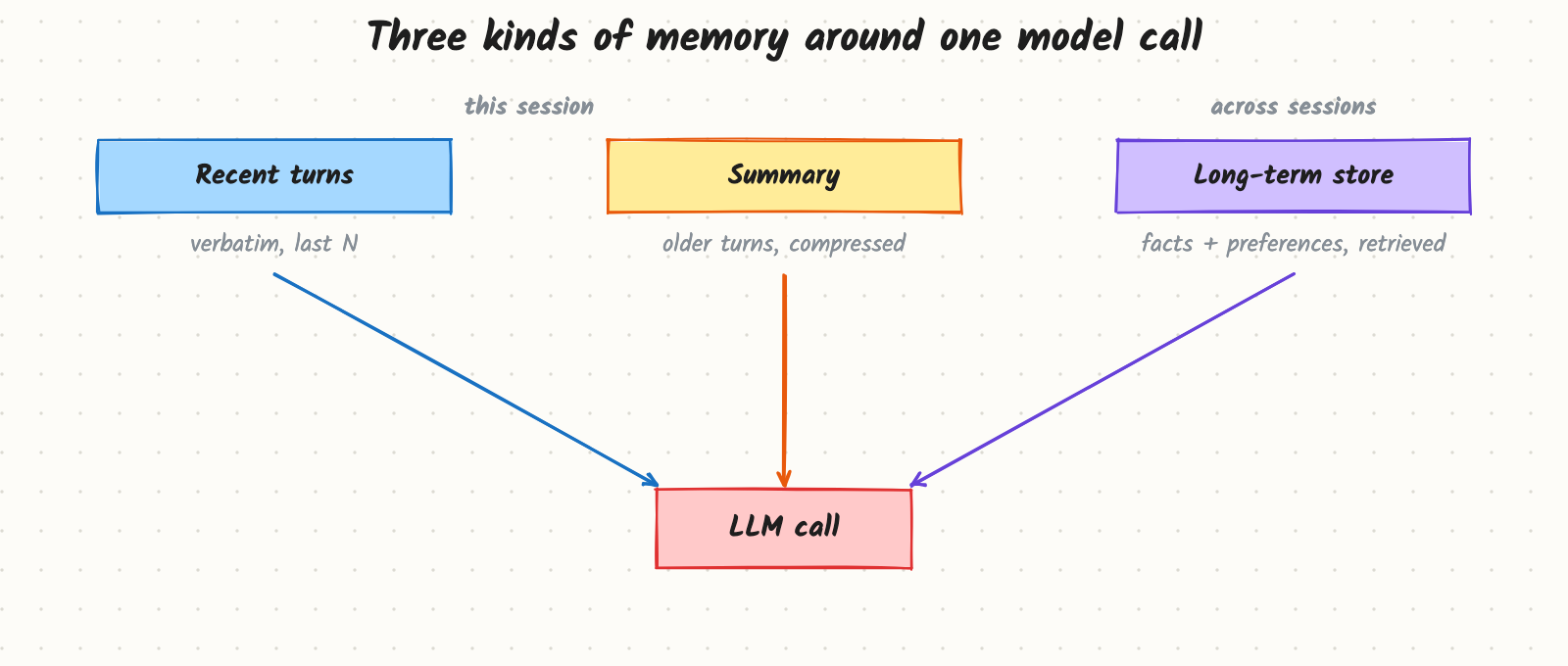
- Recent turns (short-term). The last N messages, sent verbatim. Exact and simple; it costs tokens on every call and eventually overflows.
- Running summary. When the history gets long, older turns are compressed by the model into a short summary that is sent instead. Keeps the gist cheaply; loses detail, and a summary error is repeated forever.
- Long-term memory. Facts and preferences extracted from conversations and stored outside the prompt (a database, often with embeddings for search). Each new message retrieves only the relevant memories. This is what lets an assistant remember you next week.
The write path and the read path
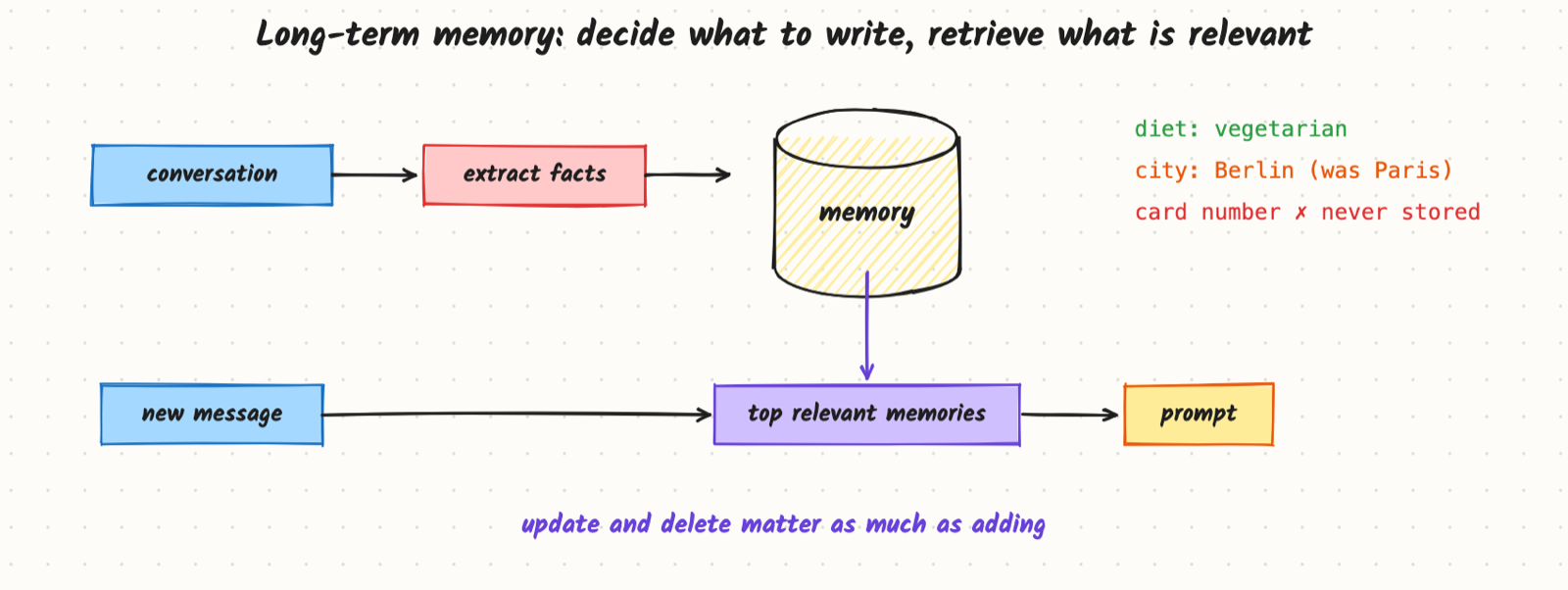
Write. After a turn (or in a background job), a model call extracts candidate memories: stable facts and preferences ("vegetarian", "lives in Berlin", "prefers short answers"). For each, decide:
- add a new memory,
- update an existing one ("moved to Berlin" replaces "lives in Paris"),
- delete when the user asks to forget, or
- ignore one-off details and anything sensitive (payment details, passwords, health data unless the product needs it and the user agreed).
Read. On each new message, search the store (semantic search plus filters such as user ID and recency), take the top few memories, and put them in a clearly labelled section of the prompt. Memories are data, not instructions.
Where memory lives
- Per user, isolated. Every query filters by user (and tenant); one user's memory must never reach another's prompt.
- Structured or free text. Simple key-value profiles (diet, city, language) are easy to show, edit and audit; free-text memories are more flexible but harder to manage. Many products combine both.
- Visible to the user. Letting people see, edit and delete what the assistant remembers builds trust and is often a legal requirement.
Trade-offs and costs
| Approach | Good | Bad |
|---|---|---|
| Full history | Exact | Expensive, hits the window |
| Last N turns | Cheap, predictable | Forgets older facts |
| Summary | Long chats in few tokens | Loses detail; errors persist |
| Long-term store | Remembers across sessions | Extraction mistakes, privacy duty, extra latency |
Every memory added to the prompt costs tokens and can distract the model, so retrieve few, relevant memories rather than everything.
In production
- Latency: run memory extraction asynchronously after the reply, not before it. Retrieval adds a few milliseconds to tens of milliseconds.
- Cost: extraction is an extra model call per turn or per session; a small model is usually enough.
- Privacy and compliance: retention limits, deletion on request (including from backups and caches), no sensitive data by default, and per-user isolation tested like any access control.
- Failure modes: stale facts that contradict new ones; wrong extractions ("the user is a doctor" from a hypothetical); memory injection, where a malicious document or message tries to write a fake instruction into memory; one user's memory leaking into another's prompt.
When to reach for it
Short sessions only need recent turns. Add a summary when chats run long. Add long-term memory when the product is personal and recurring: assistants, tutors, coaching, customer support with returning customers, coding assistants that learn project conventions.
Example
A cooking assistant keeps the last 6 turns verbatim, a 200-token summary of older turns, and a per-user profile with fields like diet, allergies, household size and favourite cuisines, plus up to 50 free-text memories. After each session, a small model proposes profile changes; changes to allergies require the user's confirmation in the UI. On each message, the profile and the 3 most relevant free-text memories go into the prompt, about 300 tokens in total. The steak suggestion can't happen anymore, and users can open "What I remember about you" to edit it.
Common mistakes
- Assuming the model remembers across calls or sessions.
- Saving everything, which fills memory with noise and sensitive data.
- Only adding, never updating or deleting, so contradictory facts pile up.
- Treating memory text as instructions, opening a prompt-injection path.
- No per-user isolation test.
Say this in the interview
"The model is stateless, so memory is built by the app. I'd use three layers: recent turns verbatim, a running summary for long sessions, and a long-term store of extracted facts and preferences that I retrieve per message. Writing is a policy decision: add, update, delete or ignore, never store sensitive data by default, and let users see and delete memories. Memories are isolated per user and treated as data, not instructions."
Interview questions on this
- How would you add memory to a chatbot? Recent turns plus summary within a session; extract facts into a per-user store and retrieve the relevant ones on each message.
- How do you handle a fact that changes? Detect conflicts at write time and update or replace, keeping a timestamp.
- What should never be stored? Secrets, payment details and other sensitive data unless required and consented; one-off details.
- How do you stop memory from being poisoned? Extract with a constrained schema, validate, require confirmation for important facts, and treat stored text as data.
- Summaries or retrieval for long chats? Summaries for the gist of one conversation; retrieval for specific facts across many.
Used in
- AI Engineering: Context Windows and Token Cost; Agent Memory and State; Embeddings; Prompt Injection and Guardrails.
- AI System Design: Memory; Design ChatGPT; Design a Customer Support Agent.