Quantization: INT8, INT4 and FP8
On this page
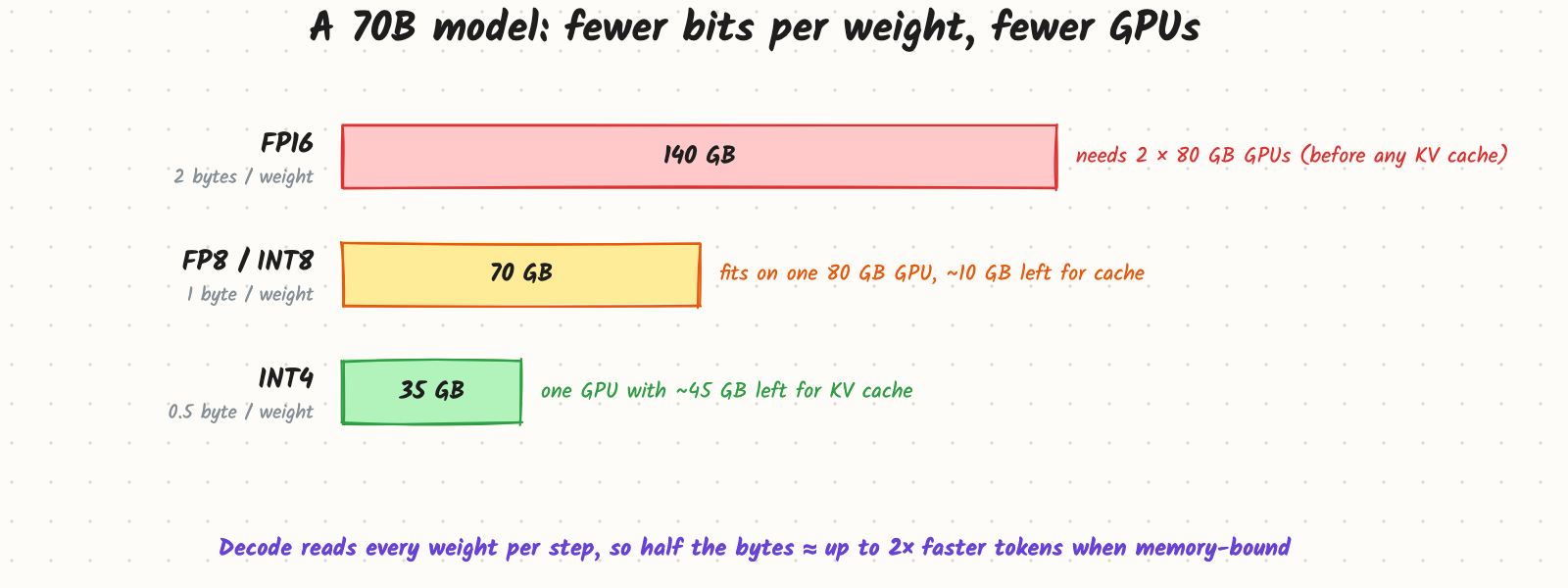
A team wants to serve a 70B model. In FP16 its weights take 140 GB, so it needs two 80 GB GPUs before storing a single token of KV cache, and every decode step reads all 140 GB. The same model with 4-bit weights is 35 GB: it fits on one GPU with room for a large cache, and decode reads a quarter of the bytes. The question in the interview is never "can we quantize?" but which numbers to shrink (weights, activations, KV cache), to which format, how to do it without breaking quality, and how to prove it didn't.
How it works
Scale and round
Quantization maps floating-point values to a small set of levels. For symmetric INT8:
- Pick a group of values (a whole tensor, one output row, or a block of, say, 128 weights).
- Compute a scale: s = max |w| / 127.
- Store q = round(w / s) as an 8-bit integer, plus the scale.
- At compute time, use q × s (or multiply integers directly and apply the scales afterwards).
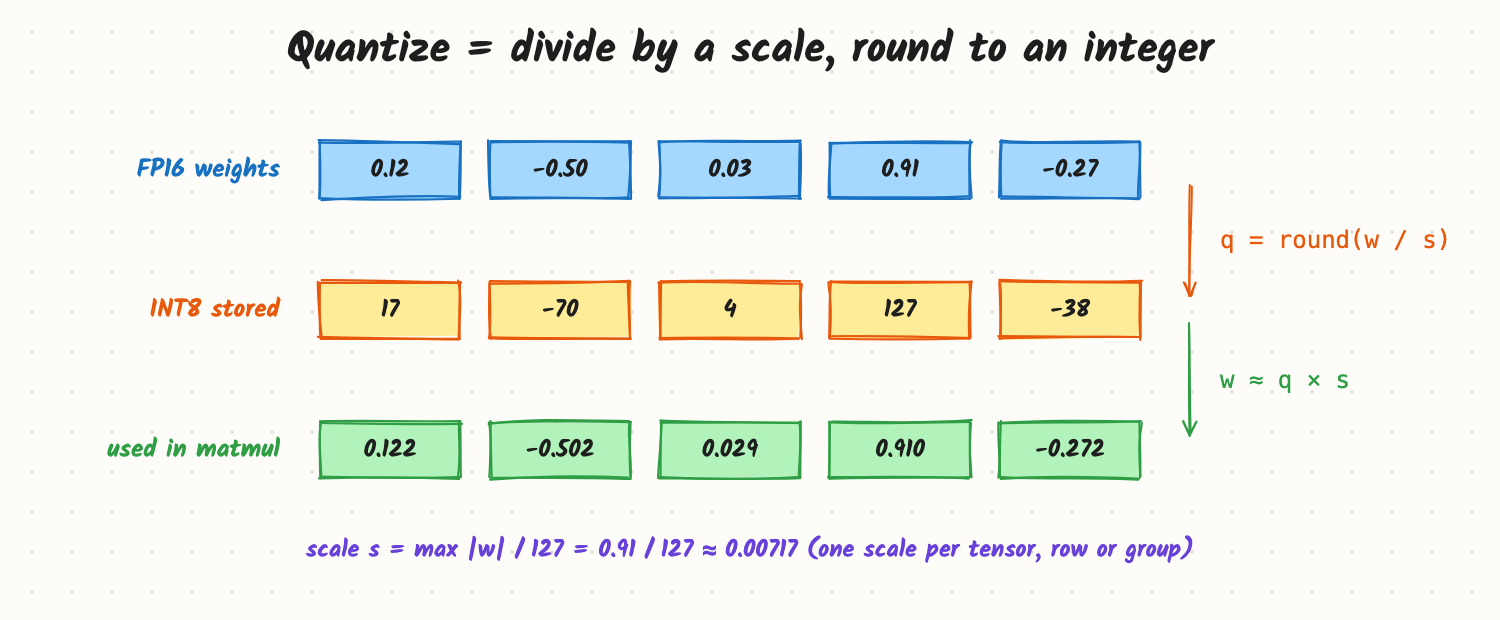
The rounding error is at most half a step (s / 2). INT4 has only 16 levels, so its steps are 16× coarser than INT8's for the same range; that's why granularity matters: smaller groups get their own scales and fit their values better.
The formats
- INT8 / INT4 weights: integers with a scale per row or group. Weight-only INT4 (weights stored in 4 bits, converted back to 16-bit inside the matrix-multiply kernel) is the common way to fit big models on fewer GPUs.
- FP8: an 8-bit floating-point format (E4M3 for weights and activations, E5M2 where range matters more), supported natively by recent data-centre GPUs (NVIDIA Hopper and later). Because it is floating point, it handles a wide range of values better than INT8, and it can run both weights and activations in 8 bits (W8A8), which also speeds up compute-heavy prefill.
- KV cache quantization: storing keys and values in FP8 or INT8 halves the cache, so twice as many tokens fit (see Prefill, Decode and the KV Cache).
Why outliers are the hard part
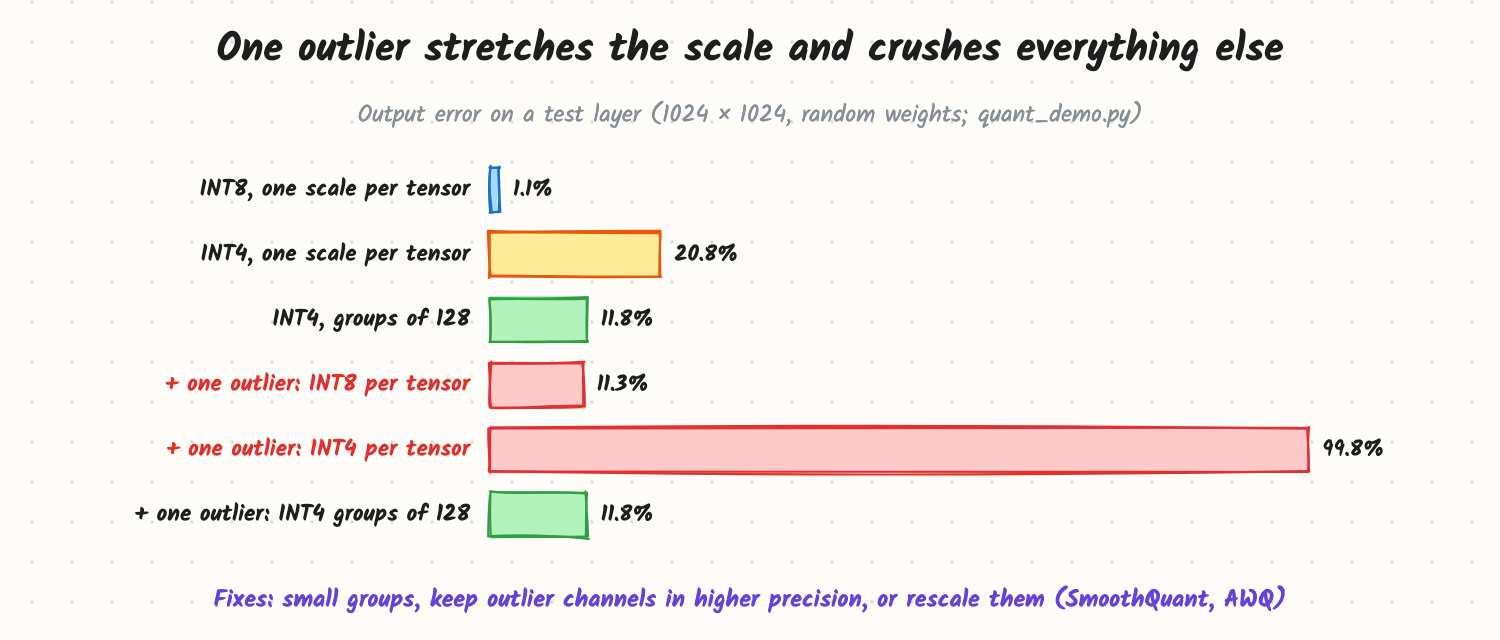
LLMs have a few very large values, especially in activations in certain channels. One outlier sets the scale for its whole group, so every other value gets only a handful of levels. In the included experiment, one weight 50× larger than the rest pushes INT4 per-tensor error from 21% to almost 100%, while groups of 128 stay at about 12%. (Random weights exaggerate the numbers; real models quantized with the methods below lose far less.) The standard answers:
- Small groups (64–128 values per scale).
- Keep outlier channels in 16-bit (the LLM.int8() approach).
- Move the difficulty: SmoothQuant rescales activations and weights so outliers shrink; AWQ protects the weights that matter most for large activations.
- Error-correcting rounding: GPTQ quantizes column by column and adjusts the remaining weights to cancel the error, using a small calibration set.
When it happens
- Post-training quantization (PTQ): quantize a finished model, usually with a few hundred calibration samples. Minutes to hours. Almost all serving uses this.
- Quantization-aware training (QAT): simulate the rounding during training or fine-tuning so the model learns to tolerate it. Better at very low bits, much more expensive.
Trade-offs and costs
- Quality. 8-bit (INT8 or FP8) is usually close to lossless for large models; 4-bit weights usually cost a little; 3-bit and below cost noticeably. Smaller models and tasks such as math, code and long reasoning suffer first.
- Speed is not automatic. Weight-only INT4 speeds up memory-bound decode but adds conversion work, so at large batch sizes (compute-bound) it can be slower than FP16. FP8 W8A8 speeds up both phases on hardware that supports it.
- Kernel support. A format only helps if your engine has fast kernels for it on your GPU.
- Memory freed is the real prize. Saved bytes usually go to KV cache, which means bigger batches and lower cost per token.
In production
- Engines such as vLLM, TensorRT-LLM and SGLang load pre-quantized checkpoints (GPTQ, AWQ, FP8) and offer FP8 KV cache as a flag.
- Evaluate before shipping: run your own task evals (not just perplexity) on the quantized model next to the original, including long-context and structured-output tests. Compare on the slices your users care about.
- Watch for subtle failures: broken JSON, worse instruction following, different refusal behaviour.
- Roll out behind a canary or A/B test with quality metrics, as with any model change.
When to reach for it
When the model doesn't fit on the GPUs you have, when decode is memory-bound and you need more tokens per second, when the KV cache caps your batch size, or when moving to cheaper hardware or on-device inference. Skip it when you have spare GPU memory, low traffic and a quality-critical task.
Example
A 70B chat model runs in FP16 on 2 GPUs per replica with a KV cache of under 20 GB. Switching to FP8 weights and activations: one GPU per replica with under 10 GB left for cache, so each replica serves fewer users at once but the fleet has twice as many replicas for the same GPUs. Alternatively INT4 AWQ weights plus FP8 KV cache: one GPU per replica with about 45 GB of cache. On the team's eval set the FP8 model is within noise of FP16; INT4 drops 1.5 points on a coding subset, so INT4 is used for the general chat route and FP8 for the code route. (Example numbers.)
Common mistakes
- Judging quality by perplexity alone. Run task evals that match production.
- Expecting INT4 to speed up everything. At high batch sizes it may not.
- Ignoring the KV cache, which often takes more memory than the weights at long context.
- Quantizing without calibration data that looks like production (for example English-only calibration for a multilingual product).
- Forgetting outliers and using one scale per tensor at 4 bits.
Say this in the interview
"Quantization stores numbers in fewer bits, a scale times a small integer. For serving, the main win is memory: a 70B model goes from 140 GB in FP16 to 70 GB in FP8 and 35 GB in INT4, so it fits on fewer GPUs, and memory-bound decode reads fewer bytes per token. The hard part is outliers, handled with small groups, keeping outlier channels in 16-bit, rescaling (SmoothQuant, AWQ) or GPTQ's error correction. I'd use FP8 where the hardware supports it, INT4 weight-only when memory is tight, FP8 KV cache for longer contexts, and check every choice with task evals and a canary before rollout."
Interview questions on this
- Why does quantizing weights speed up decode? Decode is memory-bound; fewer bytes per weight means fewer bytes read per step.
- What's the difference between weight-only and weight-and-activation quantization? Weight-only saves memory and bandwidth; quantizing activations too (W8A8) also speeds up compute-bound work.
- Why do LLMs quantize worse than CNNs did? Large outlier features in activations dominate the scale.
- What is group-wise quantization? Separate scales for small blocks of weights, so one outlier only hurts its block.
- PTQ vs QAT? Quantize after training with calibration data vs train with simulated rounding; QAT is better at very low bits but costly.
- How would you decide between FP8 and INT4 for a deployment? Hardware support, memory needs, batch size regime and measured quality on your evals.
Used in
- AI Engineering: Prefill, Decode and the KV Cache; Mixed Precision Training; Compute-Bound vs Memory-Bound: The Roofline View; How Many GPUs Do You Need to Serve a 70B Model?; How Would You Cut LLM Cost by 10x?; LoRA and QLoRA.
- AI System Design: Design an Inference Platform.