GPU Basics for AI Engineers
On this page
A team rents a new GPU that advertises roughly three times the FLOPS of their old one, moves their chatbot onto it, and token speed improves by only about 1.6×. Another team buys GPUs with more memory and suddenly fits twice as many users per box, with no change in FLOPS. Neither result is strange once you know how a GPU is built: thousands of simple cores fed by a memory hierarchy, where the speed of moving data matters as much as the speed of math. You don't need to write CUDA to reason about this, but you do need the picture.
How it works
Why AI runs on GPUs
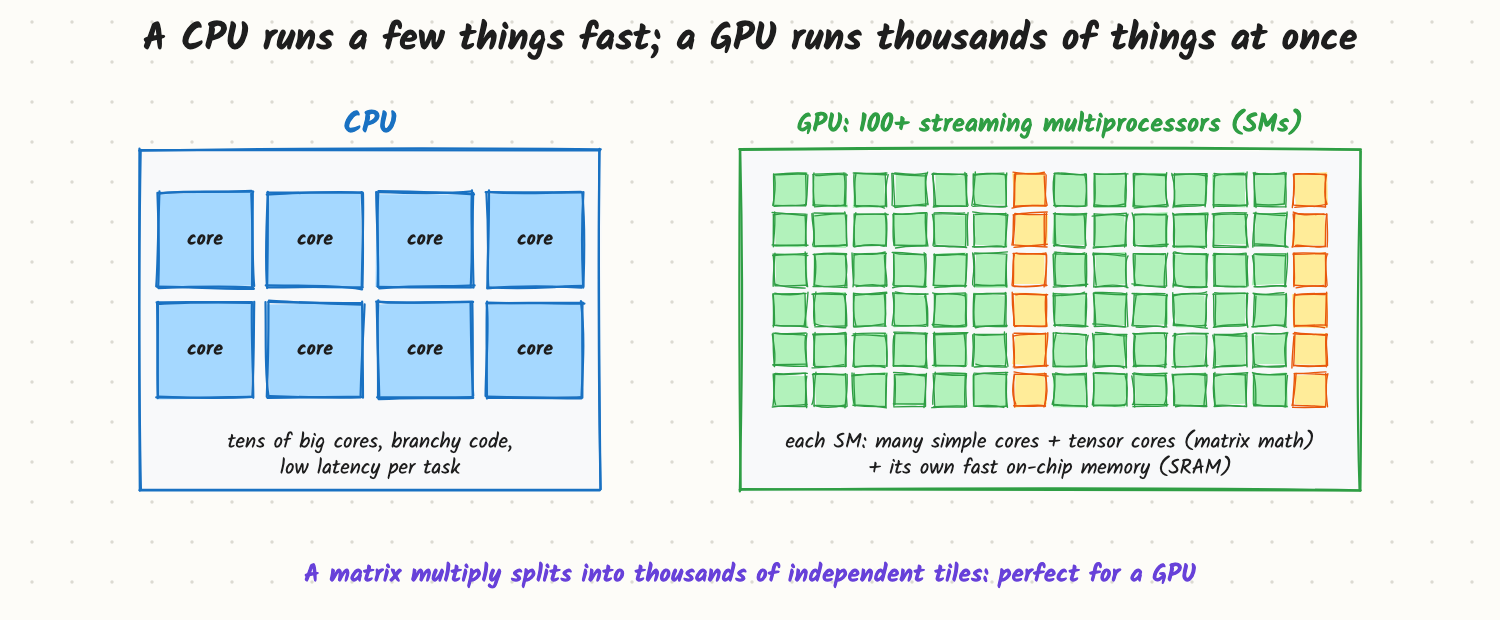
- A CPU has tens of powerful cores built for low latency and complex, branchy code.
- A GPU has 100+ streaming multiprocessors (SMs). Each runs many threads in lockstep groups (warps of 32 on NVIDIA GPUs) and has tensor cores, units that multiply small matrix tiles in one instruction.
- Neural networks are mostly matrix multiplies, which split into thousands of independent tiles. A GPU runs all of them at once.
The software model: you launch a kernel (a function) over a grid of thread blocks; each block lands on an SM, uses that SM's fast shared memory, and works on one tile. Libraries (cuBLAS, cuDNN, FlashAttention, Triton-generated kernels, PyTorch) do this for you.
The memory hierarchy
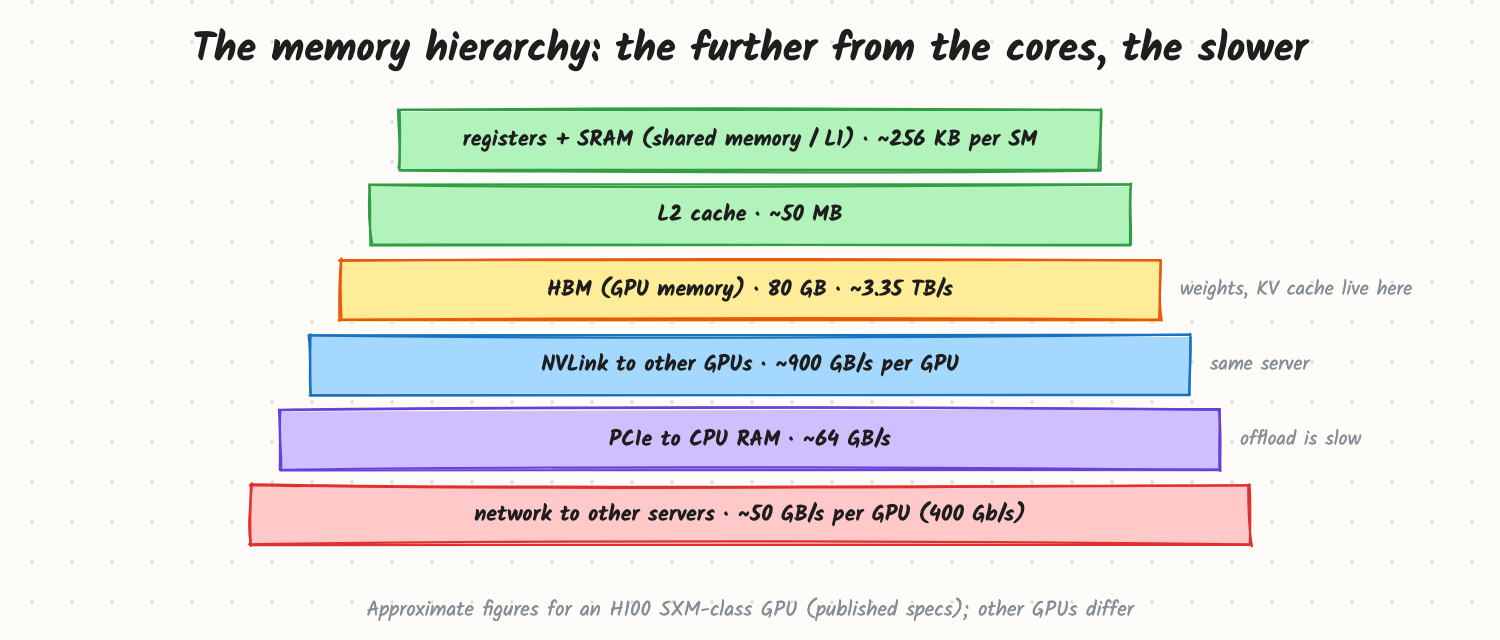
Approximate numbers for an H100 SXM-class GPU (published specs; check your GPU):
- Registers and SRAM / shared memory: a few hundred KB per SM, the fastest storage.
- L2 cache: about 50 MB shared by all SMs.
- HBM (high-bandwidth memory): 80 GB at about 3.35 TB/s. Weights, activations and KV cache live here.
- NVLink to the other GPUs in the server: about 900 GB/s per GPU.
- PCIe to the CPU's RAM: about 64 GB/s. Offloading to CPU memory is roughly 50× slower than HBM.
- Network to other servers: 400 Gb/s per GPU, about 50 GB/s, on a well-built training cluster.
A kernel is fast only if its data comes from the near levels most of the time. FlashAttention, fused kernels and tiled matrix multiplies all exist to keep data in SRAM instead of going back to HBM.
Compute vs memory
The same GPU offers roughly 1,000 TFLOPS of dense BF16 math and 3.35 TB/s of HBM bandwidth: about 300 floating-point operations for every byte it can read. An operation that does fewer than that many operations per byte waits on memory. That ratio explains most LLM performance behaviour (see Compute-Bound vs Memory-Bound: The Roofline View):
- Training and prefill multiply big matrices by many tokens at once: lots of math per byte, so FLOPS matter.
- Decode reads every weight to produce one token per request: little math per byte, so memory bandwidth matters. That's why the chatbot in the opening sped up by the bandwidth ratio, not the FLOPS ratio.
Trade-offs and costs
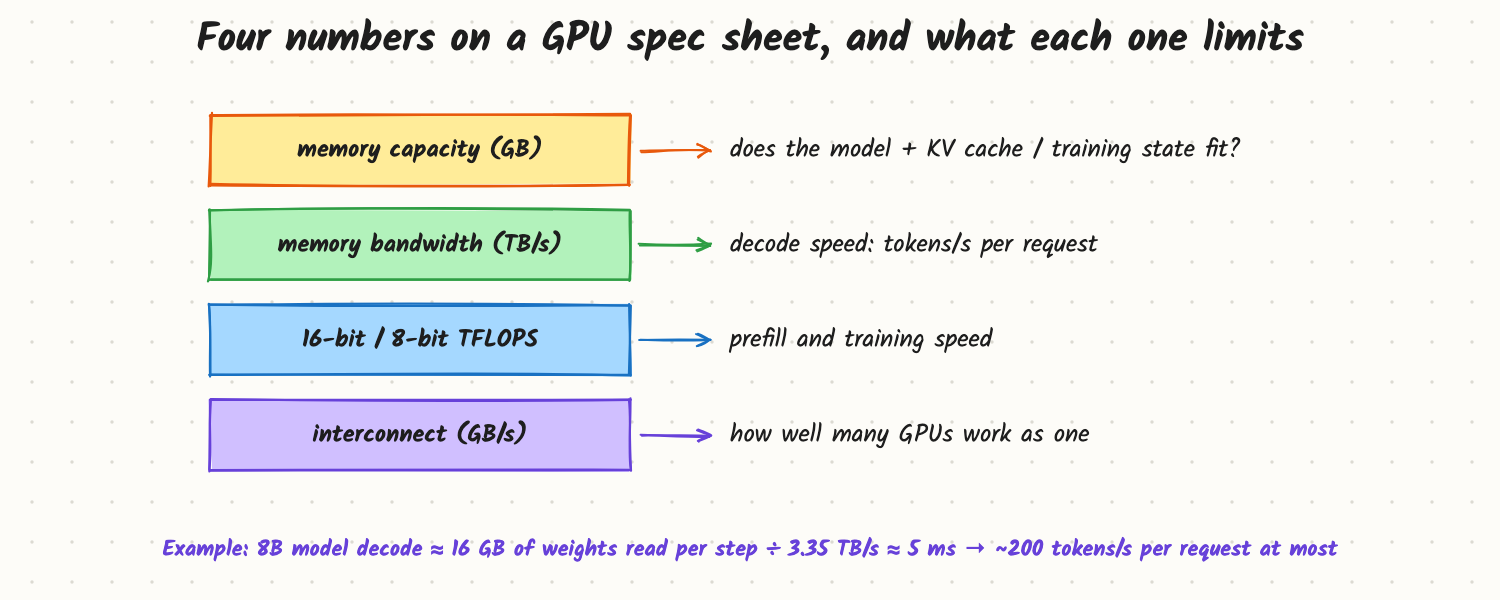
- Memory capacity decides what fits (model weights, KV cache, training state) and therefore how many GPUs a job needs and how big a batch can be.
- Memory bandwidth caps decode speed: an 8B model in BF16 reads 16 GB per step, so at 3.35 TB/s one request tops out near 200 tokens/s.
- FLOPS (at the precision you use: BF16, FP8) cap training and prefill speed. Low-precision formats double the number on paper only if your kernels use them.
- Interconnect decides how well many GPUs act as one: NVLink inside a server, InfiniBand or RoCE between servers.
- Price and availability often decide more than specs: an older GPU with enough memory can be the cheaper way to serve a small model.
In production
- Check that work actually runs on tensor cores: 16-bit or 8-bit dtypes, sensible matrix shapes (multiples of 8 or 16), fused kernels.
- Use
nvidia-smifor memory use and temperature, but don't trust its "utilisation" as a measure of efficiency: it says a kernel was running, not how well it used the GPU. Profilers (Nsight Systems, PyTorch profiler) and DCGM metrics (SM activity, tensor-core activity, memory bandwidth) tell the real story. - Watch for host bottlenecks: slow data loading, CPU-side Python overhead and small kernels can leave a fast GPU idle (CUDA graphs and larger batches help).
When to reach for it
When choosing hardware, sizing a deployment, explaining a benchmark, or answering any interview question that starts "why is this slow?" on a GPU. It's the foundation for every other AI Infra topic.
Example
Choosing between two GPUs to serve an 8B chat model in BF16: GPU A has 48 GB at 0.9 TB/s, GPU B has 80 GB at 3.35 TB/s and costs 2.5× as much per hour. Decode speed per request: about 56 tokens/s on A vs about 200 on B. Cache room: about 25 GB on A vs about 55 GB on B, so B also fits about twice the concurrent users. Throughput per dollar favours B for a busy service; A is fine for a low-traffic internal tool where 56 tokens/s is acceptable. (Example GPUs and prices.)
Common mistakes
- Comparing GPUs only by peak FLOPS for inference workloads that are memory-bound.
- Reading
nvidia-smiutilisation as efficiency. - Forgetting PCIe and CPU limits when offloading or loading data.
- Running FP32 by accident, which leaves tensor cores mostly unused.
- Ignoring the interconnect when a job spans GPUs.
Say this in the interview
"A GPU has 100+ SMs with many simple cores and tensor cores for matrix tiles, so it suits neural networks, which are mostly matrix multiplies. Data moves through a hierarchy: SRAM on each SM, an L2 cache, then HBM at a few TB/s, NVLink between GPUs in a server, and slower PCIe and network beyond. A modern GPU can do about 300 operations per byte it reads from HBM, so anything with less reuse, like LLM decode, is limited by memory bandwidth, while training and prefill are limited by FLOPS. I size hardware on memory capacity, bandwidth, FLOPS at my precision and interconnect."
Interview questions on this
- Why are GPUs better than CPUs for training? Massive parallelism and tensor cores for matrix multiplies, plus high-bandwidth memory.
- What is HBM and why does it matter for LLMs? The GPU's main memory; its capacity limits model and cache size, its bandwidth limits decode speed.
- Why might a GPU with 3× the FLOPS only give 1.6× faster decode? Decode is memory-bound; bandwidth only rose 1.6×.
- What is a tensor core? A unit that multiplies small matrix tiles at low precision in one instruction.
- Why doesn't
nvidia-smiutilisation mean the GPU is used well? It measures the time a kernel is running, not how much of the SMs or bandwidth it uses. - How would you pick a GPU to serve a 70B model? Fit weights plus KV cache (possibly quantized), then compare bandwidth and price per token.
Used in
- AI Engineering: Compute-Bound vs Memory-Bound: The Roofline View; GPU Interconnects and Collectives; GPU Utilization and Cost; FlashAttention; Prefill, Decode and the KV Cache; How Many GPUs Do You Need to Serve a 70B Model?
- AI System Design: Design an Inference Platform.