Agent Safety: Permissions, Sandboxes, Human Approval
On this page
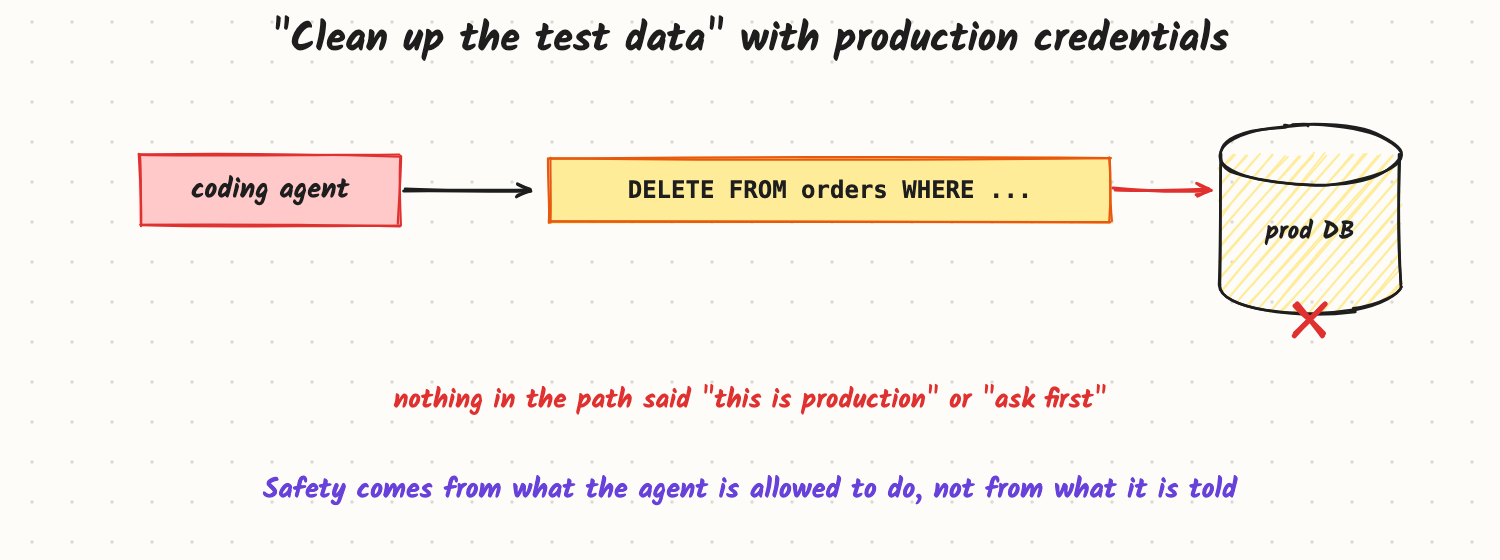
A developer asks a coding agent to "clean up the test data". The agent's shell has the same database credentials the developer uses every day, including production. It writes a reasonable-looking DELETE statement and runs it against the wrong database. The model followed the instruction as it understood it; nothing in the setup said "this is production" or "ask before deleting". Agent safety comes from what an agent is allowed to do, not from what it is told to do.
How it works
Least privilege
- Only the tools the task needs. A research agent doesn't need a shell; a support agent doesn't need delete.
- Scoped, short-lived credentials tied to the current user and task, not a shared admin key. If the user can't do it, the agent can't either.
- Separate environments: agents work against development or staging by default; production access is a deliberate, narrow exception.
- Argument limits in code: allowed recipients, domains, amounts, tables, file paths.
Match the control to the risk
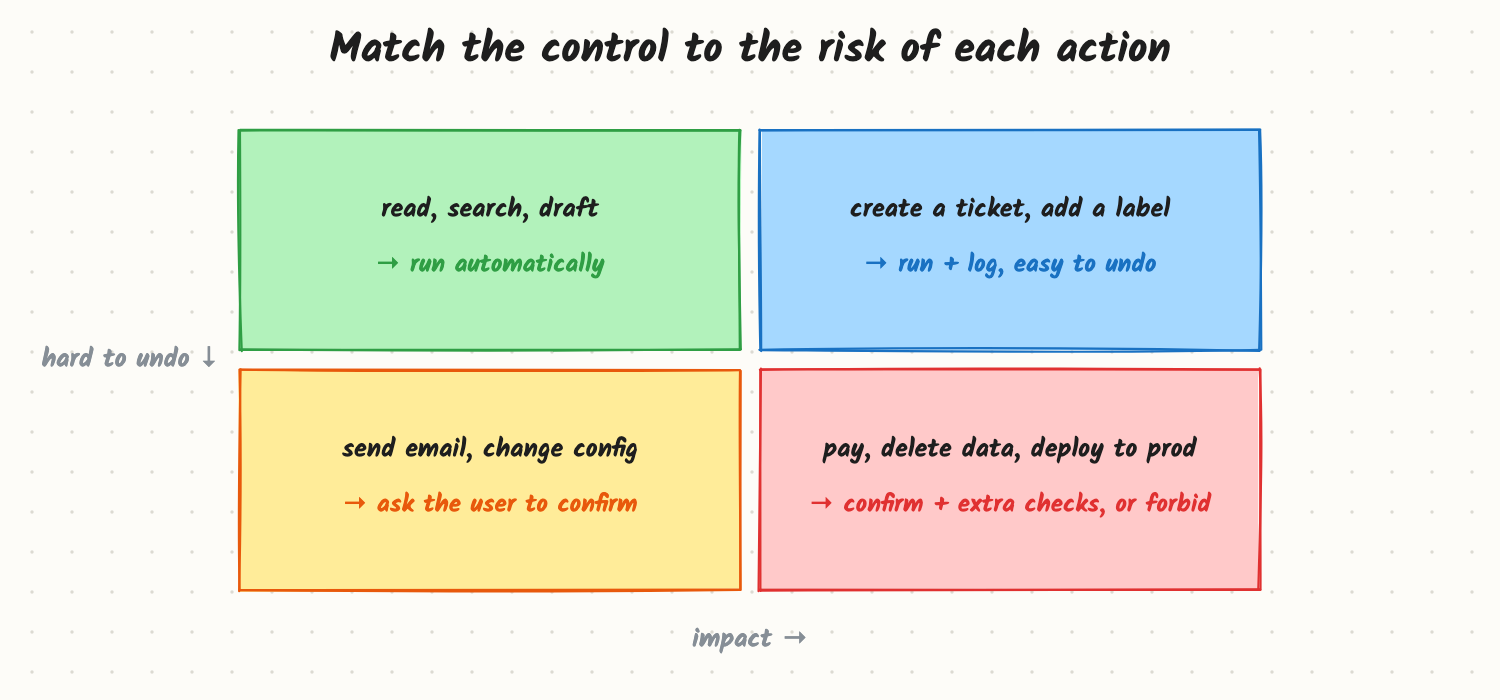
- Read and draft actions run automatically.
- Low-impact, reversible actions run and are logged (with an easy undo).
- External or consequential actions (send email, change configuration) need the user's confirmation, showing exactly what will happen.
- Irreversible or high-impact actions (payments, deleting data, production deploys) need confirmation plus extra checks (a second approver, a dry run, limits), or are not allowed for the agent at all.
Contain and check
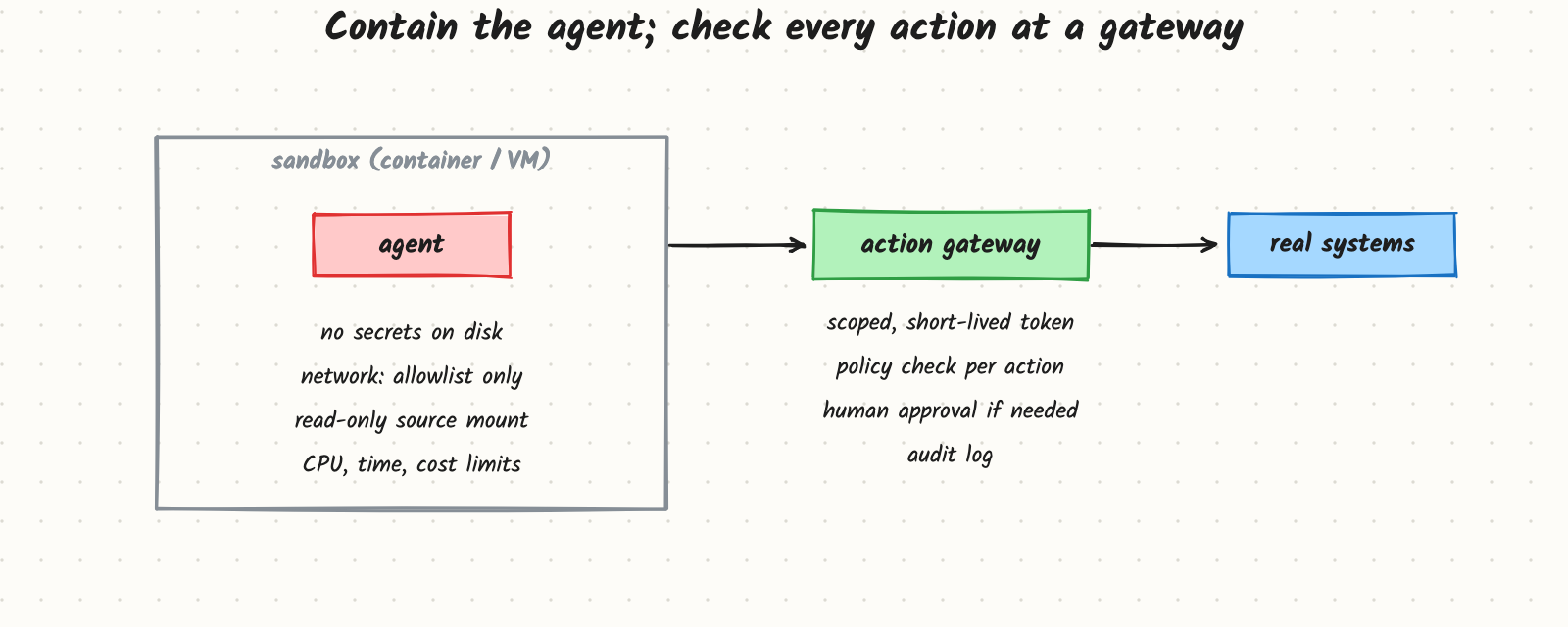
- Sandbox code execution and browsing: a container or VM with no secrets on disk, network limited to an allowlist, read-only mounts for source data, and CPU, time and cost limits.
- Action gateway between the agent and real systems: checks each action against policy, injects the right scoped credential, asks for approval when required, and writes an audit log of who asked, what the agent did and what it changed.
- Dry runs and previews for bulk changes ("this will update 1,240 rows").
Untrusted input
Anything the agent reads (web pages, emails, documents, tool results) may contain instructions. Treat it as data, and tighten permissions while untrusted content is in the context: an agent that has just read an arbitrary web page should not be able to send email without approval (see Prompt Injection and Guardrails).
Trade-offs and costs
- Friction vs autonomy: every approval slows the user; too many and they click "approve" without reading. Calibrate by risk and track approval rates.
- Sandboxes cost setup and some realism; agents may need test data that looks like production.
- Fine-grained permissions take engineering work in every tool, but they are the only control that still holds when the model is wrong or manipulated.
In production
- Audit everything: action, arguments, approver, result, and the run that produced it.
- Kill switch: be able to stop all runs of an agent instantly and revoke its credentials.
- Rate and blast-radius limits: maximum actions per minute, rows changed, money moved per run.
- Red-team with destructive requests, ambiguous ones and injected instructions; add them to evals.
- Failure modes: shared admin credentials; approvals shown without the real details; "temporary" production access that never expires; the agent finding a side route (a generic shell) around a restricted tool.
When to reach for it
Before an agent gets any tool with side effects: writing data, sending messages, spending money, running code, changing infrastructure. The more autonomous and long-running the agent, the stricter the defaults.
Example
A coding agent now runs in a container with a copy of the repository, a development database seeded with fake data, and network access only to the package registry. Its database tool rejects statements against any host except the dev one; DELETE and DROP require a confirmation that shows the exact statement and the row count from a dry run. Production changes go through the normal deploy pipeline, which the agent can open a pull request for but can't merge. The same "clean up the test data" request now produces a preview the developer approves, against the right database.
Common mistakes
- Relying on the system prompt ("never delete production data") as the safety mechanism.
- Giving agents the developer's own broad credentials.
- Approval screens without details, which train users to click through.
- Generic tools (a raw shell, arbitrary HTTP) that bypass every specific restriction.
- No audit trail, so incidents can't be reconstructed.
Say this in the interview
"I'd make safety structural: least-privilege tools, scoped short-lived credentials per user and task, agents in a sandbox with an allowlisted network and resource limits, and an action gateway that enforces policy, asks for approval on high-impact or irreversible actions, and keeps an audit log. Controls scale with risk: reads run freely, reversible writes are logged, external or destructive actions need confirmation or are forbidden. And permissions tighten when untrusted content is in context."
Interview questions on this
- Why isn't a careful system prompt enough? Models misunderstand and can be manipulated; only permissions hold when the model is wrong.
- Which actions need human approval? High-impact or hard-to-undo ones: payments, deletes, external messages, production changes.
- How do you stop approval fatigue? Approve only risky actions, show exact details and previews, batch similar approvals, and track approval rates.
- What goes in an agent sandbox? Isolated compute, no secrets, network allowlist, read-only data mounts, resource and time limits.
- How would you audit an agent incident? From the action log: request, steps, tool calls with arguments, approvals and resulting changes, all tied to one run ID.
Used in
- AI Engineering: Prompt Injection and Guardrails; Tool Calling and the Agent Loop; Designing Tools an Agent Can Use Well; Browser and Computer-Use Agents; Making Agents Reliable.
- AI System Design: Design Operator; Design a Customer Support Agent.