Browser and Computer-Use Agents
On this page
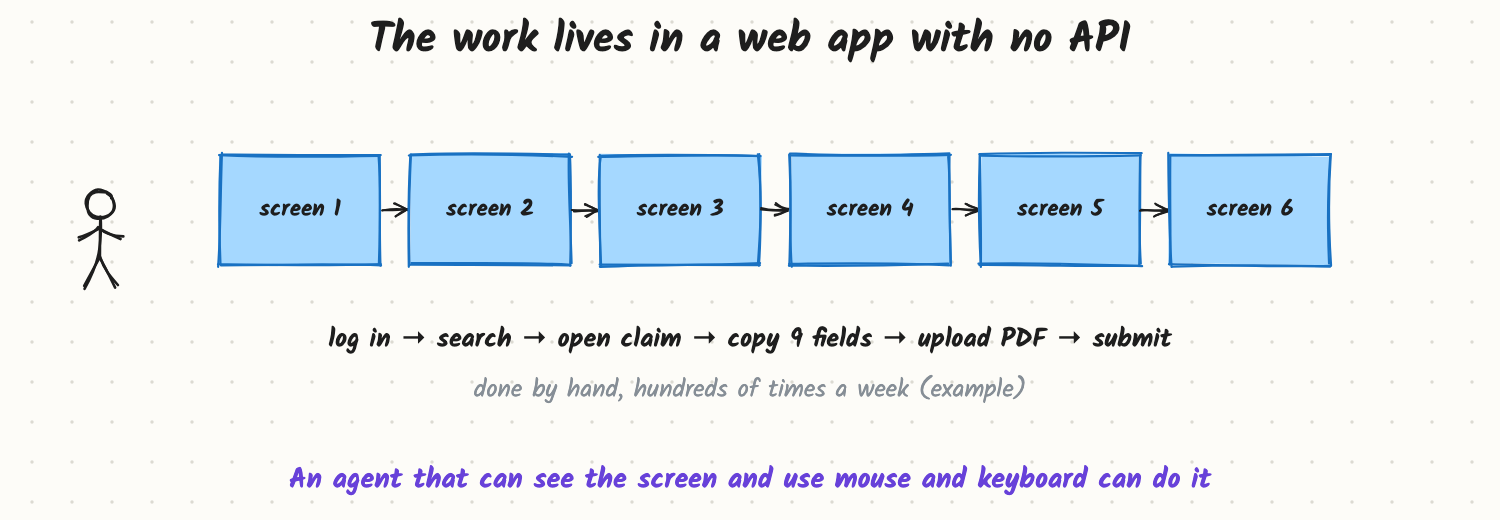
An insurance team processes claims in an old web portal with no API. For each claim, someone logs in, searches, opens the claim, copies nine fields into another system, uploads a PDF and submits, hundreds of times a week. A normal tool-calling agent can't help, because there are no tools to call; the only interface is the screen. Computer-use and browser agents operate software the way people do: they look at the screen and use the mouse and keyboard.
How it works
The loop
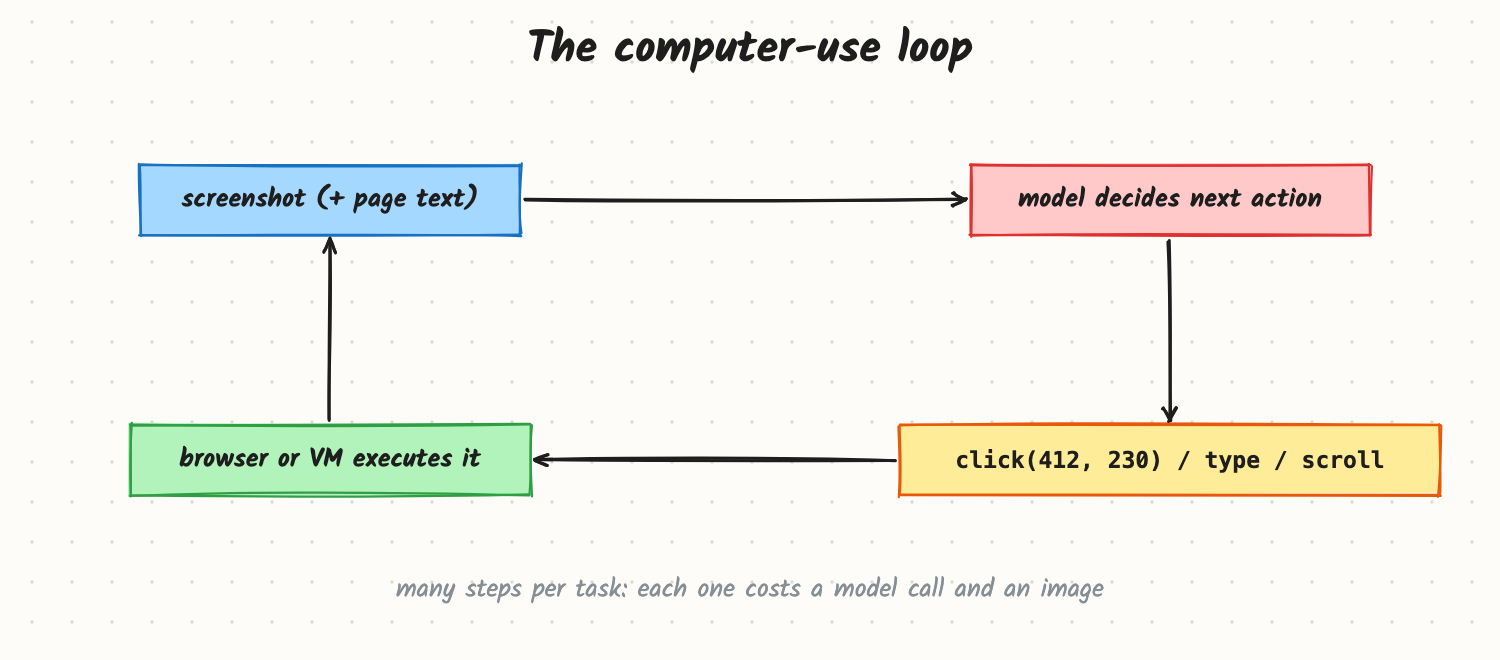
- Observe: take a screenshot of the browser or virtual desktop; for browsers, often also the page's text or accessibility tree (a structured list of buttons, fields and labels).
- Decide: a multimodal model reads the observation, the task and the history, and picks one action.
- Act: the harness executes it: click at coordinates or on an element, type text, press keys, scroll, navigate.
- Repeat until the task is done, the model asks for help, or a limit is hit.
It's the agent loop from Tool Calling and the Agent Loop, with the screen as the observation and input devices as the tools.
Three ways to drive an interface
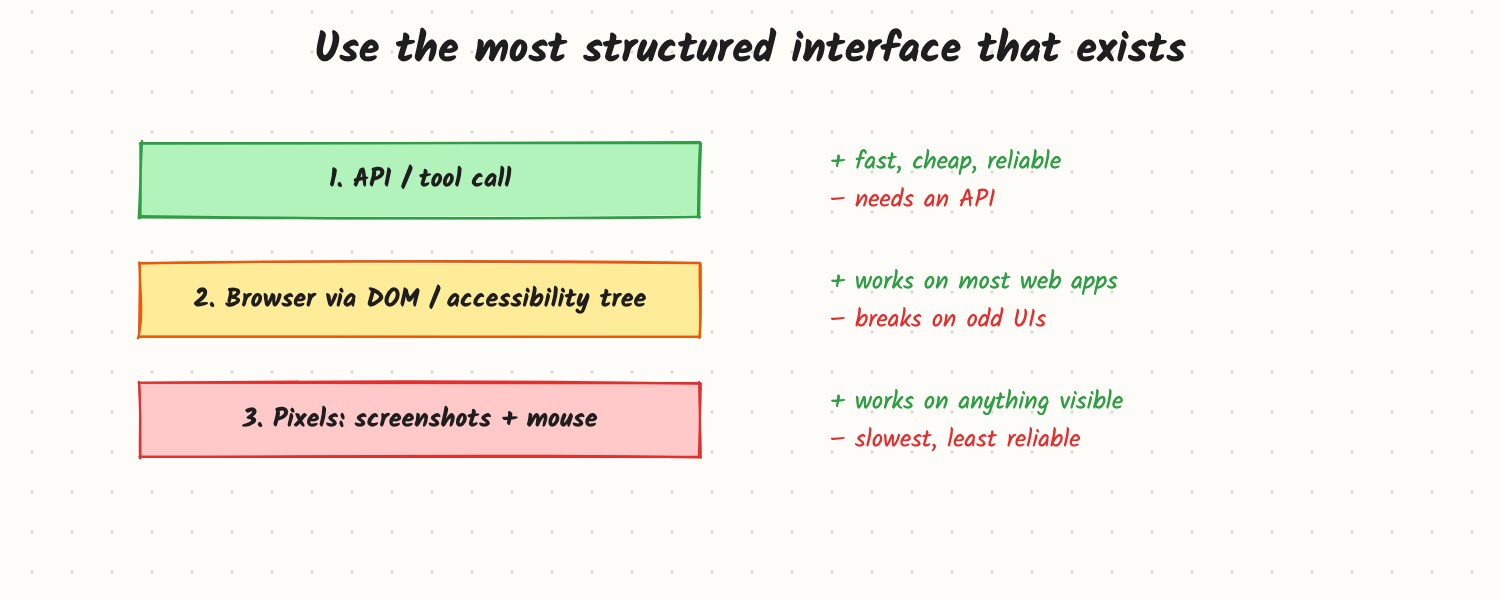
- API or tool calls: fastest, cheapest, most reliable. If an API exists, use it.
- Browser via the page structure (DOM or accessibility tree): the agent sees elements with roles and labels ("button: Submit", "textbox: Policy number") and acts on them by reference. Robust to layout changes and cheaper than images.
- Pixels: screenshots plus mouse coordinates. Works on anything visible (desktop apps, canvas-heavy pages, remote desktops), but each step needs an image, coordinates can miss, and it's the slowest and least reliable option.
Many systems combine them: structured page data when available, screenshots for visual checks.
Where it runs
Agents usually run in an isolated browser or virtual machine, not on the user's own machine and session: a clean environment, controlled network access, and credentials provided per task. The user can watch and take over when needed.
Trade-offs and costs
- Slow: a 20-step task might take minutes; each step is a model call with an image.
- Expensive: screenshots cost many tokens per step (see Multimodal Models).
- Brittle: pop-ups, layout changes, slow pages, CAPTCHAs and multi-factor logins break runs.
- Risky: the agent can click anything a user could, including "Delete" and "Pay", and reads untrusted page content that may contain injected instructions.
In production
- Prefer structure: use APIs where they exist; use the accessibility tree before pixels.
- Wait for state, not time: detect when the page has loaded or an element has appeared before acting.
- Checkpoints and verification: after each important step, confirm the expected change ("the claim status now reads Submitted").
- Safety: separate browser profile with only the needed logins, an allowlist of domains, confirmation before submits, payments or deletions, and never typing secrets the model can read back. Treat on-page text as untrusted (see Agent Safety and Prompt Injection and Guardrails).
- Hand-off: let a person take over for logins, CAPTCHAs and ambiguous decisions, then resume.
- Failure modes: clicking the wrong element after a layout shift; loops on an unexpected dialog; following instructions planted in a web page; submitting a form with a wrong field.
When to reach for it
Legacy or third-party web apps without APIs, cross-application workflows, testing user interfaces, and personal-assistant tasks across many websites. Avoid it when an API or a simple script would do the job more reliably.
Example
The claims team's agent runs in an isolated browser with access only to the portal and the internal claims system. It reads the portal through the accessibility tree, extracts the nine fields into a schema, validates them (dates, policy number format), and fills the second system. Before submitting, it shows a summary for one click of approval; the team later allowed automatic submission for claims under a set amount after 4 weeks with no errors. Average time per claim fell from about 6 minutes of human work to about 1.5 minutes of agent time plus a few seconds of review (example numbers).
Common mistakes
- Using pixels when an API or page structure is available.
- Fixed sleeps instead of waiting for the page state.
- Running in the user's own logged-in browser with full access.
- No confirmation before irreversible submits.
- Ignoring injected instructions in pages the agent reads.
Say this in the interview
"A computer-use agent loops: observe the screen, let a multimodal model choose one action like a click or typing, execute it in an isolated browser or VM, and observe again. I'd prefer an API, then the page's accessibility tree, and use raw pixels only as a last resort, because each step is slow, costly and brittle. I'd verify state after key steps, confirm irreversible actions, restrict domains and credentials, treat page text as untrusted, and let a person take over for logins and edge cases."
Interview questions on this
- Why use the accessibility tree instead of screenshots? It gives labelled, clickable elements: cheaper, faster and robust to layout changes.
- What makes computer-use agents fragile? Dynamic pages, pop-ups, timing, layout changes and authentication steps.
- How do you keep a browser agent safe? Isolated environment, domain allowlist, scoped logins, confirmations for risky actions, and treating page content as untrusted.
- How do you know a step worked? Check the resulting page state, not the model's claim.
- When should you not use one? When an API or a deterministic script can do the job.
Used in
- AI Engineering: Tool Calling and the Agent Loop; Multimodal Models; Agent Safety; Prompt Injection and Guardrails; Making Agents Reliable.
- AI System Design: Design Operator.