Simplify Path
On this page
Problem statement
Given an absolute Unix-style path, return its shortest equivalent form. In the input,
.means the current directory,..means the parent directory (at the root it stays at the root), and several slashes in a row count as one. Any other name, including..., is an ordinary directory name. The result starts with a single/, has one/between names and no trailing/.
Part 2. Implement cd(cwd, target): given the absolute current directory and a target that may be absolute or relative, return the absolute directory you end up in.
Part 1 is LeetCode 71, Simplify Path. Part 2 is how it often appears in practical rounds, as a shell's cd command; it reuses part 1 almost unchanged.
Example
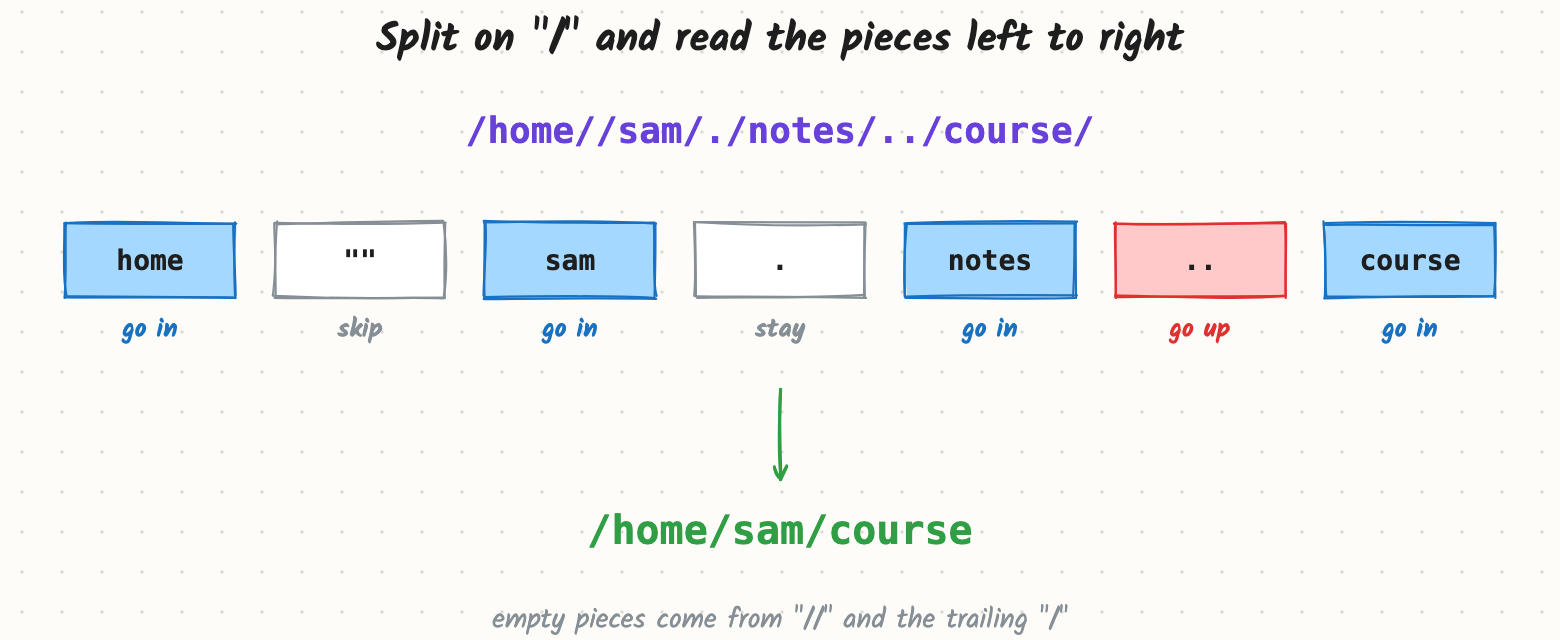
simplify("/home//sam/./notes/../course/")  ->  "/home/sam/course"
simplify("/../")                           ->  "/"
simplify("/a/.../b")                       ->  "/a/.../b"     # "..." is a name
cd("/home/sam", "../alex/./docs") -> "/home/alex/docs"
cd("/home/sam", "/tmp/../var") -> "/var" # absolute target
cd("/", "..") -> "/"Constraints (assumed)
- 1 ≤ path length ≤ 3,000.
- Paths contain letters, digits,
.,_and/.
What this question tests
- Seeing that "go in / go up" is exactly push / pop on a stack.
- Careful handling of the odd pieces: empty strings,
.,..at the root, and.... - Building the output string cleanly.
Questions to ask first
- What does
..at the root do? (Here: nothing; you stay at/.) - Is
...special? (Here: no, it's a directory name.) - Do I need to follow symbolic links? (Here: no, it's pure string processing.)
- For
cd: can the target be absolute, and is~supported? (Here: absolute yes,~no.)
Try it yourself first
You have the full problem. Sketch your answer, then sign up free to read the complete walkthrough.
- The complete design, flow by flow, with pictures
- Deep dives into the hard parts
- What mid, senior and staff candidates are expected to say
- Full company question lists
Free forever. No card needed.