Matrix and Simulation
On this page
Some problems have no clever trick. A grid has to be rotated, walked in a spiral, or moved forward one step by fixed rules, and the whole difficulty is doing exactly what the statement says without an off-by-one. Interviewers like them because they show whether you can keep indices straight under pressure. The pattern is a handful of habits that make that reliable.
Graph BFS and DFS covers grids as graphs (islands, shortest paths). This page covers grids as grids: walking, rotating and updating them in place.
When to recognise it
- Rotate, transpose, flip or spiral a matrix, often "in place".
- "Simulate" or "apply these rules to every cell": Game of Life, a board game, a robot following commands.
- Count rows, columns and diagonals to decide a winner on a board.
- Text layout: fill lines up to a width, pad with spaces, align. The "grid" is the page.
- No search, no optimum to find. If the statement reads like a rulebook, it is simulation.
Habit 1: one direction list
Write the neighbours once as a list of (row change, column change) pairs and loop over it. The bounds check then lives in one place instead of eight.
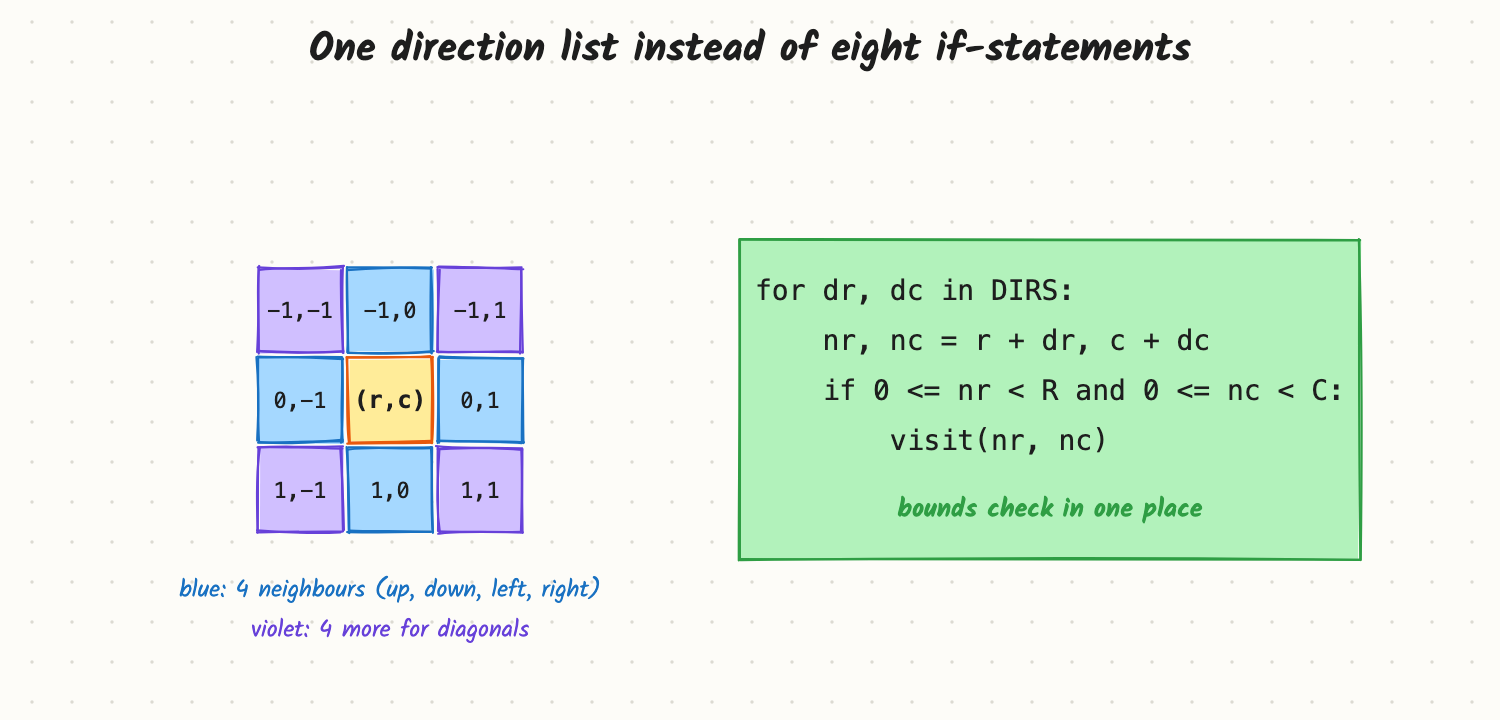
DIRS4 = [(-1, 0), (1, 0), (0, -1), (0, 1)]
DIRS8 = DIRS4 + [(-1, -1), (-1, 1), (1, -1), (1, 1)]

def live_neighbours(board, r, c):
    """Count live cells around (r, c); one bounds check for all eight directions."""
    R, C = len(board), len(board[0])
    count = 0
    for dr, dc in DIRS8:
        nr, nc = r + dr, c + dc
        if 0 <= nr < R and 0 <= nc < C:
            count += board[nr][nc]
    return count
Habit 2: walk by layers
Spiral order, rotation and "print the border" all work ring by ring. Keep four boundaries (top, bottom, left, right), walk one ring, then move every boundary one step inward.
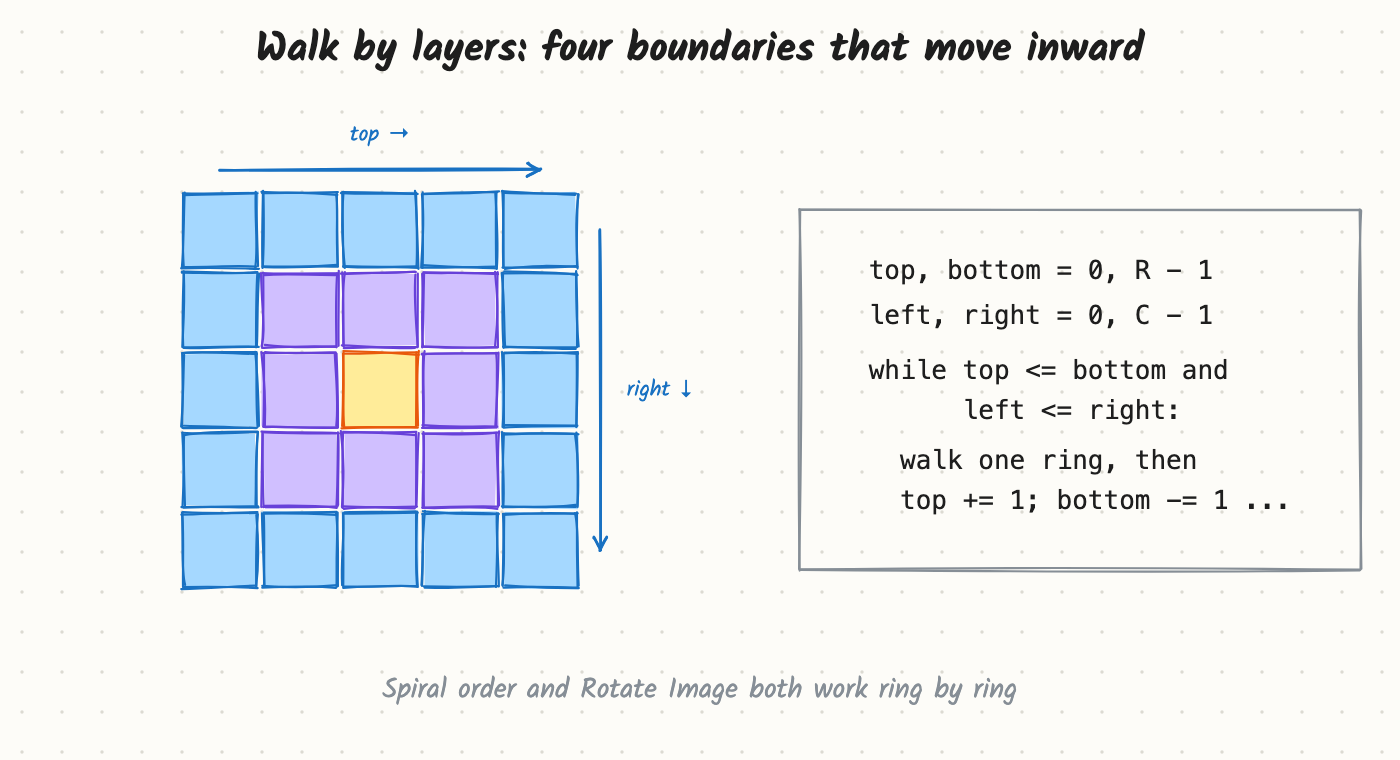
def spiral(matrix):
    """Walk ring by ring with four boundaries that move inward."""
    out = []
    if not matrix:
        return out
    top, bottom = 0, len(matrix) - 1
    left, right = 0, len(matrix[0]) - 1
    while top <= bottom and left <= right:
        for c in range(left, right + 1):
            out.append(matrix[top][c])
        for r in range(top + 1, bottom + 1):
            out.append(matrix[r][right])
        if top < bottom:                       # a single row has no bottom edge
            for c in range(right - 1, left - 1, -1):
                out.append(matrix[bottom][c])
        if left < right:                       # a single column has no left edge
            for r in range(bottom - 1, top, -1):
                out.append(matrix[r][left])
        top, bottom, left, right = top + 1, bottom - 1, left + 1, right - 1
    return out
The two if checks are the whole difficulty: without them a single leftover row or column is read twice.
Habit 3: never read what you already overwrote
In a simulation every cell's next state depends on the old state of its neighbours. Updating in place while you scan mixes old and new values. Either write into a fresh grid, or, when the follow-up asks for O(1) extra space, encode both states in one cell (for 0/1 boards: bit 0 is the old state, bit 1 the new one) and shift at the end.
def step(board):
    """One simulation step: read the old state, write a new grid."""
    R, C = len(board), len(board[0])
    nxt = [[0] * C for _ in range(R)]
    for r in range(R):
        for c in range(C):
            n = live_neighbours(board, r, c)
            nxt[r][c] = 1 if n == 3 or (n == 2 and board[r][c]) else 0
    return nxt
Habit 4: decompose a transform
A 90° clockwise rotation is a transpose followed by reversing each row. Counter-clockwise is a transpose followed by reversing each column. Breaking a transform into two simple passes is easier to get right than moving four cells at a time.
def rotate(m):
    """Rotate a square matrix 90 degrees clockwise in place: transpose, then reverse each row."""
    n = len(m)
    for i in range(n):
        for j in range(i + 1, n):          # only above the diagonal, or every pair swaps back
            m[i][j], m[j][i] = m[j][i], m[i][j]
    for row in m:
        row.reverse()
Common bugs
- Rows and columns swapped:
R = len(m),C = len(m[0]), andm[r][c]is row first. Test on a non-square input. - Reading a cell you already changed in a simulation step (habit 3).
- Double-visiting the last row or column in a spiral (habit 2).
- Swapping every (i, j) in a transpose, which swaps each pair twice and changes nothing.
- Empty input:
[]or[[]]crash onlen(m[0]).
Say this in the interview
- "There's no trick here, so I'll keep the code boring: one list of directions, one bounds check."
- "Every cell's next state depends on the old board, so I'll write into a new grid first, then show how to do it in place with a second bit."
- "I'll test on a 1×n and an n×1 input, because that's where spiral and layer code breaks."
Problems for this pattern
- Rotate Image: transpose, then reverse each row.
- Spiral Matrix: four boundaries that move inward.
- Game of Life: a direction list plus two states in one cell.
- Text Justification: fill each line greedily, then spread the spaces.
Related
Arrays and Strings · Graph BFS and DFS (grids as graphs) · Data Structure Design (board games as classes)