Design Gmail Spam Filter
On this page
Problem Description
In this interview, we're going to design the spam filter of a large email service, similar to Gmail or Outlook. Billions of emails arrive from the internet every day, and about half of them are spam: ads nobody asked for, scams and phishing. Before an email reaches someone's mailbox, the system decides whether it goes to the inbox or the spam folder, so people see their real email and almost never lose an important message to spam. People can click "Report spam" on an email in their inbox, or "Not spam" on one in their spam folder; the email moves, and later email from that sender follows their choice. The system keeps learning from these clicks. You can use existing building blocks: a mail service that receives every incoming email, checks which server sent it, puts each email in the folder we choose (and can move it later), and tells us when users click.
Out of Scope
- Viruses in attachments – scanned by a separate malware service before we see the email.
- Sorting the inbox into tabs (Promotions, Social) – a different classifier; a good follow-up question.
- Outgoing spam from our own users – a separate abuse problem about accounts.
- Receiving and storing email – the mail service does this.
- Blocking whole sending servers at the network level – the mail service's own rate limits.
Good Clarifying Questions
- How much email? – About 1 billion users receive about 20 billion emails a day from outside, roughly half of it spam.
- Which mistake is worse? – A real email in the spam folder is far worse: people miss a job offer or a bill. The goal is fewer than 1 in 10,000 real emails in spam, while catching as much spam as possible.
- How fast must an email be sorted? – Email isn't instant, but people expect it within seconds: under 500 ms per email at p99.
- How fast do spammers change? – A new campaign can send millions of near-identical emails from a brand-new domain within 10 minutes, then switch. We should stop it within 5 minutes of starting.
- What if the filter is down? – Email must never be lost and should be delayed at most a minute; a less accurate decision is acceptable for a while.
Requirements
Functional Requirements
- Filter Every Incoming Email – Before an email is delivered, the system puts it in the inbox or the spam folder.
- Report Spam and Not Spam – Users can mark an email as spam or not spam; it moves, and later email from that sender follows their choice for them.
- Keep Learning – The system trains a new model from users' clicks every day and uses it only after it proves at least as good as the current one.
Non-Functional Requirements
- Scale – 20B incoming emails a day: about 230K/s on average, 600K/s at peak.
- Latency – Under 500 ms per email at p99.
- Freshness – A new spam campaign is stopped within 5 minutes of starting; a user's click applies to their next email at once; a new model every day.
- Availability – 99.99%. If the filter is down, email waits at most a minute, then is delivered by simpler rules; nothing is lost.
Problem Framing
ML objective – The business goal is that people trust their inbox: real email always arrives, spam doesn't. The model takes one email at delivery (who sent it and from where, the subject, the text, the links, and what this user has done with this sender before) and predicts the probability that it is spam. Delivery puts it in the spam folder only above a high threshold, because a real email in spam costs far more than a spam in the inbox.
Label – 1 when a user clicks "Report spam" or the email went to a spam trap (an address no person uses, so anything sent there is spam); 0 when a user clicks "Not spam", replies, or adds the sender to contacts. Labels arrive within minutes to days of delivery. Their known biases: fewer than 1% of emails ever get a click; people report newsletters they signed up for; few people look in their spam folder, so real emails wrongly put there are rarely reported; and spammers click "Not spam" on their own emails from accounts they control.
Offline metrics – Spam caught at a 0.01% false-positive rate: the share of spam the model sends to the spam folder when at most 1 in 10,000 real emails goes there with it, measured on the most recent day. An overall accuracy of 99% would still put millions of real emails in spam each day, so only the area near our threshold matters.
Online metrics – Each launch is decided by an A/B test on spam reports per million inbox emails (spam that got through). Guardrails: "Not spam" clicks per million spam-folder emails (real email lost) must not rise, and delivery time must stay under 500 ms at p99.
Data and Features
Training data – One row per email with a label: about 500M a day from clicks, replies, contacts and spam traps, out of 20B delivered. A row holds the features the filter used at delivery and the label from the first click or reply within 7 days. To protect privacy, rows hold the email's words as hashed tokens, never readable text, and are kept 30 days. Events come from the Spam Filter Service, which records each decision, and from the mail service, which reports clicks.
Features, grouped by what they describe:
| Group | Features | Computed |
|---|---|---|
| Sender | Whether the domain proved the email is really from it (the mail service's checks), the domain's and the sending server's spam rate over 30 days, domain age | Checks at delivery; spam rates daily |
| Content | Words and short phrases of the subject and text (hashed), number of links, link domains, attachments, images with little text | At delivery |
| User × sender | Sender in contacts, the user ever replied to them, the user's past "Report spam" or "Not spam" on this sender | Clicks at once; the rest daily |
| Context | Language, time of day, number of recipients of the same email | At delivery |
The sender's reputation is usually the strongest signal: most spam comes from domains and servers that sent spam before.
API Design
REST over HTTPS with JSON. The mail service is the only caller; it sends a service key in the Authorization header, which the Spam Filter Service checks.
Classify an Email
The mail service calls this for each incoming email, once per recipient mailbox.
POST /v1/classify
{
  "messageId": "m_3e91",
  "userId": "u_5520",
  "from": "offers@example.net",
  "sendingIp": "203.0.113.88",
  "authPassed": true,                          # the mail service's sender checks
  "subject": "Your order is ready",
  "body": "Hi Sam, your order #4471 has shipped…",
  "links": ["https://shop.example.net/track/4471"],
  "recipients": 1
}

→ Response:
{
  "folder": "inbox",                           # inbox | spam
  "spamScore": 0.02
}
Record a Click
The mail service sends each "Report spam" or "Not spam" click, after it has moved the email.
POST /v1/feedback
{ "messageId": "m_3e91", "userId": "u_5520", "action": "report_spam" }    # or "not_spam"

→ Response: 202 Accepted- Keep Learning has no endpoint: it is background work.
- When we don't answer in time, the mail service applies its own simple rules (NFR 4); it never waits on us longer than a minute.
High-Level Design
One requirement at a time, in the simplest way that works; the deep dives then make it meet the numbers.
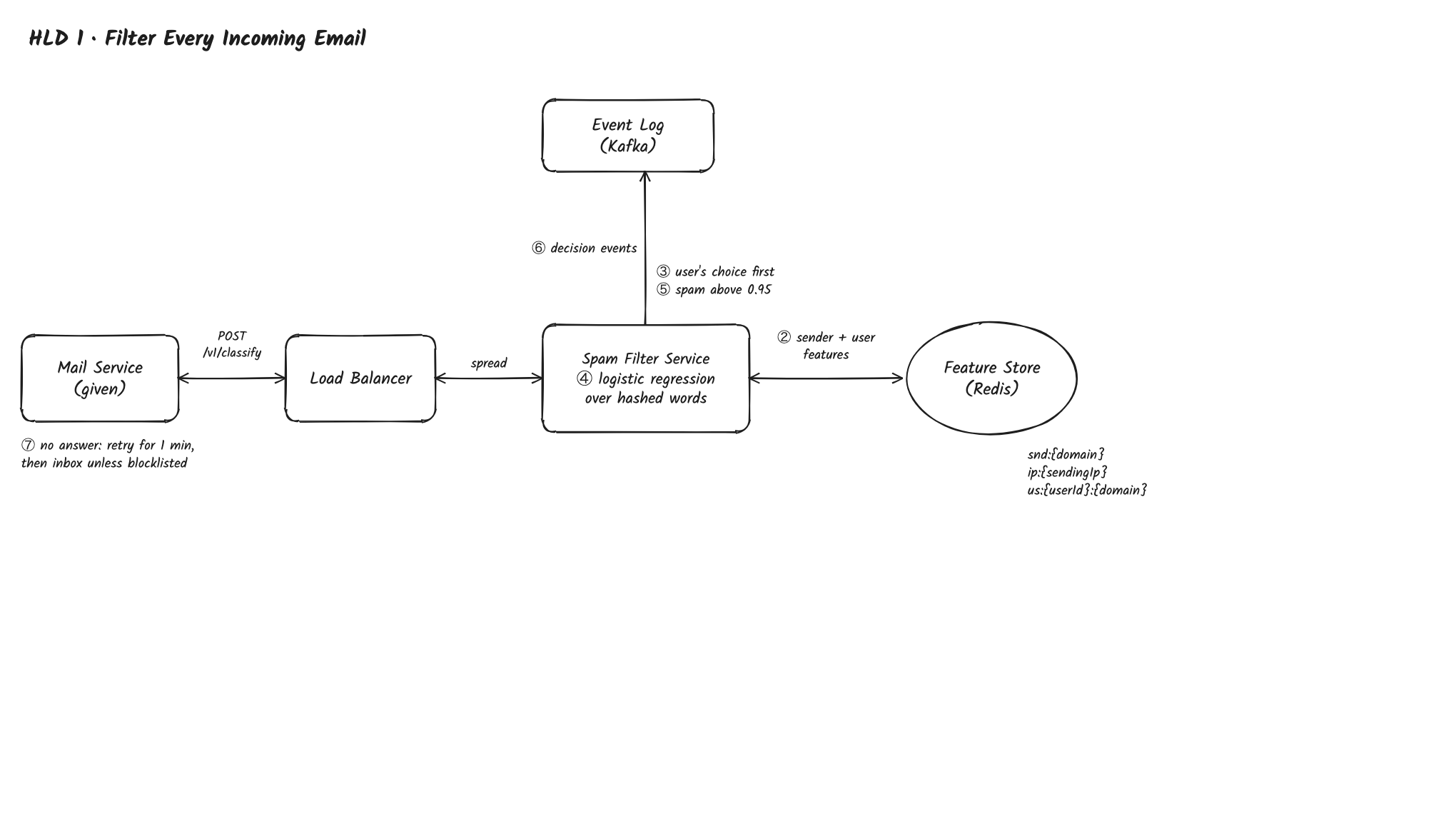
1. Filter Every Incoming Email
Path: Mail Service → Load Balancer → Spam Filter Service → Feature Store → back to the Mail Service
- The Mail Service (given) calls
POST /v1/classify. A Load Balancer spreads calls across the Spam Filter Service's servers, skipping one that fails its health check. Servers keep nothing in memory except a copy of the model, so any server can handle any email. - The Spam Filter Service reads the sender's reputation and this user's history with the sender in one batch call from the Feature Store, Redis:
snd:{domain}andip:{sendingIp}(spam rate over 30 days, domain age), andus:{userId}:{domain}(in contacts, replied before, the user's own spam or not-spam marks). - The user's choice comes first: if this user marked the sender "Not spam" or added them to contacts, the email goes to the inbox; if they reported the sender, it goes to spam. The model decides the rest.
- The service splits the subject and text into words and two-word phrases, hashes them, and scores the email with the baseline: logistic regression over the hashed words plus the sender and user features. It's the baseline because it trains on billions of rows in an hour, scores an email in well under a millisecond, and its weights show which words and senders push towards spam, so we have a filter in week one. Load: 600K emails a second at about 1 ms of CPU each, mostly reading the text, is about 600 cores, a few dozen servers.
- Above 0.95 the email goes to spam, otherwise to the inbox. The threshold is set from the newest day's data so that at most 1 in 10,000 real emails would go to spam.
- The service writes a decision event to the Event Log, Kafka:
messageId,userId, sender, the features used (words as hashes), the score, the folder and the model version. - If the Mail Service gets no answer within 500 ms, it retries for up to a minute, then delivers to the inbox unless the sending server is on its own blocklist. Email is never lost (NFR 4).
2. Report Spam and Not Spam
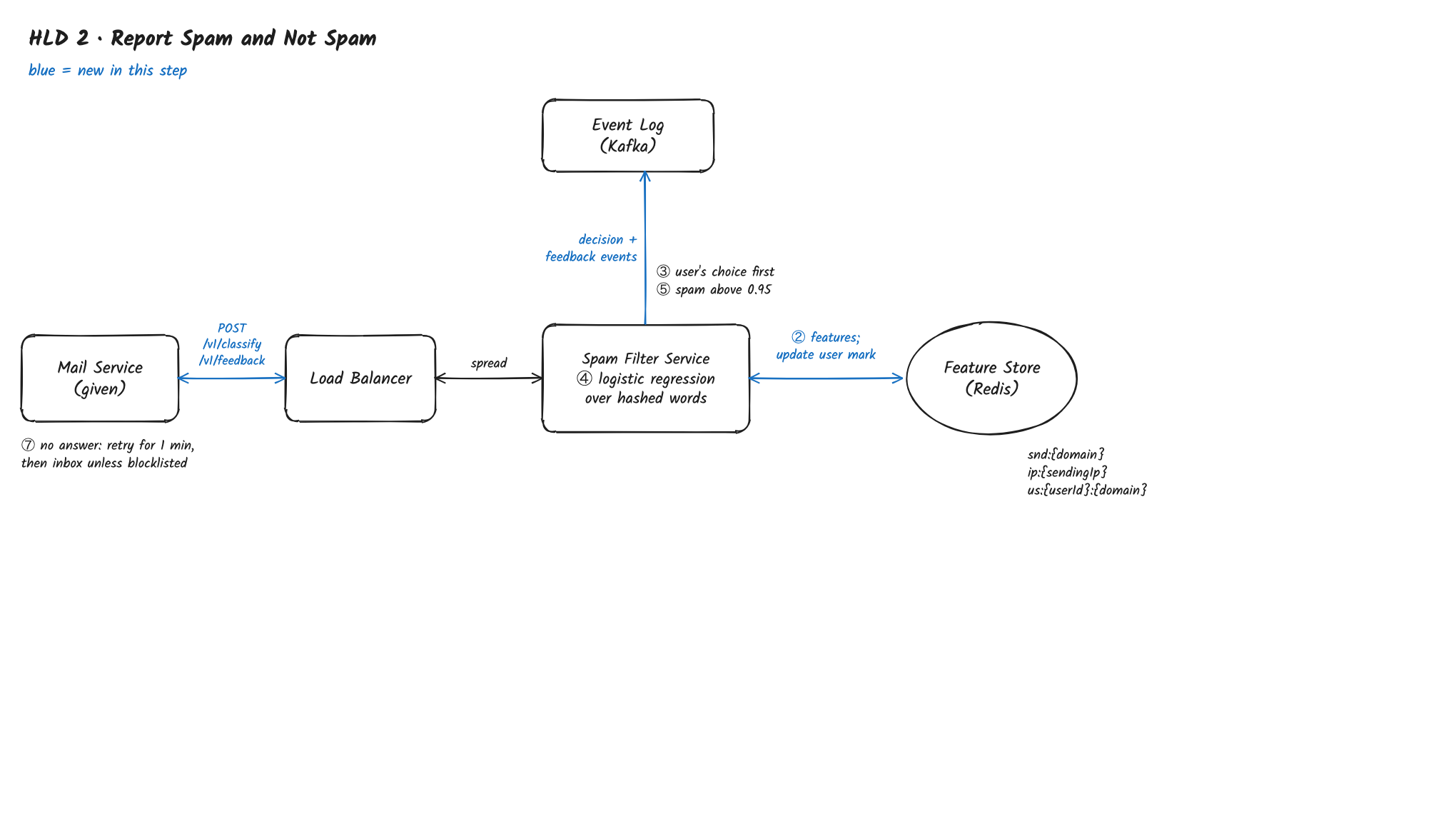
Path: Mail Service → Load Balancer → Spam Filter Service → Feature Store and Event Log
- When a user clicks "Report spam" or "Not spam", the Mail Service moves the email and calls
POST /v1/feedback. The Load Balancer passes it to the Spam Filter Service. - The Spam Filter Service updates
us:{userId}:{domain}in the Feature Store at once, so this user's next email from that sender follows their choice (step 3 of flow 1, NFR 3). - It writes a feedback event to the Event Log, which flow 3 turns into a label.
3. Keep Learning
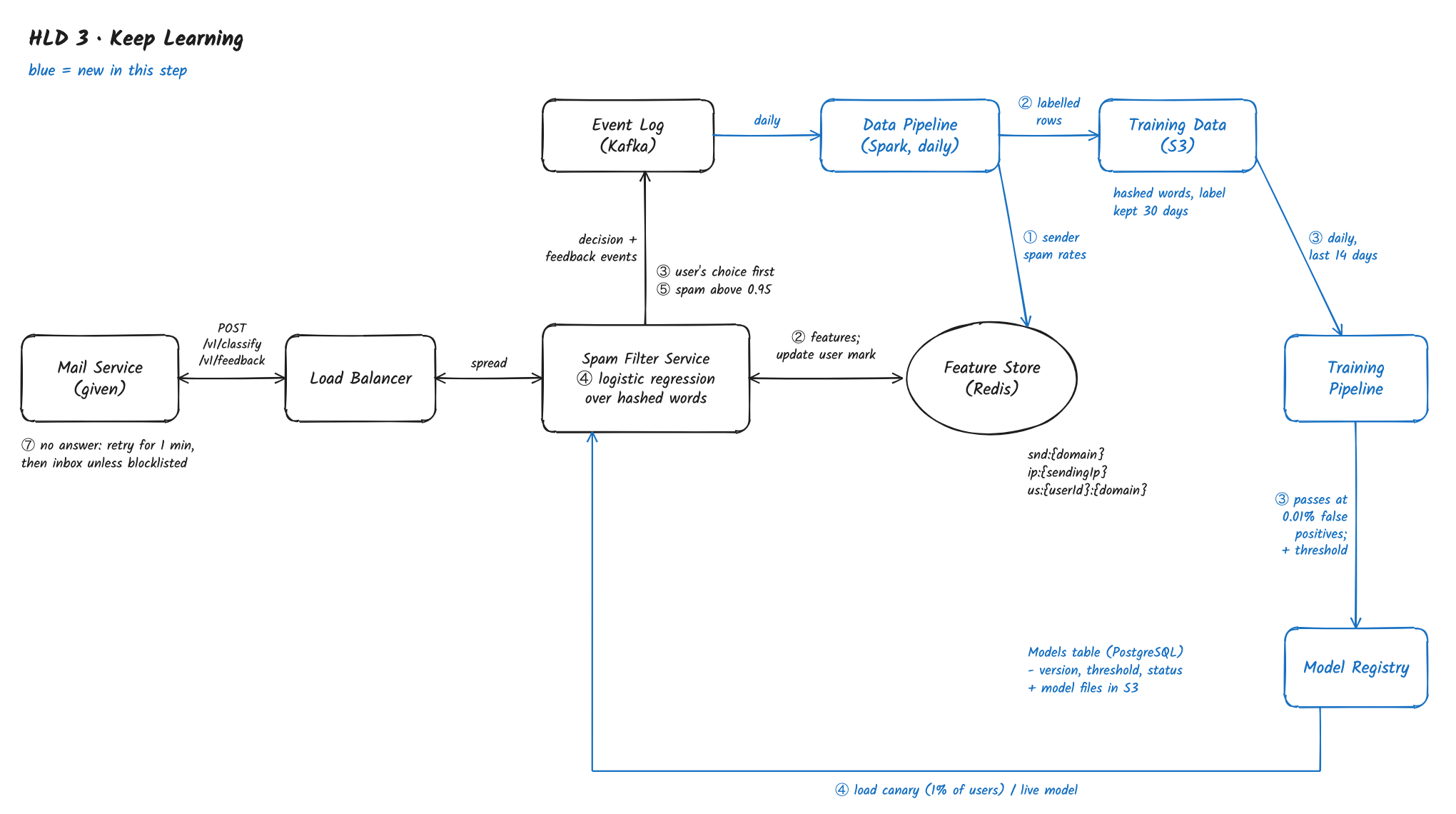
Path: Event Log → Data Pipeline → Feature Store and Training Data → Training Pipeline → Model Registry → Spam Filter Service
- Once a day, the Data Pipeline, a Spark job, reads the Event Log and computes each sending domain's and server's spam rate over 30 days, from decisions and reports, and loads them into the Feature Store.
- It joins each decision event with the first feedback event for the same email within 7 days (and replies and contacts the Mail Service reports in its events), and writes the labelled rows to Training Data, S3 (Parquet, one folder per day). Rows are kept 30 days.
- Every day, the Training Pipeline trains a new model on the last 14 days and tests it on the newest day. It passes only if it catches at least as much spam at a 0.01% false-positive rate as the live model, overall and for the 10 largest languages. It also sets the new threshold.
- A model that passes is saved in the Model Registry: files in S3, plus a row in the Models table in PostgreSQL (
version,threshold,metrics,status). Spam Filter Service servers load a canary model for 1% of users first; after a day with no rise in "Not spam" clicks, it goes live.
Known Gaps So Far – this design works for a small mail service, but not yet for our requirements:
- The model reads email too simply, and a careful one costs too much. Words one by one miss "V-i-a-g-r-a", text inside images and well-written phishing; a model that understands the text costs about a hundred times more, and on 600K emails a second that's hundreds of GPU servers (NFR 1, NFR 2).
- A new campaign gets through until tomorrow. A brand-new domain has no reputation, and sender spam rates are daily, so 5 million copies of one email in 10 minutes look like 5 million first emails (NFR 3).
- The labels are few, skewed and can be faked. Under 1% of emails get a click, people report newsletters they signed up for, real emails in the spam folder are rarely rescued, and spammers click "Not spam" on their own mail (Label, FR 3).
Deep Dives
Three deep dives, one per gap: reading email well at this volume first because it's the bottleneck, then campaigns, then the labels.
1. How do we read every email carefully when 600,000 arrive a second?
The problem: logistic regression over single words is easy to fool: spammers misspell words, put the text in an image, or write phishing that reads like a real bank. A small language model that reads the whole email handles these, but at about 2,000 emails a second per GPU server, all 600K a second would need about 300 GPU servers, and most emails are easy (NFR 1, NFR 2).
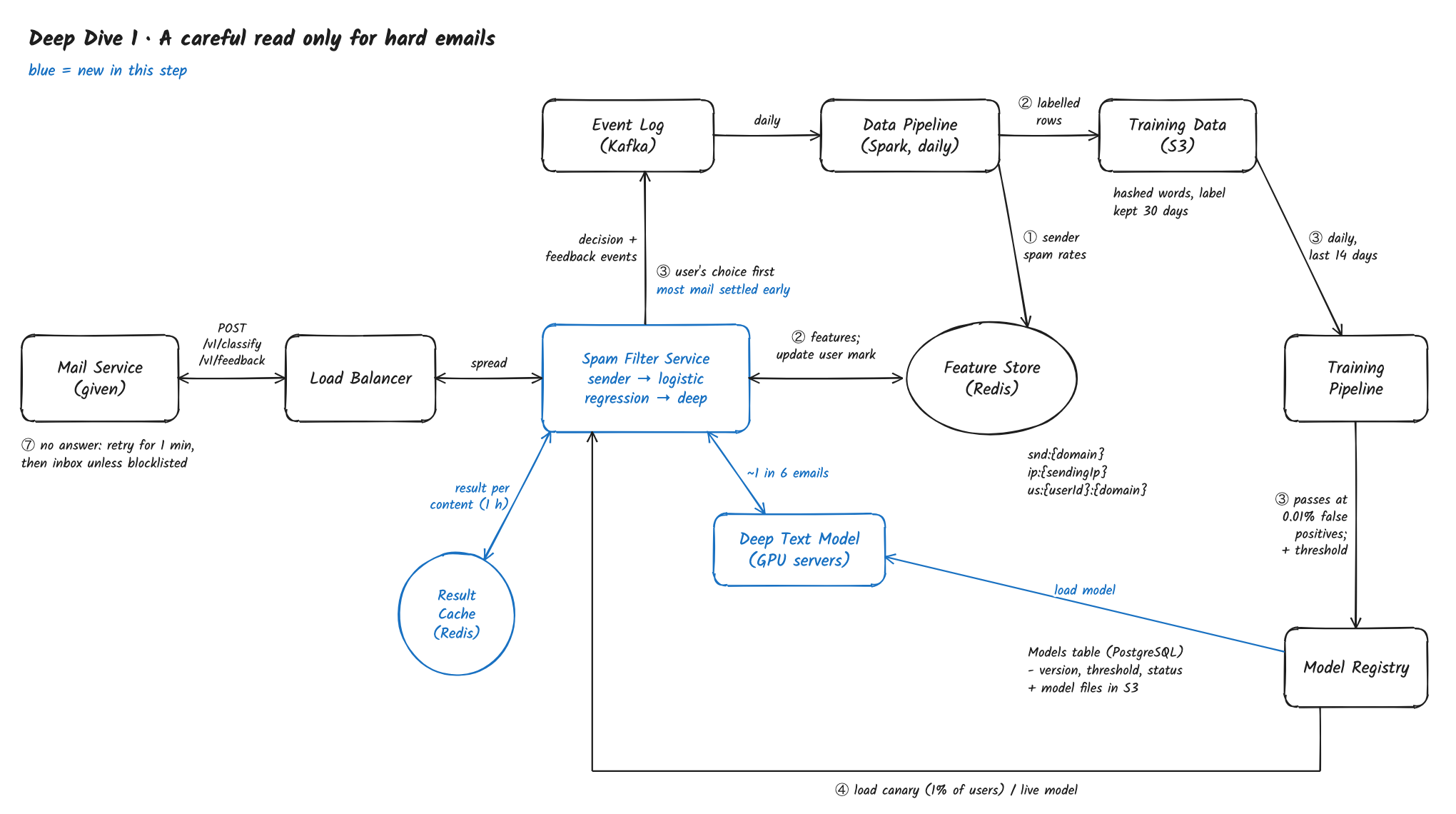
Solution: Spend effort only where it's needed – the Spam Filter Service settles clear cases with sender checks and the logistic regression, and sends only the uncertain ones to a Deep Text Model on GPU servers that reads the whole subject, text, links and the text inside images, so hard emails get a careful read at about a tenth of the cost.
- Stage 1, sender: emails from senders the user knows (contacts, replied before) go to the inbox; emails from servers whose 30-day spam rate is over 99% go to spam. Together that settles about 40% of mail with no model at all.
- Stage 2, logistic regression: on the rest, as in flow 1. Below 0.05 the email goes to the inbox, above 0.99 to spam; between the two it goes on. About 1 email in 6 overall falls in between.
- Stage 3, Deep Text Model: a separate service on GPU servers, a small multilingual language model fine-tuned on our labels, which reads the subject, the text, the link domains, and text pulled out of images. It returns a spam probability with the same 0.01% false-positive threshold. Cost: about 100K emails a second at peak ÷ 2,000 a second per server is about 50 GPU servers, instead of about 300.
- Batching: the Spam Filter Service groups calls to the Deep Text Model for up to 20 ms, so the GPUs work on full batches; the extra delay is well inside 500 ms.
- Same email, many recipients: a newsletter to 100K of our users is the same text 100K times. The Deep Text Model's result for a message's content (by a hash of its text) is cached in Redis for an hour, and only the user × sender features are recomputed per recipient.
- If the Deep Text Model is slow or down, stage 2 decides with a stricter threshold, so fewer real emails go to spam even if more spam gets through.
Other options:
- The Deep Text Model on every email – the most accurate, but about 300 GPU servers, most of them spent on newsletters and obvious spam.
- Gradient-boosted trees instead of the language model – cheaper, and good with sender numbers, but they don't understand text that was written to look harmless.
- Rules for misspellings and images – spammers adapt within days; a model trained on fresh labels keeps up.
Trade-off: a spam email that stage 2 scores confidently low never reaches the careful model; deep dive 2's campaign counters catch most of these.
What changed: step 4 of flow 1 is now three stages; the Deep Text Model and its content cache are new. NFR 1 and NFR 2 are met.
2. How do we stop a new spam campaign within 5 minutes?
The problem: a campaign from a brand-new domain sends millions of nearly identical emails within minutes, each with small changes (the name, a number). Sender reputation is daily and a new domain has none, so every copy looks like a first email until tomorrow's run (NFR 3: 5 minutes).
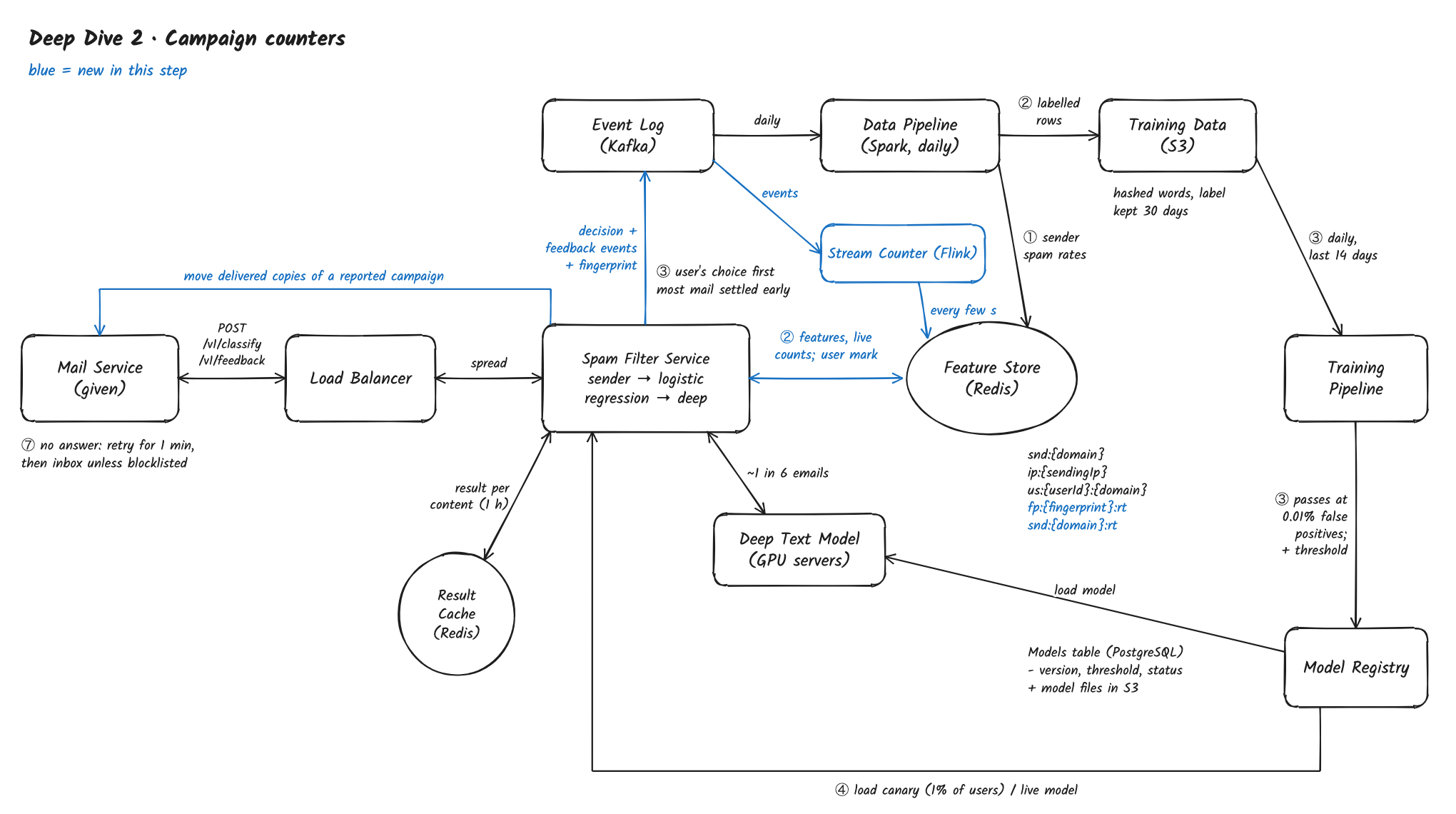
Solution: Count campaigns as they happen – the Spam Filter Service gives each email a content fingerprint that stays the same under small changes, a Stream Counter (Flink) counts each fingerprint's and each new sender's emails and spam reports minute by minute, and writes them to the Feature Store every few seconds, so a fast-spreading campaign is recognised within minutes and copies already delivered are moved to spam.
A content fingerprint (here SimHash) turns an email's text into a short number so that two emails differing only in a name or a number get the same or a very close fingerprint, while different emails get different ones.
Feature Store (Redis), written by the Stream Counter
key:      fp:{fingerprint}:rt             hash
fields:   emails10m, recipients10m, reports60m, notSpam60m, firstSeen
key:      snd:{domain}:rt                 hash
fields:   emails10m, reports60m, firstSeen
expires: 2 days after the last update- The Spam Filter Service computes the fingerprint of each email's text and adds it to the decision event. Feedback events carry the fingerprint of the email they're about.
- The Stream Counter reads decision and feedback events from the Event Log, keyed by fingerprint and by sending domain, counts in 1-minute buckets, and writes changed counts to the Feature Store at most every 10 seconds per key. Load: about 600K events a second at peak is a few dozen Flink servers; writes to Redis are far fewer because each key is written at most every 10 seconds.
- The Spam Filter Service reads
fp:andsnd:counters in the same batch call as the other features. Both the logistic regression and the Deep Text Model gain them as features: thousands of copies from a domain first seen an hour ago, sent to people who never wrote to it, is the clearest sign of a campaign. - Moving delivered copies: when a fingerprint passes 100 spam reports with almost no "Not spam", the Spam Filter Service asks the Mail Service to move every delivered copy with that fingerprint from inboxes to spam. Copies delivered in the first minutes don't stay in inboxes.
- Hot keys: a big campaign is one fingerprint written by many Flink servers; each server adds up its share for a few seconds and sends one update, so a hot key costs a few writes a second.
- These counts are logged in the decision events with the other features, so the next daily model learns what they mean.
Other options:
- Run the daily reputation job every 10 minutes – recomputing every sender for 20B emails a day is wasteful, and 10 minutes plus the run time misses the 5-minute target.
- Exact duplicates only (a hash of the whole text) – spammers change one word per copy, so every copy is "new".
- Block every brand-new domain – real companies launch new domains too; the counts let the model weigh newness with what recipients do.
Trade-off: a legitimate big send from a new domain (a launch announcement) looks like a campaign for its first minutes; recipients' replies and "Not spam" clicks on it pull it back.
What changed: the Stream Counter is new; decision events carry the fingerprint; the Feature Store gets fp: and snd: live counters; the Spam Filter Service moves delivered copies of a reported campaign. NFR 3's 5 minutes is met.
3. How do we learn from clicks that are rare, skewed and sometimes faked?
The problem: only about 500M of 20B emails a day get a label; "Report spam" on a newsletter someone subscribed to says "I don't want this", not "this is spam"; real emails put in spam are rarely rescued, so the model hears little about its worst mistakes; and spammers click "Not spam" on their own campaigns from accounts they control (Label, FR 3).
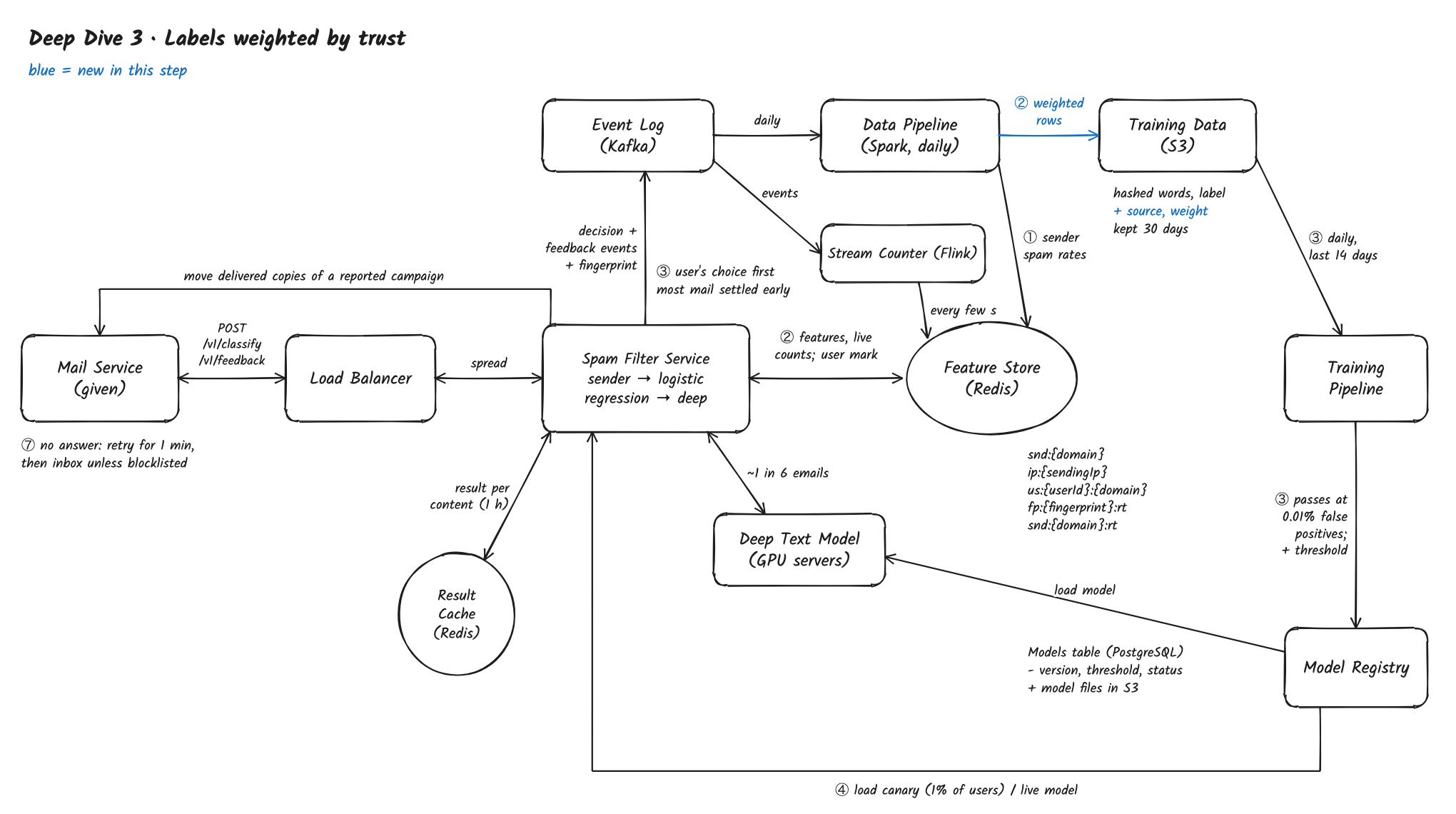
Solution: Weigh each click by how much it can be trusted – the Data Pipeline gives each label a weight from the reporter's track record, turns a sender into a spam label for everyone only when a share of its recipients report it, and adds labels from spam traps and replies, so the model learns from honest, broad signals and a few thousand fake clicks change nothing.
- Reporter trust: for each user, the Data Pipeline keeps how often their clicks agreed with the final label of that fingerprint, from others' clicks. A new account's "Not spam" counts a tenth as much as an established user's, and clicks from users who mark many unrelated senders "Not spam" in a few minutes count for nothing.
- Personal vs everyone: a "Report spam" always applies to that user (flow 2). It becomes a training label for everyone only when at least 0.1% of the sender's recipients report it; a newsletter reported by a few readers stays a personal choice, not spam.
- Campaign labels: once a fingerprint is clearly spam (deep dive 2), all its copies get the label, not only the reported ones, but they're sampled down to 1,000 per fingerprint, so one big campaign doesn't fill a day of training.
- Labels nobody clicks: emails to spam traps are spam; emails the user replied to or whose sender they added to contacts are real. These cover senders nobody bothers to report.
- Finding real email in spam: among users who open their spam folder, a "Not spam" click is the most valuable label we get; these rows are weighted up 20 times, and their rate per million spam-folder emails is the false-positive guardrail.
- Each row in Training Data keeps its label's source and weight, so the daily test can be checked by source.
Other options:
- Every click counts the same – simplest, but a spammer with 10,000 accounts can "Not spam" a campaign into everyone's inbox.
- Have people review a sample of email – the cleanest labels, but reading users' private email isn't acceptable; spam traps and campaign labels do the same job without it.
- Only spam traps – honest but narrow: spammers who buy real address lists never hit them.
Trade-off: a newsletter many people find annoying but few report stays in the inbox, and a new user's honest "Not spam" counts little at first.
What changed: the Data Pipeline weights labels by reporter trust, labels whole campaigns, and adds spam-trap and reply labels; Training Data rows carry source and weight. FR 3 now learns from trustworthy labels.
What's Expected at Each Level
Mid
- Makes all three flows work end to end: sender and user features from the Feature Store, a word-based model with a high threshold, clicks that apply to the user at once, a daily model.
- Explains why a real email in spam is worse than spam in the inbox and sets the threshold from that.
- Reaches deep dive 1 with hints, and suggests a cheaper first pass once told the careful model can't read every email.
Senior
- Does the math without hints: 600K emails a second, about 300 GPU servers for the careful model on everything, about 50 with a cascade.
- Picks spam caught at a 0.01% false-positive rate as the offline metric, not accuracy.
- Spots new campaigns from the freshness question and designs fingerprint and sender counters with hot-key handling, plus moving delivered copies.
- Reaches deep dive 3: notices that clicks are rare and can be faked.
Staff
- Gets to "where to spend the careful read" as the core decision early, and keeps the user's own choice above the model.
- Raises failures before being asked: the mail service's fallback, the Deep Text Model falling back to a stricter stage 2, a canary watched on "Not spam" clicks.
- Treats it as adversarial: reporter trust, personal vs global labels, campaign labels capped per fingerprint.
- Handles privacy: hashed tokens in training rows, 30-day retention, no people reading email.