Design Similar Item Recommendations
On this page
Problem Description
In this interview, we're going to design the "similar items" row on an online store's product pages, similar to the "Customers also viewed" row on Amazon or the similar listings on eBay. A shopper opens a product page, say a pair of trail running shoes. Below the details, a row shows about 10 other products they might buy instead: alternatives that do the same job, from other brands or at other prices. Every product has such a row, including new products and ones few people have looked at. Products that are out of stock or can't be delivered to the shopper aren't shown. Shoppers click products in the row, add them to their cart and buy them, sellers add new products all the time, and the system keeps every row up to date and learns from what shoppers do. You can use existing building blocks: a catalog service that knows every product's title, category, brand, price, stock and where it can be delivered, and an order service that records every purchase. This interview is about choosing and ordering the alternatives, not about the product page itself.
Not the same as Design Amazon Product Recommendations, which picks products for one shopper's home page from their own history.
Out of Scope
- "Frequently bought together" – accessories and add-ons that go with the product rather than replace it; a good follow-up question.
- Personalizing the row for each shopper – the row is the same for everyone who opens the page; a good follow-up question.
- Search and the home page – other products with their own ranking.
- Sponsored products in the row – placed by the ads system.
- Adding and editing products – the catalog service does this; we only read it.
Good Clarifying Questions
- How many products and page views? – About 100 million products, with about 1 million new ones a day, and about 2 billion product page views a day.
- What makes a row good for the business? – A shopper who isn't sure about this product finds one they buy instead. Purchases from the row count; accessories belong in another row.
- How fast must the row load? – It loads just after the product details, within 100 ms at p99.
- How fresh must it be? – A new product should have its own row within an hour, and appear in other products' rows within a day. Stock is checked live.
- What if the row fails? – The product page must never fail because of it: show the category's top sellers, or no row at all.
Requirements
Functional Requirements
- Show Similar Items on a Product Page – When a shopper opens a product page, a row shows about 10 other products they might buy instead, best first.
- Only Show What Can Be Bought – The row never shows products that are out of stock or can't be delivered to the shopper.
- Record What Shoppers Do – The system records which product pages shoppers view, which products each row showed and where, and what shoppers did: click, add to cart, buy.
- Keep the Rows Up to Date – The system rebuilds every product's row from new behaviour at least daily, and gives new products a row of their own.
Non-Functional Requirements
- Scale – 2B product page views a day: about 23K/s on average, 60K/s at peak; about 100M products, with about 1M new ones a day.
- Latency – The row under 100 ms at p99.
- Freshness – A new product has its own row within 1 hour and appears in other rows within a day; rows reflect the previous day's behaviour; stock is checked live.
- Availability – 99.9% for the row. If it fails, the product page still loads, with the category's top sellers or without the row.
Problem Framing
ML objective – The business goal is that a shopper who isn't sure about this product finds one they buy instead. The model takes one (page product, candidate product) pair, the same for every shopper, and predicts the probability that a shopper on the page product's page clicks the candidate in the row and buys it within 7 days. Each row is sorted by that probability of a purchase from the row. Because the row doesn't depend on who is looking, it can be computed ahead of time for every product.
Label – The label comes from the row's own impressions: a click in the same visit, and a purchase of the clicked product within 7 days, from the order service. Before a pair has ever been shown, a weaker signal stands in: the two products were viewed in the same visit (a co-view). Known biases: popular products are co-viewed with almost everything, the first slots get more clicks just for being first (position bias), and only pairs we showed can get row labels.
Offline metrics – Hit rate@10 on the next week's visits: when a shopper viewed product A and then bought a different product B from the same leaf category in that visit, is B in A's row of 10? It measures exactly what the row is for, finding the product bought instead, and it doesn't depend on what the old row happened to show.
Online metrics – An A/B test decides each launch on purchases from the row per 1,000 product page views. Guardrails: purchases per product page view overall must not fall (the row mustn't just pull buyers away from products they would have bought anyway), and the return rate of row purchases must not rise.
Data and Features
Training data – Two kinds of rows. Co-view pairs: every pair of products viewed in the same visit, about 400M visits a day × about 10 pairs, so about 4B pairs a day, counted per pair. Row impressions (once the row's model exists, deep dive 2): one row per product a shopper saw in a row, about 6 per page view, so about 12B a day, labelled with click and purchase.
Features, grouped by what they describe. The row is the same for every shopper, so there are no shopper or context features; only stock and delivery are checked at request time.
| Group | Features | Computed |
|---|---|---|
| Product (page and candidate) | Leaf category, brand, price, average rating, number of reviews, title words | When the product changes |
| Product engagement | Views, purchases and purchase rate per view over the last 30 days | Daily |
| Pair | Co-views in the last 30 days and their normalized score; same brand; price ratio | Daily |
The normalized co-view score is usually the strongest signal: products that the same shoppers compare in one visit are, more often than not, alternatives.
API Design
REST over HTTPS with JSON.
Get Similar Items
GET /v1/products/B0-48812/similar?limit=10&deliverTo=US-98101

→ Response:
{
  "requestId": "r_7340",                      # ties later events to this row
  "products": [
    { "productId": "B0-22176", "position": 1 },
    { "productId": "B0-90215", "position": 2 }
  ]
}
Record Actions
The app sends page views, clicks and cart adds as they happen.
POST /v1/events
{
  "events": [
    { "productId": "B0-48812", "action": "view", "at": "2026-11-16T12:01:10Z" },
    { "requestId": "r_7340", "productId": "B0-22176", "action": "shown", "position": 1 },
    { "requestId": "r_7340", "productId": "B0-22176", "action": "click", "at": "2026-11-16T12:01:31Z" },
    { "productId": "B0-22176", "action": "add_to_cart", "at": "2026-11-16T12:02:05Z" }
  ]
}

→ Response: 202 Accepted- Shoppers don't need to be signed in to see the row. The app sends the delivery location the store already knows (from the account, or chosen on the page); a signed-in shopper is identified by the login token in the
Authorizationheader, which ties their events to a visit. - Purchases are not sent by the app: the order service reports them (flow 2).
- Only Show What Can Be Bought has no endpoint: it removes products inside Get Similar Items.
- Keep the Rows Up to Date has no endpoint: it is background work.
High-Level Design
One requirement at a time, in the simplest way that works; the deep dives then make it meet the numbers.
1. Show Similar Items on a Product Page
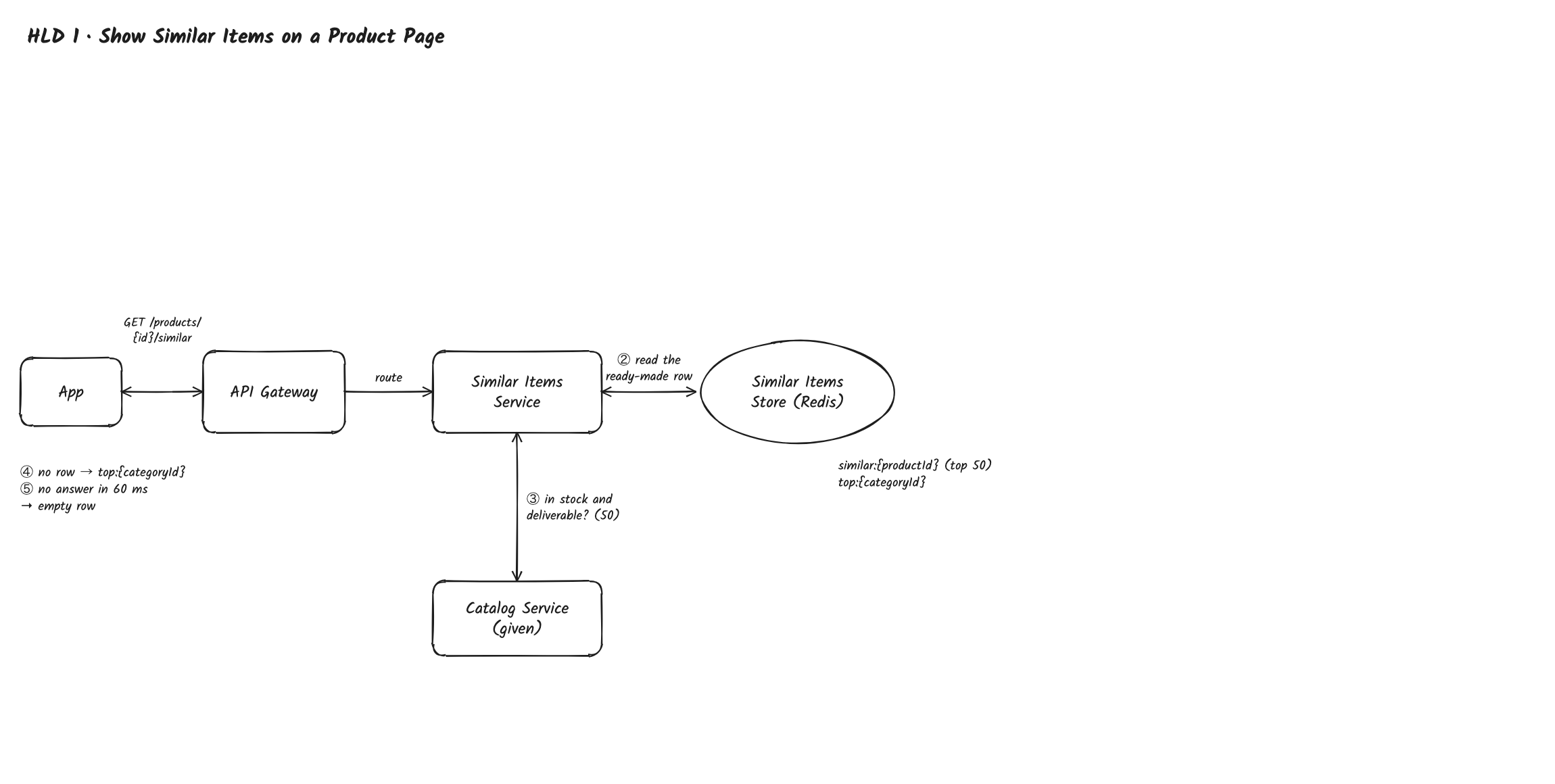
Path: App → API Gateway → Similar Items Service → Similar Items Store → Catalog Service → back to the App
- The app calls
GET /v1/products/{productId}/similar. The API Gateway routes the call to the Similar Items Service and spreads calls across its servers, skipping one that fails its health check. Similar Items Service servers keep nothing in memory, so any server can handle any call. - The Similar Items Service reads the product's ready-made row from the Similar Items Store, Redis:
similar:{productId}, a list of the top 50 product IDs with their scores. Rows are built ahead of time (flow 3) because the row is the same for everyone, so a request is one key read of under a millisecond. Size: 100M products × 50 entries × about 12 bytes is about 60 GB, a small Redis cluster. - Only Show What Can Be Bought: the Similar Items Service asks the Catalog Service in one batch call whether the 50 products are in stock and can be delivered to
deliverTo, and keeps the first 10 that are. Stock is read live, so a product that sold out a minute ago never appears (NFR 3). - If the product has no row yet, it reads the top sellers of the product's leaf category instead (
top:{categoryId}, in the same store), with the same stock check. - If the store or the Catalog Service doesn't answer within 60 ms, the Similar Items Service returns an empty row, and the product page loads without it (NFR 4).
2. Record What Shoppers Do
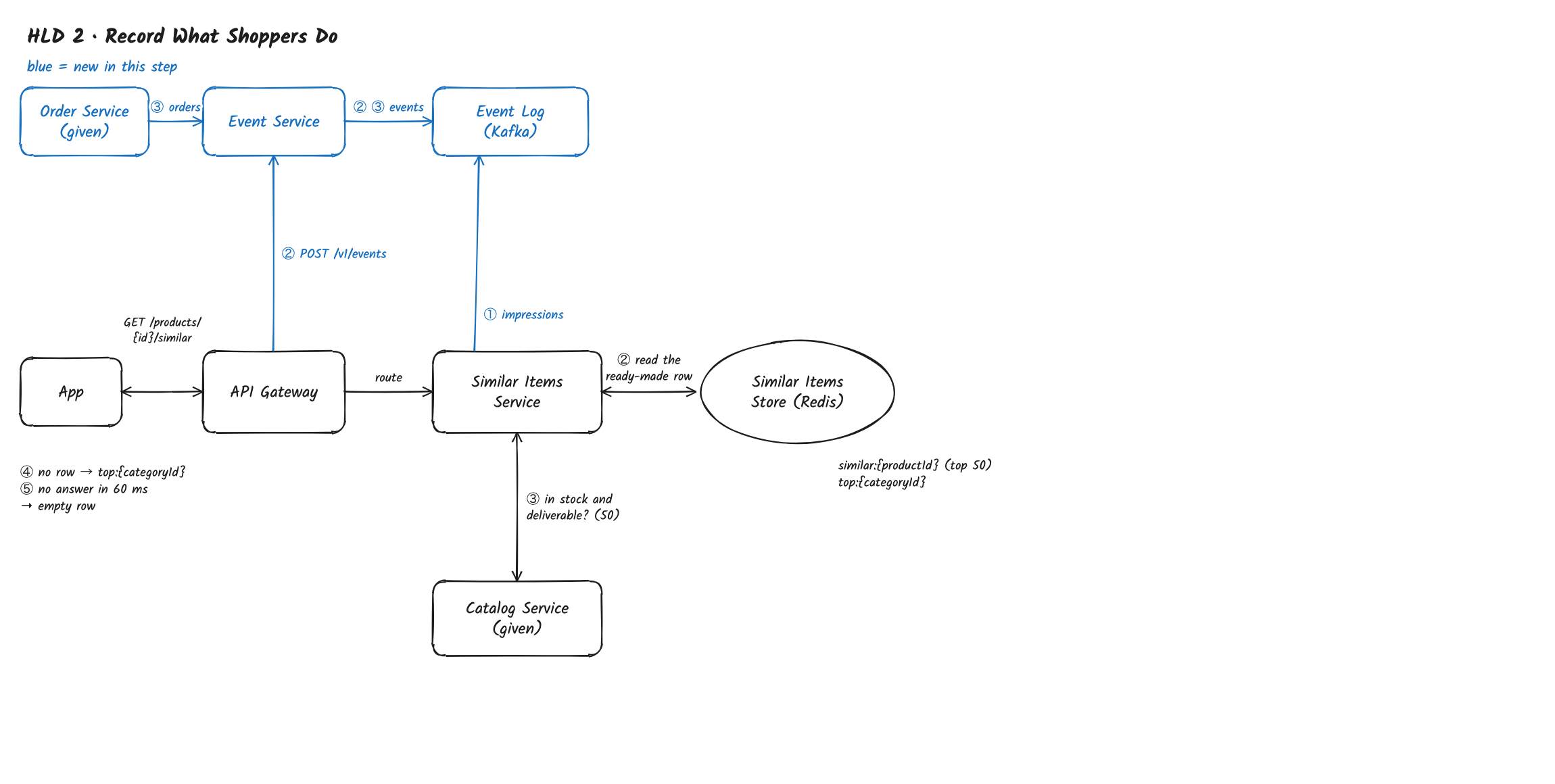
Path: Similar Items Service → Event Log; App → API Gateway → Event Service → Event Log; Order Service → Event Service
- When the Similar Items Service returns a row, it writes one impression event per product to the Event Log, Kafka:
requestId, pageproductId, shownproductId,position,rowVersion, time. Kafka, because the events are an append-only stream that several jobs read at their own pace; it keeps them for 7 days. - The app sends page views,
shownevents (once a product in the row has been on screen), clicks and cart adds withPOST /v1/events. The API Gateway routes it to the Event Service, which checks the events, attaches a visit ID (the signed-in shopper, or the app's session ID), and writes them to the Event Log. - The Order Service reports each purchase (
userId,productId, time) to the Event Service, which writes it to the Event Log too.
3. Keep the Rows Up to Date
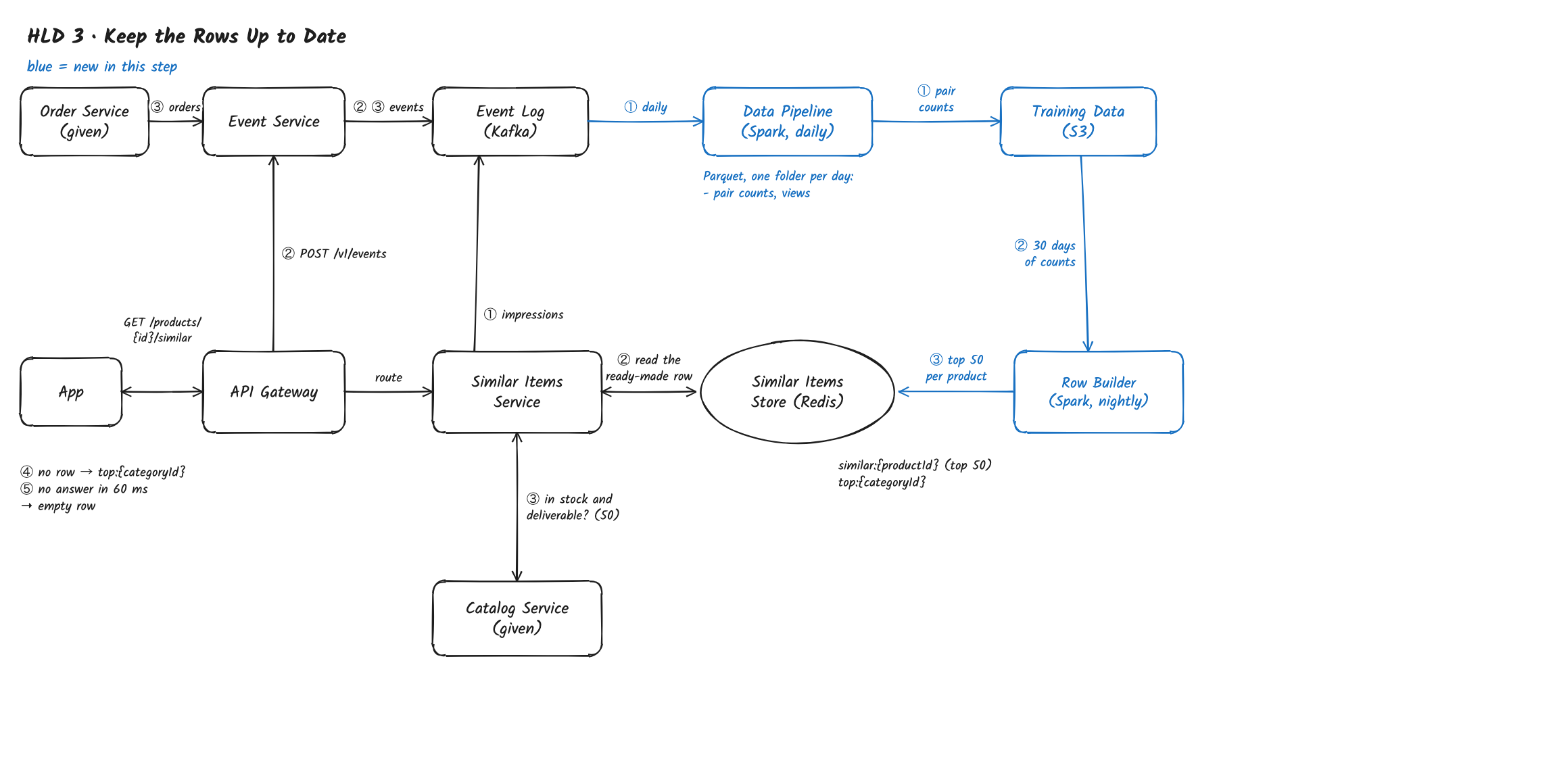
Path: Event Log → Data Pipeline → Training Data → Row Builder → Similar Items Store
- Once a day, the Data Pipeline, a Spark job, reads the day's page views from the Event Log, groups them by visit, and counts every pair of products viewed in the same visit. It writes the day's pair counts and each product's view count to Training Data, S3 (Parquet files, one folder per day). Files in S3, because they are read in large scans and kept for months, longer than Kafka keeps events.
- The Row Builder, a nightly Spark job, adds up the last 30 days of counts and scores each pair with the baseline: normalized co-views, the co-views of A and B divided by the square root of (A's views × B's views). Dividing by the views keeps bestsellers, which are viewed alongside everything, from filling every row. It's the baseline because it needs no labels and no model, and works from day one for every product with enough views.
- For each product it keeps candidates from the same department, sorts them by score, and writes the top 50 to the Similar Items Store, replacing the old
similar:{productId}; it also writestop:{categoryId}for the fallback. Each night's rows carry arowVersion, which impressions record.
Known Gaps So Far – this design works for a store with popular products, but not yet for our requirements:
- Most products have too few co-views. Most of the 100M products are viewed only a few times a month, so their pairs have one or two co-views, which is noise, and the 1M new products a day have none; all of them fall back to category top sellers (FR 1, Problem Framing).
- Co-views don't know what replaces and what sells. A phone and its case are co-viewed all the time, so cases appear in the phone's row of alternatives, and the row is ordered by how often products are looked at together, never by what shoppers bought from it (Problem Framing).
- A new product waits a day. It has no row until the nightly run, and even then its row is the category fallback until it has views (NFR 3: 1 hour).
Deep Dives
Three deep dives, one per gap: the long tail first because it affects most products, then what the row should rank by, then new products.
1. How do we find alternatives for products almost nobody has viewed?
The problem: normalized co-views only work for products viewed often enough to be compared. With 2B page views a day spread over 100M products, a typical product gets a handful of views a month; its few co-views are random, so its row is noise or the category fallback, and every new product starts with none (FR 1).
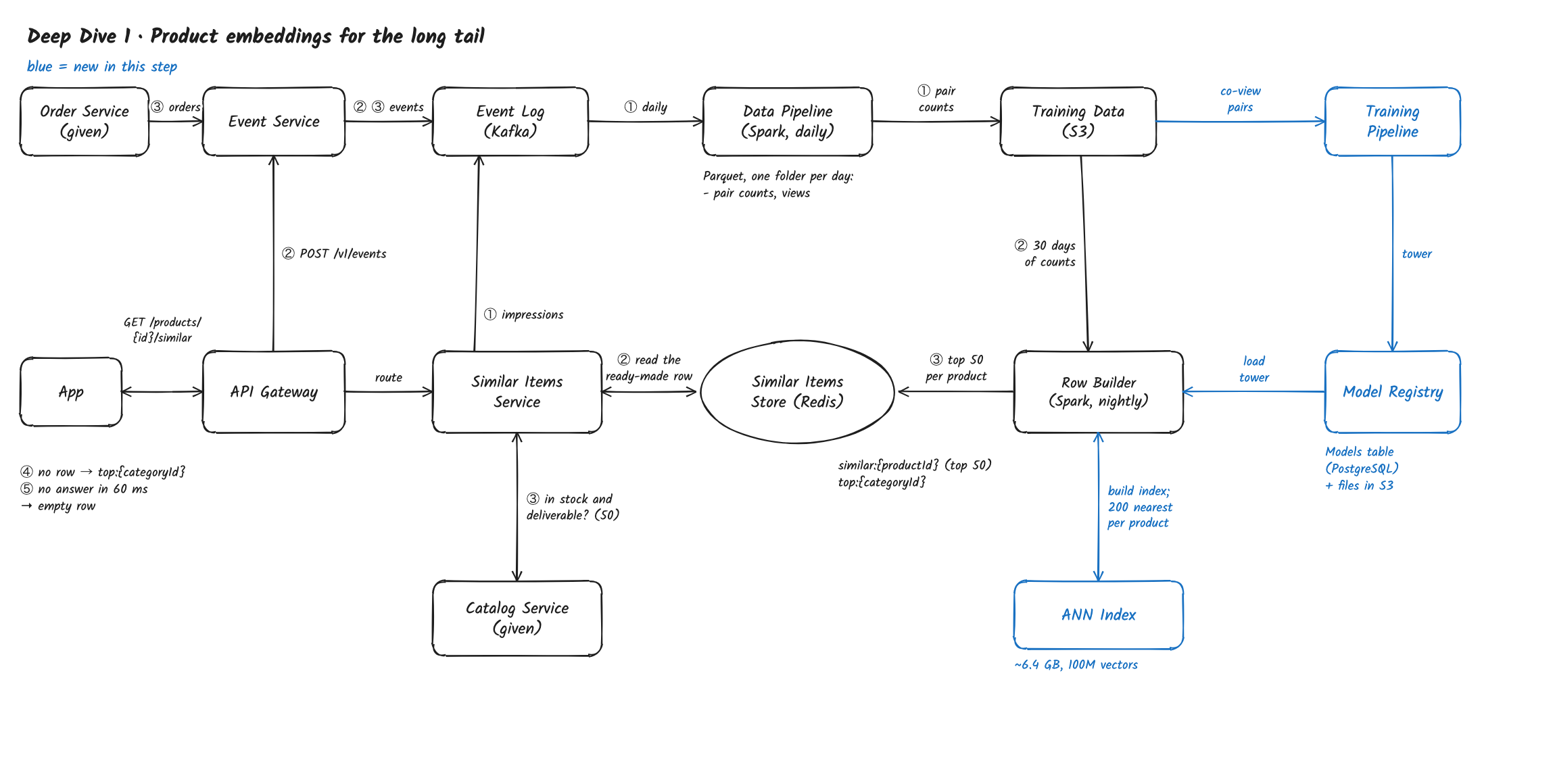
Solution: Learn product embeddings from what the catalog says – a product tower turns each product's title, category, brand and price into a vector, trained so that products often compared by shoppers land close together, the Row Builder writes all 100M vectors into an ANN Index each night and adds each product's 200 nearest neighbours to its co-view candidates, so every product, popular or not, gets a row of real alternatives.
An embedding is a list of numbers that places similar things close together. The product tower is a neural network that turns a product's details into such a list. An ANN (approximate nearest neighbour) index finds the closest vectors among millions in milliseconds by searching only the most promising part of the space.
- The tower: it reads the product's title words, leaf category, brand, price band and key attributes (size, colour, material) and outputs 128 numbers. It never uses the product's ID, so a product with no views gets a vector as good as its description.
- Training: the Training Pipeline trains it nightly on pairs from products that do have enough views: pairs with a high normalized co-view score in the same leaf category are the positives; other products in the training batch, plus products from the same category that are never co-viewed, are the negatives, so it learns what separates real alternatives within a category. It saves the tower in the Model Registry (files in S3, a row in the Models table in PostgreSQL).
- Index: after training, the Row Builder loads the tower, runs it on all 100M products and builds a new ANN Index. Compressed to about 64 bytes per product, that's about 6.4 GB.
- Neighbours: for each product, the Row Builder asks the index for the 200 nearest products in the same leaf category. Load: 100M lookups at about 2,000 a second per index server is under 20 minutes on 50 servers, within the nightly window.
- Merging: each product's candidates are its top 100 by co-view plus its 200 nearest. Until the ranker of deep dive 2 exists, a pair with at least 20 co-views is scored by its co-view score, and any other by its embedding similarity.
- Checking it: hit rate@10 is computed separately for popular, medium and rarely viewed products, so a tower that helps only bestsellers is caught.
Other options:
- Rules: same leaf category, price within 20% – quick, but no idea which products shoppers actually treat as alternatives; every shoe in the category looks equally good.
- Matrix factorization of the visit × product matrix – learns vectors only for products that already have views, which is exactly what the long tail lacks.
- Text similarity of titles alone – finds products described alike, including "case for phone X" on phone X's page; the tower learns from co-views which words matter.
Trade-off: a nightly training run, 100M embeddings and a fresh index to build, and a tower that can still match products that read alike but aren't alternatives (fixed by the ranker in deep dive 2).
What changed: the Training Pipeline, Model Registry and ANN Index are new; the Row Builder merges co-view and embedding candidates. FR 1 now holds for the long tail.
2. How do we rank alternatives by what shoppers actually buy instead?
The problem: co-view and embedding scores measure what is looked at, or described, together. That puts a phone case in a phone's row, lets popular cheap products crowd in, and never learns from the row itself: a product that gets clicked but never bought stays in slot 1 forever (Problem Framing).
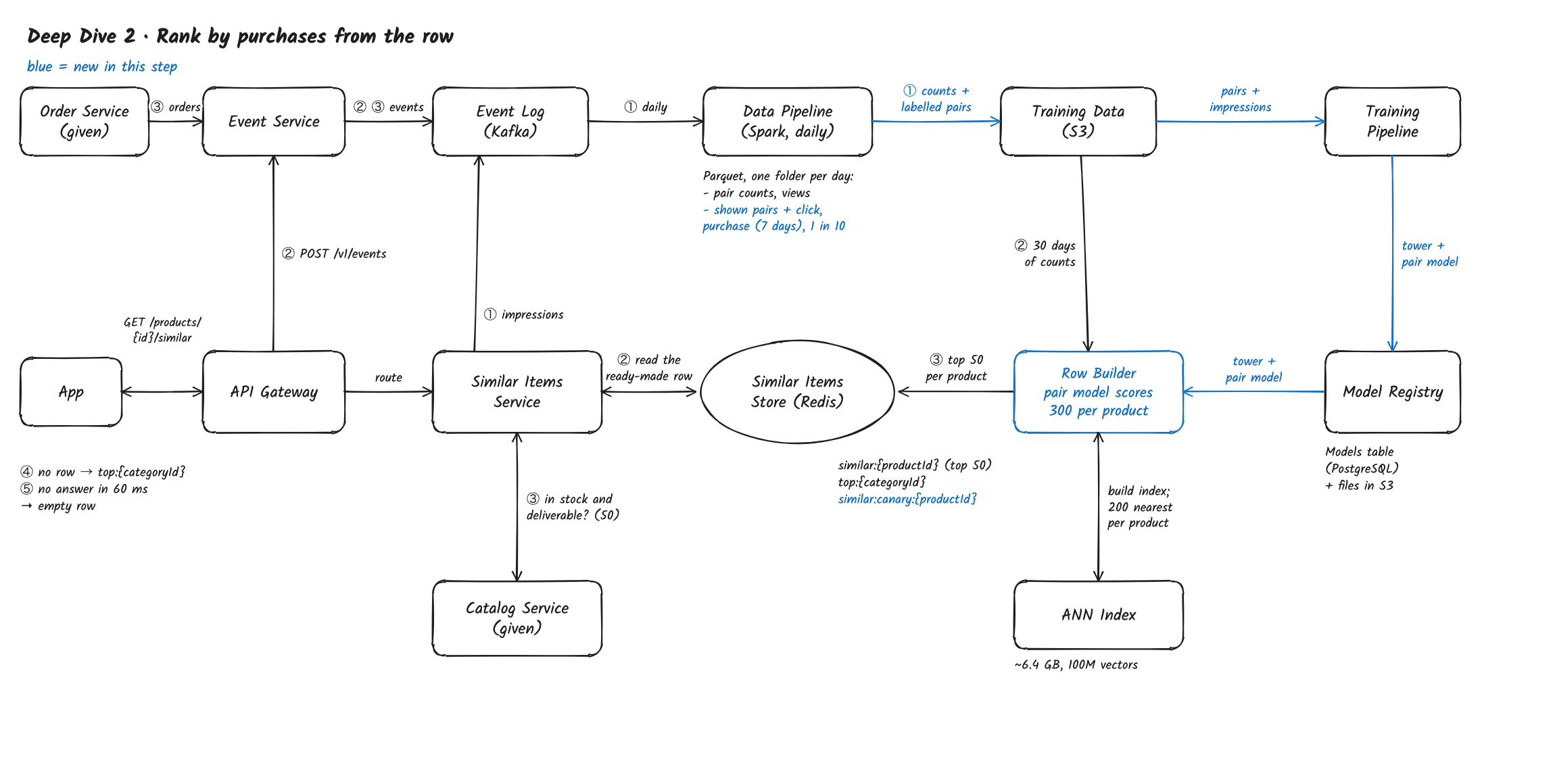
Solution: Learn to rank each row from its own results – the row's impressions become labelled pairs, a pair model (gradient-boosted trees) trained on them scores each product's 300 candidates every night in the Row Builder, and each row is sorted by predicted purchases from the row, so alternatives that sell rise and accessories and filler fall.
Gradient-boosted trees are many small decision trees added together, each correcting the errors of the ones before. They work very well on counts and ratios like the pair features here, and score a pair in about a microsecond.
- Training rows: each night the Data Pipeline joins the row's
shownimpressions with clicks in the same visit and purchases of the clicked product within 7 days, and writes them to Training Data. It keeps every row with a click and 1 in 10 of the rest, about 1.5B rows a day, each storing the rate it was kept at. - Pair features: normalized co-views, embedding similarity, same leaf category, same brand, price ratio, rating difference, the candidate's purchase rate, and bought together: how often the two products appear in the same order. Products bought together are complements (phone and case), so this feature lets the model push them out of a row of alternatives.
- Two outputs: the click probability and the purchase probability after a click; the row is sorted by their product. The slot the pair was shown in is a training feature, set to slot 1 when scoring, so a product isn't rewarded just for having been shown first.
- Nightly scoring: the Row Builder loads the live pair model from the Model Registry and scores each product's 300 candidates. Load: 100M products × 300 = 30B pairs at about a microsecond each is about 8 core-hours, a few minutes on a modest Spark cluster.
- Testing and canary: the Training Pipeline tests the model on hit rate@10 before saving it. The Row Builder then writes the canary model's rows next to the live ones (
similar:canary:{productId}), and the Similar Items Service serves them to 1% of visits, chosen by a hash of the visit ID, for a week. - Exploration: in 5% of page views, slot 8 shows a random candidate ranked 11–50, so the model gets labels for products it would never have shown.
Other options:
- Hand-tuned weights on co-views, similarity and price – easy to start, but nobody can tune eight signals for thousands of categories by hand.
- A neural network scoring pairs at request time – could add the shopper's context, but the row is the same for everyone, so nightly scoring is far cheaper and keeps the request a key read.
- Remove products bought together by a fixed rule – catches phone cases but also removes alternatives that are sometimes bought together, such as two sizes of the same shoe.
Trade-off: rows change only nightly, so a product that stops selling at noon keeps its place until the next run; and labels exist only for pairs we showed, which exploration only partly fixes.
What changed: impressions become training rows; the Training Pipeline trains the pair model; the Row Builder scores 300 candidates per product with it; canary rows and an exploration slot are new. Rows are now ordered by Problem Framing's objective.
3. How does a new product get its own row within an hour?
The problem: about 1M products are added every day, about 12 a second, with bursts when a seller uploads 100,000 at once. The Row Builder runs nightly, so a new product shows the category fallback for up to a day; and with no views, it only enters other products' rows through embedding neighbours at the next run (NFR 3: 1 hour).
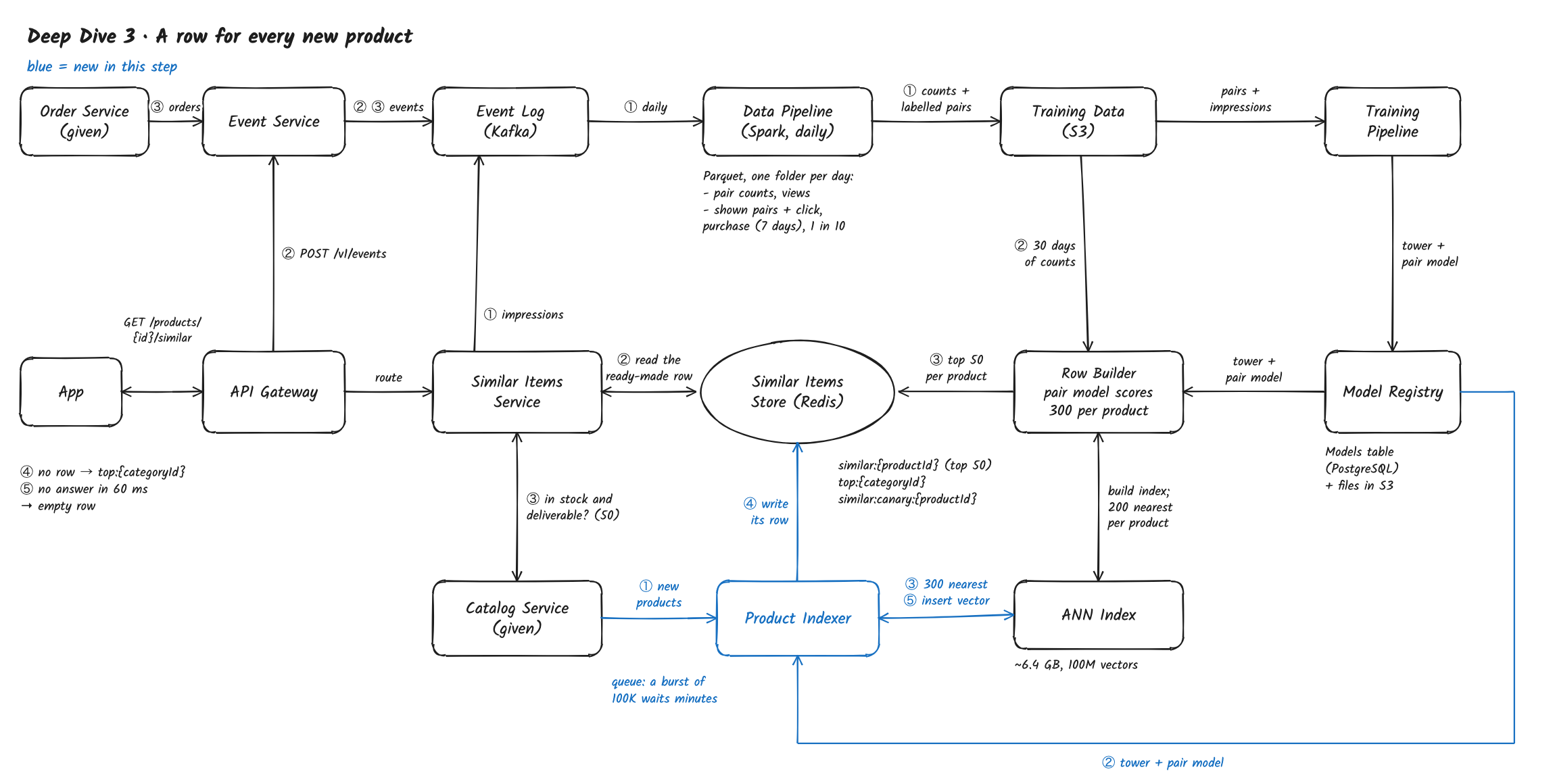
Solution: Build a new product's row as it arrives – a Product Indexer receives each new product from the Catalog Service, embeds it with the product tower, asks the ANN Index for its nearest products, scores them with the pair model and writes its row to the Similar Items Store, then adds its vector to the index, so a new product has a row within minutes and other rows pick it up at the next nightly run.
- The Catalog Service sends each new product to the Product Indexer, which works through them from a queue, so a burst of 100,000 waits a few minutes instead of failing.
- It loads the live tower and pair model from the Model Registry, and runs the tower on the product's title, category, brand, price and attributes; it needs nothing but the description.
- It asks the ANN Index for the 300 nearest products in the same leaf category and scores the pairs with the pair model. Co-views and bought-together are zero for a new product, so the score leans on similarity, brand, price and the candidates' purchase rates.
- It writes the top 50 to
similar:{productId}in the Similar Items Store, within minutes of the product going on sale. - It inserts the new vector into the ANN Index, so the next nightly Row Builder finds it as a neighbour of similar products, and it appears in their rows within a day.
- Getting views: the exploration slot from deep dive 2 prefers candidates less than 7 days old, so new products collect the row labels that let the model judge them on real results.
Other options:
- Run the Row Builder every hour – rebuilds 100M rows to add about 40K new ones, and is still up to an hour late.
- Show the category fallback until the nightly run – today's design: up to a day of a generic row on exactly the products that most need help being found.
- Also insert the new product into its neighbours' rows at once – it would appear in other rows within minutes, but updating hundreds of rows per new product, with no evidence it sells, risks filling rows with untested products; exploration does this more carefully.
Trade-off: a second path that builds rows, which must use the same tower and model versions as the nightly run, and an index that grows between rebuilds.
What changed: the Product Indexer is new; it writes rows for new products and inserts their vectors into the ANN Index; exploration favours new products. NFR 3 is met.
What's Expected at Each Level
Mid
- Makes all three flows work: ready-made rows read in one key lookup, a live stock check, events and purchases in a log, a nightly job building rows from normalized co-views.
- Explains why the row can be precomputed (it's the same for every shopper) and why co-views are normalized.
- Reaches deep dive 1 with hints, and suggests using product details once told most products have too few views.
Senior
- Sees from the statement that the long tail and new products are the core problem, and designs content-based embeddings with an ANN Index, with the lookup math for 100M products.
- Designs the pair model with "bought together" as the way to keep complements out, and position as a training-only feature.
- Reaches deep dive 3: a new product's row built on arrival with the same models as the nightly run.
Staff
- Names the objective trade-off early: a row of alternatives can take sales from the page's product, so site-wide purchases per page view is the guardrail, not just clicks on the row.
- Raises failures before being asked: the page never fails because of the row, empty rows fall back to category top sellers, bursts of new products queue rather than fail, canary rows are served side by side.
- Owns the cost: 60 GB of rows, 30B pair scores a night in minutes, and keeps the request path a single key read.
- Handles the feedback loop: exploration for products the model would never show, including new ones.